What This Workflow Does
Manual SEO analysis is time-consuming and inconsistent. Marketing teams spend hours each week collecting data from multiple tools, copying numbers into spreadsheets, and trying to spot trends across different metrics. This process delays insights and distracts from actual optimization work.
This automated workflow solves that problem by connecting RapidAPI's SEO On Page API directly to Google Sheets. It automatically pulls comprehensive SEO data for any website—including traffic metrics, domain authority, backlink profiles, and competitor analysis—and logs everything into organized spreadsheets. What used to take hours of manual work now happens automatically on a schedule you define.
The system creates a historical record of your SEO performance, making trend analysis simple and enabling data-driven decisions about where to focus your optimization efforts. It's like having a dedicated SEO analyst working 24/7 to monitor your website and competitors.
How It Works
1. Trigger & Data Collection
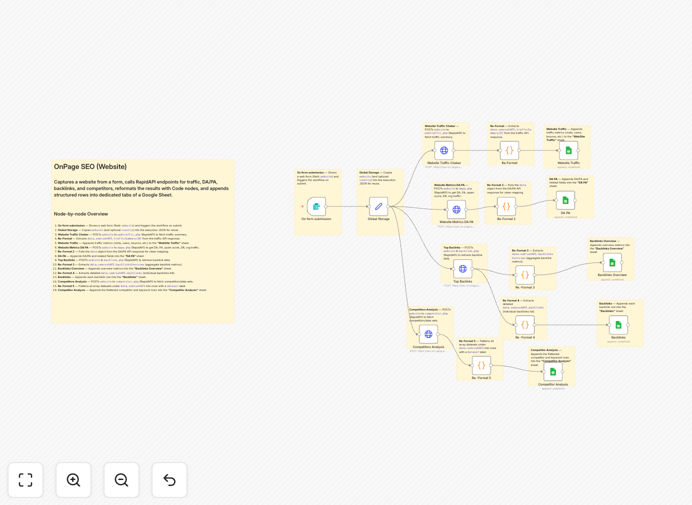
The workflow starts with a web form where you enter the website URL to analyze. This triggers a series of API calls to RapidAPI's SEO On Page endpoints, gathering traffic data, domain metrics, backlink information, and competitor insights.
2. Data Processing & Transformation
Each API response is processed through reformatting nodes that extract the relevant metrics from the JSON structure. The workflow cleans and structures the data, preparing it for organized logging in your spreadsheet.
3. Multi-Sheet Logging
The processed data is appended to specific sheets in Google Sheets: "Website Traffic" for visitor metrics, "DA PA" for domain and page authority scores, "Backlinks Overview" for link profile summaries, "Backlinks" for detailed referring domains, and "Competitor Analysis" for competitive intelligence.
4. Scheduled Execution
Once configured, the workflow can run on a schedule—daily, weekly, or monthly—creating a continuous log of SEO performance without manual intervention. You can also trigger it manually for one-time audits.
Who This Is For
This automation is ideal for digital marketing agencies managing multiple client websites, in-house SEO teams at growing companies, e-commerce businesses monitoring competitor strategies, and consultants who need to provide regular SEO reports to clients. It's particularly valuable for businesses that track rankings across multiple domains or need to demonstrate SEO ROI through consistent reporting.
Even solo entrepreneurs and small business owners can benefit by automating what would otherwise be a complex, technical process. If you currently spend more than 2 hours per week on SEO data collection and reporting, this workflow will save you significant time.
Pro tip: Schedule this workflow to run weekly and create a connected Google Data Studio dashboard. This gives you and your clients a real-time visual overview of SEO performance without manual report generation.
What You'll Need
- A running n8n instance (cloud or self-hosted)
- Google Sheets account with a prepared spreadsheet (template creates sheets automatically)
- RapidAPI account with access to the SEO On Page API
- API credentials for both services stored securely in n8n
- Basic understanding of SEO metrics you want to track
Quick Setup Guide
Importing and configuring this workflow takes about 15 minutes:
- Download the template using the button above
- Import the JSON file into your n8n instance
- Create a new Google Sheets spreadsheet and note its ID
- Set up credentials for Google Sheets and RapidAPI in n8n
- Update the workflow nodes with your spreadsheet ID and API endpoints
- Test with a single website URL to verify data flows correctly
- Configure the schedule trigger for automatic execution
Key Benefits
Save 5-10 hours weekly on manual SEO reporting. Automating data collection and spreadsheet updates eliminates repetitive tasks, allowing your team to focus on strategic optimization work rather than data entry.
Improve decision accuracy with historical trend data. Continuous logging creates a performance timeline that reveals what's actually working versus random fluctuations, helping you allocate resources to the most effective SEO tactics.
Enhance client transparency with automated reports. Share live spreadsheets or scheduled PDF exports with clients to demonstrate ongoing value and build trust through consistent, professional reporting.
Monitor competitors without manual checks. The competitor analysis module automatically tracks key competitors, alerting you to significant changes in their strategy that might impact your rankings.
Scale SEO monitoring across multiple domains. Once configured for one website, the same workflow can be duplicated and modified for additional sites, creating a centralized SEO monitoring system for your entire portfolio.