n8n PDF Processing Form Automation Email Delivery

Automated PDF form processing with web forms and email delivery

Convert web form submissions to professional PDFs and deliver them automatically via email

Download Template JSON · n8n compatible · Free
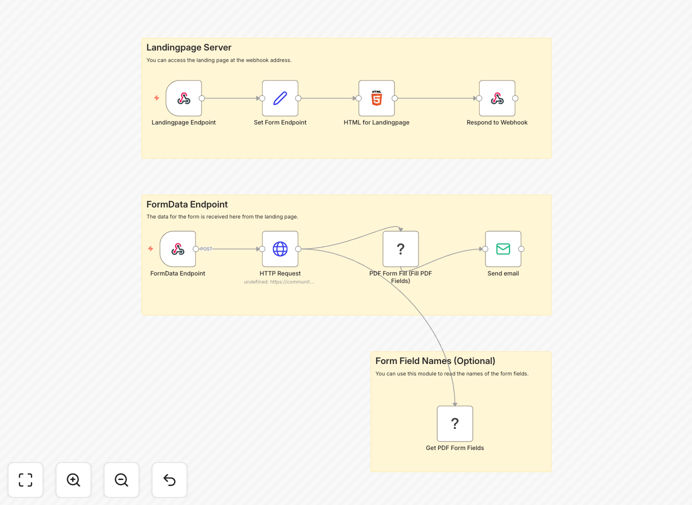
Automated PDF form processing workflow diagram

What This Workflow Does

This automation solves the tedious manual process of collecting form submissions, converting them to PDFs, and sending them to recipients. Businesses often waste hours each week manually processing form data from contact forms, job applications, surveys, or order forms.

The workflow automatically converts web form submissions into professional PDF documents with formatted fields, then delivers them via email to designated recipients. It eliminates manual data entry, reduces human error, and ensures consistent document formatting across all submissions.

How It Works

1. Web form submission trigger

The workflow starts when a form is submitted through your web form platform. This could be Google Forms, Typeform, JotForm, or any form builder that can send webhook notifications.

2. Data extraction and formatting

The workflow extracts all form field data and prepares it for PDF conversion. It can handle text fields, checkboxes, dropdown selections, and file uploads.

3. PDF generation

Using the PDF Toolkit node, the workflow converts the structured form data into a professionally formatted PDF document. The template includes proper field labeling, consistent styling, and your company branding.

4. Email delivery

The completed PDF is automatically attached to an email and sent to your designated recipients. You can customize the email content, subject line, and recipient list based on form type or submission data.

Pro tip: Set up conditional routing to send different PDFs to different departments based on form responses (e.g., sales inquiries vs. support requests).

Who This Is For

This automation is ideal for businesses that regularly collect information through web forms and need to:

  • Process job applications or candidate screening forms
  • Handle customer inquiries or contact forms
  • Manage order forms or service requests
  • Collect survey responses that need documentation
  • Process registration forms for events or memberships

What You'll Need

  1. An n8n instance (self-hosted or cloud)
  2. The @custom-js/n8n-nodes-pdf-toolkit-v2 community node installed
  3. A web form platform that can send webhook notifications
  4. An email service (SMTP or API-based) configured in n8n
  5. A PDF template design (optional but recommended)

Quick Setup Guide

  1. Download and import the JSON template into your n8n instance
  2. Connect your web form platform to the trigger node
  3. Configure the PDF Toolkit node with your desired formatting
  4. Set up your email service in the Email node
  5. Test with sample form submissions
  6. Activate the workflow for production use

Key Benefits

Save 5-10 hours per week by eliminating manual form processing. No more copying data from forms to documents.

Reduce errors by 90% with automated data transfer from form to PDF. Human transcription mistakes are eliminated.

Improve response times by delivering completed forms instantly instead of waiting for manual processing.

Professional documentation with consistent formatting for all submissions, enhancing your brand image.

Scalable solution that handles increased form volume without additional staff time.

Frequently Asked Questions

Common questions about PDF form processing and automation

This workflow can process virtually any digital form including contact forms, job applications, order forms, surveys, and registration forms. The key requirement is that your form platform can send submission data via webhook or API.

For example, a medical clinic could automate patient intake forms, converting them to PDFs that automatically route to the appropriate department. The system handles both simple forms with text fields and complex forms with multiple sections.

  • Works with most major form builders
  • Handles text, numbers, selections, and file uploads
  • Scales to process hundreds of forms daily

Automated PDF processing eliminates manual data handling while ensuring consistent documentation. Businesses benefit from faster processing times, reduced errors, and improved record-keeping.

A real estate agency, for instance, could automatically convert online rental applications to PDFs with all applicant information neatly formatted. This eliminates manual document creation while ensuring every application follows the same professional format before being reviewed by agents.

  • Standardizes document formatting
  • Reduces processing time from hours to minutes
  • Creates audit-ready documentation

Yes, the PDF Toolkit node allows extensive customization of the PDF output. You can modify fonts, colors, layouts, and even add your company logo to create branded documents.

A university admissions office might customize their PDFs to match official letterhead, with specific sections for different applicant types. Conditional formatting can highlight important information or flag incomplete sections.

  • Add logos and branding elements
  • Create conditional formatting rules
  • Design templates for different form types

The workflow maintains security by processing data within your n8n instance. No form data is stored externally unless you configure additional storage nodes. For sensitive information, you can add encryption steps.

A financial services firm handling client information could implement additional security measures like PDF password protection or automatic redaction of sensitive fields before email delivery, all within the same automated workflow.

  • Data remains within your systems
  • Optional encryption available
  • Audit trails of all processing steps

The workflow includes error handling to catch and flag failed submissions. You can configure notifications for processing errors and set up automatic retries for temporary issues.

An e-commerce business using this for order forms would receive immediate alerts if a customer's special request field caused PDF generation to fail, allowing them to manually process that one order while the system continues handling hundreds of others successfully.

  • Built-in error detection
  • Configurable alert notifications
  • Option to store failed submissions for review

Absolutely. The generated PDFs can be saved to cloud storage, added to CRM records, or uploaded to document management systems. n8n's extensive integration capabilities allow connecting to hundreds of platforms.

A law firm might configure the workflow to save client intake forms directly to their case management system while also emailing copies to the assigned attorney and paralegal, creating multiple distribution paths from a single automation.

  • Connect to cloud storage like Google Drive or Dropbox
  • Integrate with CRM platforms
  • Add to document management systems

Yes, GrowwStacks specializes in building custom form processing automations tailored to your specific business needs. We can design workflows that match your existing systems and processes.

Our team will analyze your current form handling procedures, identify optimization opportunities, and implement a solution that saves your staff time while improving data accuracy. We handle everything from PDF template design to complex conditional routing logic.

  • Custom PDF templates matching your branding
  • Integration with your existing systems
  • Ongoing support and optimization

Need a Custom PDF Form Automation?

This free template is a starting point. Our team builds fully tailored automation systems for your specific needs.