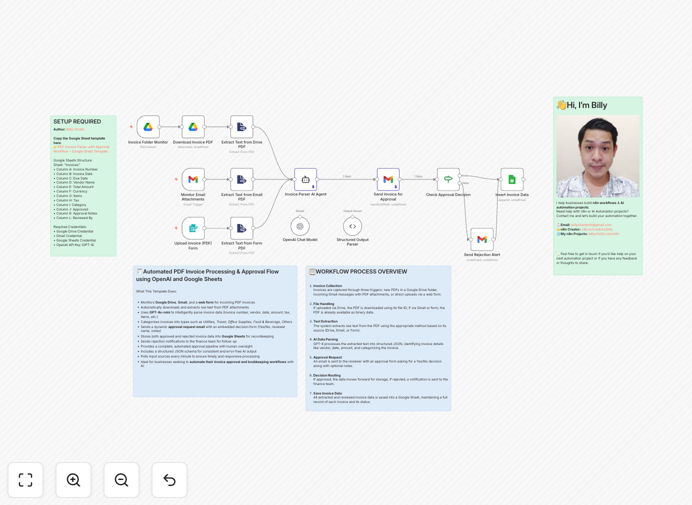
What This Workflow Does
Manual invoice processing is a time-consuming, error-prone bottleneck for finance teams. This automation transforms that entire process—from receiving PDF invoices via email or Google Drive to extracting key data with AI, routing for approval, and logging everything in Google Sheets.
The workflow handles three input methods simultaneously: monitoring a Google Drive folder for new invoices, scanning Gmail attachments, and accepting direct uploads via web form. Each invoice is automatically converted to text, analyzed by OpenAI to extract vendor details, amounts, dates, and categories, then sent to approvers with embedded decision forms.
Approved invoices are logged with all extracted data for immediate reporting and payment processing. Rejected invoices trigger notifications to finance teams for follow-up. The entire system operates 24/7, eliminating manual data entry and providing complete audit trails.
How It Works
1. Invoice Intake & Conversion
The workflow monitors multiple sources simultaneously. New PDF files in a designated Google Drive folder trigger immediately. Gmail checks for invoices with PDF attachments at regular intervals. A web form provides direct upload capability for internal teams or vendors.
2. AI-Powered Data Extraction
Each PDF is converted to text, then sent to OpenAI's GPT-4 with a structured prompt. The AI identifies and extracts vendor name, invoice number, date, total amount, tax, line items, and due date with high accuracy. It also categorizes the invoice type (Travel, Software, Utilities, etc.) based on content analysis.
3. Approval Workflow Routing
Extracted data is packaged into an approval request email sent to designated approvers. The email includes embedded action buttons (Approve/Reject) and a notes field. The system tracks response times and can escalate overdue approvals automatically.
4. Data Logging & Notification
Approved invoices are written to Google Sheets with all extracted fields, approval timestamp, and approver name. Rejected invoices trigger notifications to finance teams with rejection reasons. All actions are logged for compliance and reporting.
Who This Is For
This template is ideal for finance teams at small to mid-sized businesses processing 50-500 invoices monthly. Operations managers needing structured approval workflows will benefit from the automated routing and audit trails. Companies using Google Workspace with scattered invoice sources (email, drive, uploads) gain centralized processing.
Businesses experiencing growth in invoice volume without proportional finance staff expansion can maintain control while automating repetitive tasks. Organizations transitioning from paper-based or manual Excel tracking to digital systems will find this a practical stepping stone.
What You'll Need
- n8n instance (cloud or self-hosted) with workflow execution capabilities
- Google Workspace account with Drive and Sheets API access
- OpenAI API key with GPT-4 access for data extraction
- Designated approver email addresses for the approval workflow
- Google Sheet template (included in setup instructions) for data logging
- Folder structure in Google Drive for incoming invoice storage
Quick Setup Guide
- Download and import the JSON template into your n8n instance
- Connect Google Drive credentials and specify your invoice folder ID
- Configure Gmail trigger with search filters for invoice emails
- Add OpenAI API key to the AI processing node for data extraction
- Set up Google Sheets connection and specify your spreadsheet ID
- Update approver emails in the email sending nodes
- Test with sample invoices to verify end-to-end flow
Pro tip: Start with a small batch of historical invoices to train your team on the approval interface and refine AI extraction prompts before full deployment. Monitor the first 20-30 processed invoices closely to catch any format-specific issues.
Key Benefits
Eliminate manual data entry errors that cost businesses 1-2% of invoice value in corrections and delays. AI extraction achieves 95%+ accuracy consistently.
Reduce processing time from days to minutes by automating intake, extraction, and routing. Finance teams reclaim 15+ hours monthly per staff member.
Improve cash flow visibility with real-time logging of all invoices in Google Sheets. Dashboards can track aging, categories, and approval status instantly.
Enforce compliance with structured approval workflows that capture decisions, notes, and timestamps automatically. Audit trails are complete and searchable.
Scale without adding staff as invoice volume grows. The system handles increased load with minimal configuration changes.