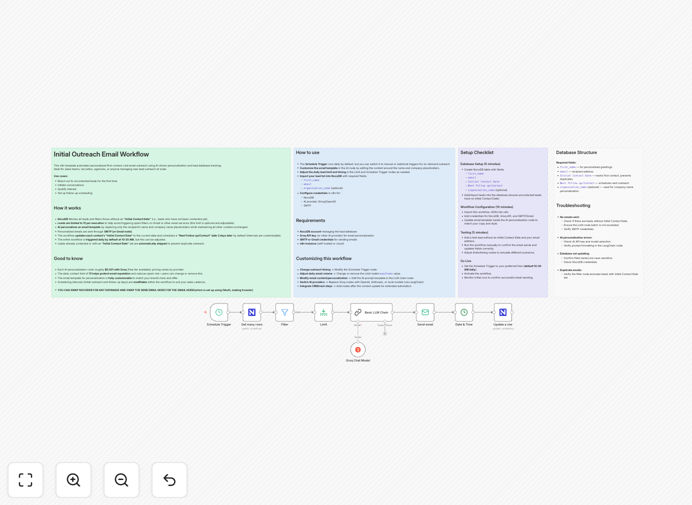
What This Workflow Does
This automation solves the tedious, time-consuming problem of manual cold email outreach. Sales teams, recruiters, and agencies spend hours each week writing individual emails, tracking who they've contacted, and scheduling follow-ups—often with inconsistent timing and generic messaging that gets low response rates.
The workflow automatically identifies unengaged leads from your database, personalizes email content using AI based on each lead's specific information, sends emails through your preferred email service, and schedules automatic follow-ups. It ensures consistent outreach while protecting your email reputation by limiting daily sends.
Instead of manually managing dozens of leads daily, you set up this system once and it runs autonomously, contacting new prospects, nurturing existing leads, and tracking all interactions in your database—freeing up your team for higher-value conversations and strategy.
How It Works
Step 1: Fetch Uncontacted Leads
The workflow queries your database (like NocoDB, Airtable, or Google Sheets) to find leads without an "Initial Contact Date." These are prospects who haven't received your first outreach email yet.
Step 2: Apply Daily Send Limit
A limit node restricts the number of emails sent per day—typically 15–20—to protect your email sender reputation and avoid spam flags. This ensures gradual, sustainable outreach rather than bulk blasting.
Step 3: AI Personalization
For each lead, an AI model (like Groq, OpenAI, or Claude) generates a personalized email using the lead's first name, company name, and other available data. The AI adapts your base template to create unique, contextually relevant messages that feel individually written.
Step 4: Send Email
The personalized email is sent via SMTP or Gmail integration to the lead's email address. The system handles all technical sending details, including headers and formatting.
Step 5: Update Database & Schedule Follow-up
After sending, the workflow updates the lead's record in your database with today's date as the "Initial Contact Date" and sets a "Next Follow-up Date" (typically 3 days later). This creates a complete tracking system for your outreach campaign.
Step 6: Daily Scheduled Execution
The entire workflow runs automatically on a daily schedule (e.g., 10:30 AM each morning), continuously processing new uncontacted leads without manual intervention.
Pro tip: Start with a low daily limit (10–15 emails) to test deliverability and response rates before scaling up. Monitor open rates for the first week to ensure your template and sending setup are effective.
Who This Is For
This automation is ideal for sales teams conducting B2B prospecting, recruiters reaching out to potential candidates, marketing agencies running client outreach campaigns, startups building their initial customer base, and solopreneurs who need systematic lead nurturing without hiring staff.
If you're currently spending more than 5 hours per week on manual email outreach, tracking leads in spreadsheets, or struggling with inconsistent follow-up timing, this workflow will dramatically reduce your workload while improving results.
What You'll Need
- A database (NocoDB, Airtable, Google Sheets, MySQL, etc.) with leads containing: first name, email address, optional company name, and fields for "Initial Contact Date" and "Next Follow-up Date."
- Access to an AI provider (Groq, OpenAI, Anthropic, etc.) for personalization—many offer affordable or free tiers.
- Email sending capability via SMTP or Gmail integration.
- An n8n instance (cloud or self-hosted) to run the workflow.
- A base email template that the AI will personalize for each lead.
Quick Setup Guide
- Download the template JSON file and import it into your n8n workspace.
- Configure your database credentials in the NocoDB (or equivalent) node—set up the query to fetch leads where "Initial Contact Date" is empty.
- Set up your AI provider credentials and customize the email template prompt in the AI node to match your brand voice and offer.
- Configure your email sending credentials (SMTP or Gmail) with your sending address and proper authentication.
- Adjust the daily limit in the Limit node based on your email reputation and capacity.
- Test the workflow manually with a few leads to ensure personalization, sending, and database updates work correctly.
- Enable the schedule trigger to run daily at your preferred time.
Pro tip: Create a test lead in your database with a personal email address to verify the entire flow before going live. Check that the AI personalization feels natural and the email arrives correctly.
Key Benefits
Save 5–10 hours weekly on manual email tasks: Automating outreach eliminates individual email writing, lead tracking, and follow-up scheduling—freeing your team for higher-value activities.
Increase response rates with AI personalization: Personalized emails using lead-specific details generate 2–3 times higher open and reply rates compared to generic templates.
Protect email reputation with controlled sending: The daily limit prevents bulk sending that triggers spam flags, maintaining your sender score and ensuring deliverability.
Create complete outreach tracking automatically: Every lead contact and follow-up schedule is recorded in your database without manual entry, providing clear campaign analytics.
Scale outreach without scaling staff: You can increase daily limits gradually to reach hundreds of leads weekly without adding team members or increasing workload.