Google Sheets Telegram Quiz Automation Community Engagement n8n

Automated Quiz Delivery from Google Sheets to Telegram

Schedule and deliver interactive quizzes automatically with status tracking and refill notifications.

Download Template JSON ยท n8n compatible ยท Free
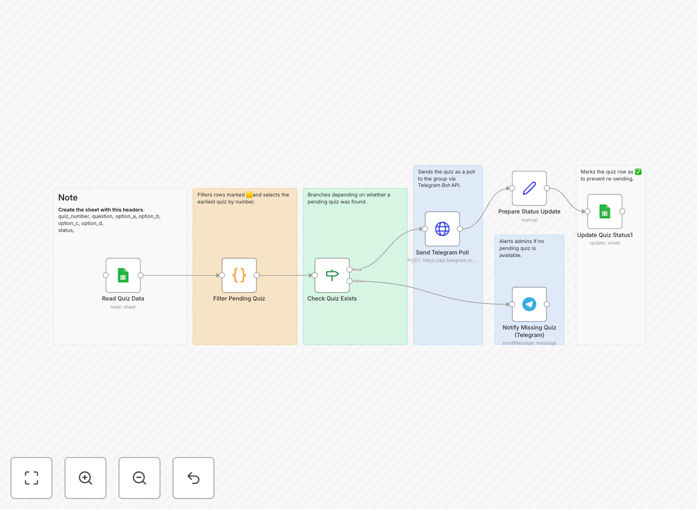
Automated quiz delivery workflow connecting Google Sheets to Telegram

What This Workflow Does

Manually posting quizzes to your Telegram community is time-consuming and prone to errors. This automation solves that by connecting Google Sheets directly to Telegram, transforming your spreadsheet into an automated quiz delivery system. Each quiz question becomes an interactive poll delivered on schedule, with automatic status tracking to prevent duplicates.

The workflow reads pending quizzes from your Google Sheet, posts them as Telegram polls one by one, marks them as completed, and even sends notifications when you're running low on content. This ensures your community receives consistent engagement without manual intervention, perfect for educators, community managers, and content creators.

How It Works

1. Sheet Monitoring

The workflow regularly checks your Google Sheet for new quiz entries marked as pending. It reads the question, multiple-choice options, and any metadata you've included in your structured spreadsheet format.

2. Quiz Processing

Each pending quiz is formatted as a Telegram poll with the correct question structure and answer options. The system ensures proper formatting and handles any special characters or emojis you've included in your questions.

3. Telegram Delivery

The formatted quiz is posted to your specified Telegram group or channel as an interactive poll. Members can vote directly within the chat, and results are visible to everyone based on your privacy settings.

4. Status Tracking

Once successfully posted, the workflow updates the quiz status in your Google Sheet from "pending" to "completed." This creates an audit trail and prevents the same quiz from being sent twice.

5. Refill Notifications

When no pending quizzes remain, the system sends a notification to your admin channel, prompting you to add more content. This ensures you never run out of engagement material unexpectedly.

Who This Is For

This automation is ideal for educators running online courses, community managers maintaining active Telegram groups, content creators building engaged audiences, and businesses using quizzes for lead generation or customer engagement. If you regularly share knowledge checks, trivia, or interactive content with your community, this workflow eliminates the manual work while increasing consistency.

Community moderators, online course instructors, Telegram group admins, and marketing teams will find particular value. The system scales from small study groups of 20 members to large communities with thousands of participants, adapting to your specific engagement needs.

What You'll Need

  1. A Google account with Google Sheets access
  2. A Telegram bot token (created via @BotFather)
  3. The chat ID for your Telegram group or channel
  4. A separate notification channel ID for refill alerts
  5. A Google Sheet structured with quiz questions and options
  6. Basic understanding of n8n or similar automation platforms

Pro tip: Structure your Google Sheet with clear columns: Question, Option A, Option B, Option C, Option D, and Status. Use emojis like ๐ŸŸจ for pending and โœ… for completed to make tracking visually intuitive.

Quick Setup Guide

  1. Download the template and import it into your n8n instance
  2. Connect your Google Sheets account with appropriate permissions
  3. Replace the placeholder sheet ID with your actual Google Sheet ID
  4. Set up environment variables for your Telegram bot token and chat IDs
  5. Test with a single quiz entry to verify the connection works
  6. Schedule the workflow to run at your preferred frequency
  7. Monitor the status column in your sheet to track delivery

Key Benefits

Saves 5-10 hours weekly on manual quiz preparation and posting. Instead of copying questions between applications and scheduling posts, your entire process runs automatically from a single spreadsheet.

Eliminates duplicate content with automatic status tracking. The system knows exactly which quizzes have been delivered and prevents accidental repeats that can frustrate your community members.

Increases engagement consistency by delivering quizzes on a reliable schedule. Your community learns to expect regular interactive content, building habitual participation and stronger connections.

Provides content inventory management through refill notifications. You'll never unexpectedly run out of quiz material, and you can plan your content creation around actual usage patterns.

Scales effortlessly from small groups to large communities. The same automation handles 10 participants or 10,000 without additional configuration or manual effort on your part.

Frequently Asked Questions

Common questions about quiz automation and Telegram integration

You can automate quiz delivery by connecting Google Sheets to Telegram using automation tools like n8n. Create a spreadsheet with your quiz questions and options, then set up a workflow that reads new entries and posts them as interactive polls to your Telegram group automatically.

This approach centralizes your content management in Google Sheets while leveraging Telegram's native poll features for engagement. The automation handles scheduling, formatting, and delivery without manual intervention.

Automating quizzes saves hours of manual work each week while ensuring consistent engagement with your community. It eliminates human error, prevents duplicate questions, and allows you to schedule quizzes at optimal times for maximum participation, even when you're not available.

Beyond time savings, automation provides data consistency and allows A/B testing of different question formats. You can track which quiz topics generate the most engagement and optimize your content strategy accordingly.

Yes, automation workflows can include status tracking that marks quizzes as sent in your Google Sheet. This prevents duplicates and gives you a complete history of what content has been delivered, along with timestamps and engagement data if you integrate with Telegram's analytics.

The tracking system creates an audit trail that helps with content planning and performance analysis. You can see which quizzes performed best and use that data to inform future content creation.

Simply update your Google Sheet with new quiz questions, and the automation will handle the rest. You can use status columns to mark questions as active, pending, or completed, and set up notifications when you're running low on content to refill your quiz bank.

This centralized approach means multiple team members can contribute questions without needing access to Telegram or understanding the technical delivery system. Content creation and delivery become separate, specialized tasks.

Multiple-choice polls, trivia questions, knowledge checks, and daily challenges work exceptionally well. Telegram's poll feature supports up to 10 options, making it perfect for quizzes. Educational content, community icebreakers, and promotional quizzes all benefit from automation.

Consider your audience's interests and the learning objectives of your community. Technical communities might enjoy coding challenges, while creative groups might prefer design critiques or inspiration prompts.

When set up properly through secure automation platforms, the connection uses encrypted API tokens and follows best practices for data security. Your Google Sheets credentials are stored securely, and Telegram bot tokens provide controlled access without exposing personal information.

Always use environment variables for sensitive data like API keys, and ensure your automation platform follows security best practices. Regular token rotation and access auditing further enhance security.

Absolutely. Automation workflows can include timezone logic to schedule quiz delivery when your community is most active. You can set up different schedules for weekdays vs weekends, account for multiple time zones, and even randomize delivery times for organic engagement.

Advanced scheduling considers member activity patterns, timezone distributions, and even seasonal variations in engagement. This ensures your quizzes reach members when they're most likely to participate.

Yes, GrowwStacks specializes in building custom quiz automation systems tailored to your specific business needs. We can create workflows that integrate with your existing tools, add advanced features like scoring systems, leaderboards, and analytics dashboards, and ensure the solution scales with your community growth.

Our team works with you to understand your engagement goals, technical environment, and content strategy. We deliver a complete solution that fits seamlessly into your operations while providing measurable improvements in community participation and content efficiency.

  • Integration with your existing CRM or learning management system
  • Custom reporting and analytics dashboards
  • Multi-language support for global communities
  • Advanced moderation and content filtering features

Need a Custom Quiz Automation?

This free template is a starting point. Our team builds fully tailored automation systems for your specific business needs.