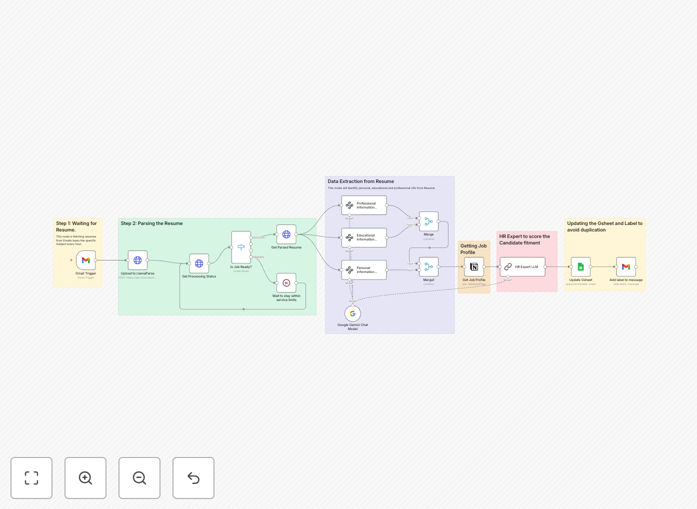
What This Workflow Does
HR teams are drowning in resumes. For every open position, hundreds of applications arrive via email, each requiring manual review to identify qualified candidates. This process consumes 10–15 hours per week of valuable HR time and introduces inconsistency and bias in early screening.
This automation solves that problem completely. When a resume arrives via Gmail with a specific subject line, the workflow automatically extracts the candidate information, pulls the relevant job description from your Notion hiring board, and uses Google's Gemini LLM to score the resume against the job requirements. The scored candidate data is then updated in a Google Sheet for easy review, and the email is labeled for tracking.
What used to take hours now happens in seconds, with consistent, objective scoring that ensures no qualified candidate is overlooked due to manual screening fatigue.
How It Works
1. Resume Capture & Parsing
The workflow monitors a dedicated Gmail inbox for incoming resumes. When an email with a predefined subject (like "Job Application") arrives with an attachment, it automatically extracts the PDF or DOCX file. Using document parsing services, it converts the resume into structured text data.
2. Candidate Information Extraction
The parsed resume text is analyzed to extract key information into three categories: Personal Details (name, contact), Educational Background (degrees, institutions), and Professional Experience (roles, skills, duration). This structured data forms the basis for AI evaluation.
3. Job Profile Retrieval
Simultaneously, the workflow queries your Notion hiring database to retrieve the complete job description, required skills, experience levels, and qualifications for the specific position being applied to. This ensures scoring is always against the most current job requirements.
4. AI-Powered Scoring
Google's Gemini LLM acts as an expert HR analyst. It receives both the candidate's structured information and the job profile, then evaluates the match based on skills relevance, experience alignment, education requirements, and overall fit. It outputs a numerical score (typically 1-100) with specific reasoning.
5. Data Storage & Notification
The scored candidate information—including the AI's score and match reasoning—is appended to a Google Sheet that serves as your candidate pipeline. The original Gmail message is labeled (e.g., "AI Scored: 85/100") for quick inbox triage, and optional notifications can be sent to Slack or Teams for high-scoring candidates.
Who This Is For
This automation is ideal for growing companies, recruitment agencies, and HR departments that:
- Receive 50+ applications per job posting
- Have limited HR staff for initial screening
- Want to reduce time-to-hire metrics
- Need consistent, unbiased initial candidate evaluation
- Already use Gmail for applications and Notion for hiring coordination
- Want to leverage AI but avoid expensive enterprise ATS systems
It's particularly valuable for technical roles where specific skills must be matched, high-volume hiring (retail, customer service), and companies prioritizing diversity through reduced unconscious bias in early screening.
What You'll Need
- n8n instance (cloud or self-hosted) with workflow execution capabilities
- Google Gemini API access for the LLM scoring component
- Gmail account with API access to monitor incoming resumes
- Notion workspace with a hiring/job descriptions database
- Google Sheets for storing scored candidate pipeline
- Document parsing service (like LlamaParse or similar) for resume text extraction
Pro tip: Create a dedicated Gmail alias like "[email protected]" for applications. This keeps hiring emails separate from regular correspondence and simplifies automation setup.
Quick Setup Guide
- Import the template into your n8n instance using the downloaded JSON file.
- Configure credentials for Gmail, Gemini API, Notion, and Google Sheets in n8n's credentials management.
- Update the Gmail trigger to watch for your specific application email subject patterns.
- Connect to your Notion database by updating the database ID and property mappings in the Notion node.
- Set up your Google Sheet with appropriate columns (Name, Email, Score, Notes, etc.) and update the Sheet ID in the workflow.
- Test with a sample resume by sending a test email to your application inbox and verifying the scoring appears in your Sheet.
- Activate the workflow and begin receiving automatically scored candidates.
Key Benefits
Reduce screening time by 80%. What takes a human 10 minutes per resume happens in seconds. A batch of 100 applications can be scored and ranked in under 5 minutes instead of 16 hours.
Eliminate early-stage bias. The AI evaluates based on qualifications, not names, schools, or other demographic indicators that can unconsciously influence human reviewers.
Never miss a qualified candidate. Consistent scoring means every application gets equal attention. No more "screening fatigue" where later applications get less thorough review.
Improve hiring quality. By precisely matching candidate skills to job requirements, you shortlist candidates who are genuinely qualified rather than those who simply look good on paper.
Scalable hiring process. Handle 10 or 1,000 applications with the same efficiency. Perfect for companies experiencing rapid growth or seasonal hiring spikes.