n8n Google Sheets Gemini AI Content Automation

Automated RSS monitoring with Gemini AI summaries and deduplication to Google Sheets

Self-hosted n8n workflow for content creators and marketers to automate industry research and content curation

Download Template JSON · n8n compatible · Free
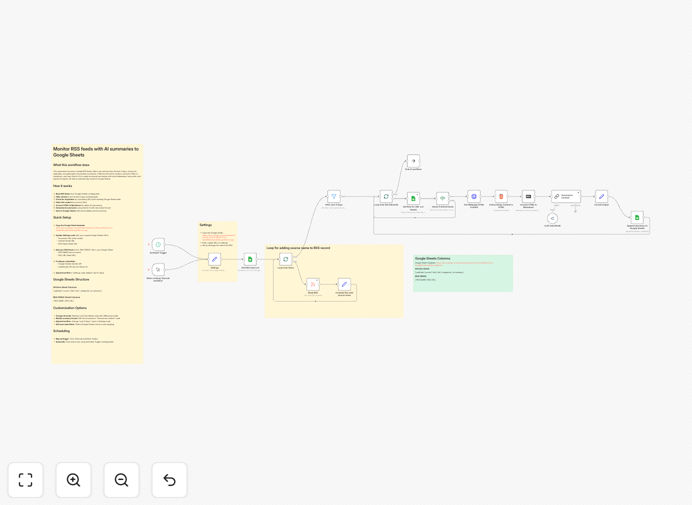
Screenshot of n8n workflow for RSS monitoring with AI summaries

What This Workflow Does

This automation solves the challenge of manually monitoring multiple RSS feeds for content research. It automatically checks specified RSS feeds, uses Gemini AI to generate concise summaries of new articles, identifies and removes duplicate content across feeds, and organizes everything in a Google Sheet for easy reference.

The workflow is particularly valuable for content teams, marketers, and researchers who need to stay updated on industry news without spending hours reading through redundant or irrelevant articles. By combining AI-powered processing with spreadsheet organization, it creates an efficient content monitoring system.

How It Works

1. RSS Feed Monitoring

The workflow begins by periodically checking your configured RSS feeds for new content. You can specify multiple feeds from different sources that are relevant to your industry or research topics.

2. AI-Powered Summarization

Each new article is processed by Gemini AI to extract key points and generate a concise summary. This transforms lengthy articles into digestible insights, saving you reading time while preserving the essential information.

3. Deduplication Process

The system compares new articles against previously processed content using multiple criteria (titles, URLs, content snippets) to identify duplicates or near-duplicates. This prevents redundant entries in your tracking system.

4. Google Sheets Integration

Filtered and summarized content is automatically added to your specified Google Sheet with relevant metadata including source, publication date, summary, and original URL. This creates a searchable knowledge base.

Pro tip: Configure your Google Sheet with filters and pivot tables to quickly analyze trends across your monitored sources.

Who This Is For

This workflow is ideal for:

  • Content marketing teams tracking industry trends
  • SEO professionals monitoring competitor blogs
  • News aggregators curating content from multiple sources
  • Research analysts compiling industry reports
  • Social media managers looking looking for shareable content

What You'll Need

  1. A self-hosted n8n instance (community nodes required)
  2. Google Sheets with edit permissions
  3. <
  4. Gemini API access (free tier available)
  5. List of RSS feeds to monitor
  6. Basic familiarity with n8n workflow editing

Quick Setup Guide

  1. Download and import the JSON template into your n8n instance
  2. Configure your RSS feed URLs in the HTTP Request nodes
  3. Set up your Gemini API credentials in the AI node
  4. Connect to Google Sheets and specify your target spreadsheet
  5. Adjust the deduplication sensitivity as needed
  6. Set your preferred monitoring schedule
  7. Test with sample feeds before going live

Key Benefits

Save 5-10 hours weekly by automating manual RSS monitoring and summarization tasks that would otherwise require reading each article.

Eliminate duplicate content across monitored sources, ensuring your research database contains only unique valuable information.

AI-powered insights help you quickly identify trending topics and trends without reading full articles.

Centralized knowledge base in Google Sheets makes content easily searchable and shareable with your team.

Scalable monitoring lets you track more sources without proportional increase in effort.

Frequently Asked Questions

Common questions about RSS monitoring and AI summarization

AI-powered RSS monitoring saves content creators hours by automatically summarizing articles and filtering duplicates. It helps identify trending topics faster while eliminating manual research work. For example, a marketing team can track industry news across 50+ sources daily without reading each article.

The system surfaces relevant content that might otherwise be missed in the volume of daily publications. The AI can also highlight emerging patterns across sources, providing strategic insights.

  • Reduces content discovery time by 70-80%
  • Ensures comprehensive coverage of key sources
  • Provides structured data for content planning

Google Sheets provides an accessible, shareable database that teams can easily filter and analyze. Unlike RSS readers with proprietary formats, Sheets lets you create custom dashboards, run analytics, and connect to other tools. Many businesses use it as a centralized content research hub.

The spreadsheet format enables sorting by date, source, or topic relevance. Teams can add custom columns for internal notes, priority ratings, or assignment tracking. Teams often combine multiple automation outputs in single master sheet.

Deduplication compares article titles, URLs, and content snippets to identify duplicates across feeds. Advanced systems use semantic analysis to recognize similar stories from different sources. This prevents redundant entries in your tracking system and ensures each unique piece of content is only processed once.

Modern deduplication goes beyond exact matches to identify substantially similar content with different headlines. Some systems even cluster related stories about the same event from perspectives.

Content agencies, marketing teams, news aggregators, and competitive intelligence professionals benefit most. These businesses need to monitor multiple information sources daily. Automation helps them scale content curation without proportional increases in staff time or costs.

Legal firms and academic researchers also use these tools to track developments in specialized fields. Any organization that needs to stay informed across multiple publications will find value in RSS automation.

AI summaries complement but don't replace human curation. They excel at processing volume and identifying patterns, while humans provide nuanced judgment. The ideal workflow uses AI for initial filtering and summarization, allowing curators to focus on high-value analysis and decision-making.

Human editors add context, make connections between disparate stories, and apply organizational knowledge that AI can't replicate. The combination of AI efficiency and human insight creates the most effective monitoring system.

Most businesses check feeds every 1-4 hours depending on industry pace. News organizations may monitor continuously, while niche blogs might check twice daily. The key is balancing freshness with resource usage - automation makes frequent checks practical without manual effort.

Consider your monitoring frequency based on content velocity—breaking news needs near-real-time checking while weekly industry digests can be checked less frequently.

Yes, GrowwStacks specializes in custom RSS monitoring solutions tailored to your specific sources, analysis needs, and reporting requirements. We can integrate with your existing tools and add advanced features like sentiment analysis, custom alerting, and team collaboration workflows.

Our automation experts will design a system that fits your existing processes, whether you need simple monitoring or complex analysis pipelines with multiple output formats. We handle everything from initial consultation to ongoing maintenance.

Need a Custom RSS Monitoring Solution?

This free template is a starting point. Our team builds fully tailored automation systems for your specific needs.