What This Workflow Does
Manual keyword research is a time-consuming bottleneck for marketers and SEO professionals. You have to juggle multiple tools, copy-paste data, and constantly update spreadsheets. This workflow eliminates that friction by automating the entire process.
It connects the powerful SEO On-Page API (via RapidAPI) directly to Google Sheets. You simply input a target keyword and country, and the automation fetches keyword suggestions, difficulty scores, and SERP (Search Engine Results Page) data. All this information is then neatly organized into separate tabs within a Google Sheet, ready for analysis and reporting.
This turns a multi-hour, repetitive task into a one-click operation, ensuring your SEO data is always current and actionable without manual intervention.
How It Works
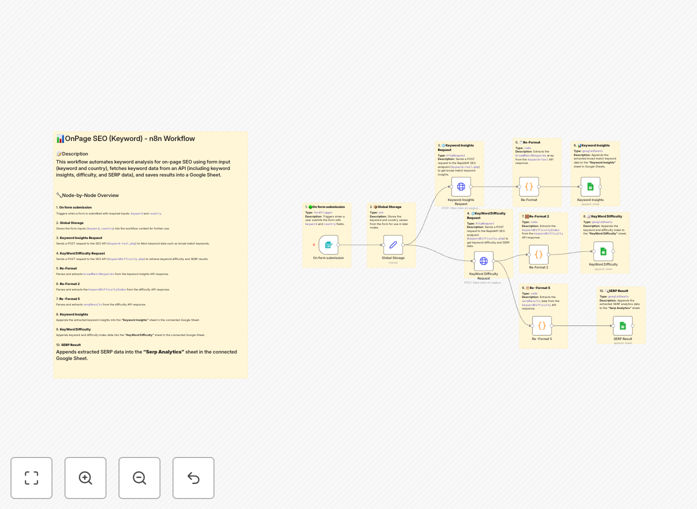
The workflow is built in n8n, a visual automation platform. It follows a logical sequence to gather, process, and store SEO data.
1. Trigger & Input
The process starts with a simple form or manual trigger where you enter your primary keyword and target country (e.g., "project management software" and "US"). This data is stored temporarily for use in subsequent steps.
2. Fetch Keyword Suggestions
The workflow sends your keyword to the SEO On-Page API on RapidAPI. It requests "broad match" keyword ideas—related terms and phrases that users are actually searching for. This helps you build a comprehensive keyword list beyond your initial idea.
3. Process & Store Suggestions
The list of suggested keywords is extracted from the API response, formatted, and appended to a dedicated "Keyword Insights" tab in your Google Sheet. This creates a living database of potential target terms.
4. Analyze Keyword Difficulty
Next, the workflow calls the API again to get the "Keyword Difficulty Index" for your primary keyword. This score (often 0-100) estimates how hard it would be to rank for that term, helping you prioritize your efforts.
5. Log Difficulty Score
The difficulty score is saved to a "Keyword Difficulty" sheet, providing a quick reference for your core terms' competitiveness over time.
6. Extract SERP Data
The same API call returns rich SERP data—what's currently ranking on the first page of Google. This includes page titles, URLs, and meta descriptions of the top results.
7. Populate SERP Analytics
This competitive intelligence is parsed and added to a "SERP Analytics" tab. You can analyze the content and structure of competing pages to understand what Google currently rewards for your target query.
Pro tip: Schedule this workflow to run weekly or monthly for your core keywords. This builds a historical dataset in Google Sheets, allowing you to track ranking changes and difficulty trends over time.
Who This Is For
This automation is a game-changer for anyone responsible for driving organic search traffic.
- SEO Agencies: Scale client reporting by automatically populating dashboards with fresh keyword data for multiple campaigns.
- Content Marketers & Bloggers: Quickly validate content ideas, assess competition, and build data-driven content calendars.
- Digital Marketing Teams: Empower team members with self-service keyword research, reducing dependency on specialized SEO tools.
- Startups & Small Businesses: Conduct professional-grade SEO analysis without the high cost of enterprise platforms like Ahrefs or SEMrush.
- E-commerce Managers: Research product category keywords and analyze competitor rankings for strategic pricing and content.
What You'll Need
- An n8n instance (cloud or self-hosted).
- A RapidAPI account with access to the "SEO On-Page API". You'll need an API key.
- A Google Cloud Project with the Google Sheets API enabled and a service account JSON key for n8n to write to your sheets.
- A Google Sheet pre-formatted with three tabs: "Keyword Insights", "Keyword Difficulty", and "SERP Analytics". The template will map data to these.
Quick Setup Guide
Import and configure this workflow in under 10 minutes.
- Download the Template: Click the "Download Template" button above to get the JSON file.
- Import into n8n: In your n8n dashboard, go to Workflows > Import from File and select the downloaded JSON.
- Configure RapidAPI Credentials: In the "Keyword Insights Request" and "Keyword Difficulty Request" nodes, replace the placeholder `"your key"` with your actual RapidAPI key from the SEO On-Page API page.
- Set Up Google Sheets Connection: In the three Google Sheets nodes, authenticate n8n with your Google Service Account credentials and enter the ID of your target spreadsheet.
- Test the Workflow: Execute the workflow manually once with a test keyword (e.g., "best coffee") to ensure data flows correctly into your sheet.
- Schedule It (Optional): Add a Schedule Trigger node to run this analysis automatically daily, weekly, or monthly for your keyword list.
Key Benefits
Save 5-10 hours per month on manual research. Automating data collection and entry frees up significant time for strategic SEO work and content creation.
Eliminate human error in data transcription. Automated workflows pull data directly from the source API to your sheet, ensuring accuracy and consistency in your reports.
Make faster, data-backed content decisions. With instant access to difficulty scores and SERP data, you can confidently prioritize which keywords to target in your next article or campaign.
Create a scalable, centralized keyword database. Every analysis run adds to your historical Google Sheet, building a valuable asset for tracking trends and performance over time.
Reduce software costs. Leverage affordable API calls via RapidAPI instead of subscribing to multiple expensive, all-in-one SEO platforms.