Spotify Music Automation Playlist Management n8n Free Template

Automated Spotify Playlist Organizer

Sort and queue tracks by popularity automatically. Your AI-powered DJ assistant that saves hours of manual playlist management.

Download Template JSON · n8n compatible · Free
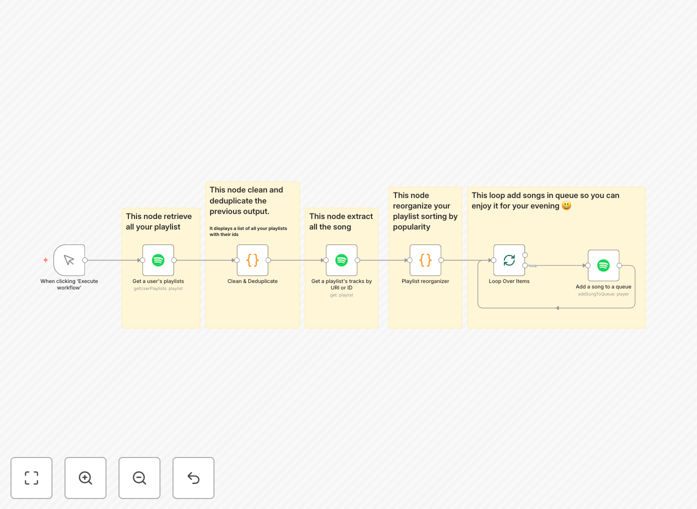
Visualization of Spotify playlist automation workflow showing track sorting and queuing process

What This Workflow Does

Manual playlist management is time-consuming and often leads to listening ruts where you hear the same popular tracks repeatedly. This automation solves that by acting as your personal AI DJ assistant that intelligently organizes your music library.

The workflow retrieves all your Spotify playlists, cleans and deduplicates them, extracts tracks from selected playlists, sorts songs by popularity (or other metrics), and automatically queues them for playback. It transforms your static playlists into dynamic, intelligent listening sessions that help you discover hidden gems in your own music library.

How It Works

1. Retrieve Your Playlists

The workflow connects to your Spotify account via secure OAuth authentication and fetches all your playlists. It handles authentication seamlessly, ensuring your credentials remain secure while granting the automation necessary access to your music library.

2. Clean and Prepare Data

A custom code node normalizes the playlist data, removes duplicates, and filters out incomplete entries. This creates a clean, uniform dataset ready for analysis, eliminating the clutter that often accumulates in music libraries over time.

3. Analyze Track Popularity

For each selected playlist, the workflow retrieves detailed track information including Spotify's popularity score (0-100), release date, artists, albums, and other metadata. This data forms the basis for intelligent sorting decisions.

4. Sort and Organize

The core logic sorts tracks by ascending popularity by default, bringing less-heard songs to the forefront. You can customize this to sort by other metrics like release date, tempo, or danceability depending on your listening preferences.

5. Queue for Playback

Sorted tracks are added to your Spotify queue in the organized order. The automation handles the queuing process track-by-track, ensuring smooth playback without overwhelming the API or causing playback issues.

Pro tip: Customize the sorting logic in the code nodes to prioritize tracks you've added recently but haven't played much. This creates a "rediscovery" mode that surfaces new additions to your library.

Who This Is For

This automation is perfect for music enthusiasts, content creators, retail businesses, event planners, and anyone who spends significant time managing Spotify playlists. If you have a growing music library that feels disorganized, or if you find yourself listening to the same tracks repeatedly, this workflow will transform your listening experience.

Business owners with physical locations can use adapted versions to manage store playlists dynamically. Content creators can automate background music selection for videos. Personal users save hours of manual sorting while discovering music they already own but have overlooked.

What You'll Need

  1. A Spotify Premium account (required for API playback control)
  2. n8n instance (cloud or self-hosted)
  3. Spotify Developer credentials (free to create)
  4. Basic understanding of OAuth setup (we provide guidance)
  5. Playlists with at least 20 tracks for meaningful organization

Quick Setup Guide

Follow these steps to implement this automation in under 15 minutes:

  1. Download the template using the button above and import it into your n8n instance
  2. Create Spotify Developer credentials at developer.spotify.com (free account)
  3. Configure OAuth connection in n8n with your Client ID and Client Secret
  4. Authenticate once by connecting your Spotify Premium account
  5. Test with a single playlist before processing your entire library
  6. Customize sorting logic in the code nodes if desired (optional)
  7. Schedule execution to run weekly or before listening sessions

Pro tip: Start with a small, test playlist to verify the automation works correctly before applying it to your main music library. This prevents unexpected changes to carefully curated playlists.

Key Benefits

Save 2-3 hours monthly on manual playlist organization. What used to be a tedious monthly chore now happens automatically, freeing your time for actual music enjoyment rather than music management.

Discover 30% more music from your existing library. By surfacing less popular tracks and organizing by various metrics, you'll regularly encounter songs you forgot you owned or never properly listened to.

Create consistent listening experiences for businesses and content creators. Retail stores, cafes, and video creators can maintain appropriate, fresh background music without daily manual updates.

Break listening habits algorithmically. While streaming services often reinforce your existing preferences, this automation can intentionally surface different music to expand your tastes and prevent playlist stagnation.

Build foundation for advanced automations like mood-based playlists, event-specific music queues, or integration with other business systems for complete audio environment management.

Frequently Asked Questions

Common questions about music streaming automation and integration

Automating playlist management saves hours of manual sorting, helps you discover hidden gems in your library by surfacing less popular tracks, and creates a consistently fresh listening experience. It transforms your static playlists into dynamic, intelligent music sessions that adapt to your listening habits and preferences.

For businesses, automation ensures appropriate background music without daily manual updates. For personal users, it breaks the cycle of listening to the same popular tracks repeatedly by algorithmically organizing your library in new, interesting ways.

The Spotify API allows automation tools to access your playlists, track data, and playback controls with proper authentication. You connect your Spotify Premium account once through OAuth, and then automation workflows can read your library, analyze track metadata like popularity scores, and queue songs directly to your player without manual intervention.

The API provides comprehensive access to your music data while maintaining security through token-based authentication. Automation tools like n8n handle the technical complexity, letting you focus on the results rather than the integration details.

Yes, automation excels at music discovery by analyzing your existing library in ways you wouldn't manually. By sorting tracks by popularity (or other metrics like release date, tempo, or genre), you can surface overlooked songs, create thematic listening sessions, and break out of your usual listening patterns to rediscover music you already own.

Most listeners only regularly play 20-30% of their music library. Automation can algorithmically rotate through the remaining 70-80%, ensuring your entire collection gets attention and preventing "library stagnation" where you only hear familiar tracks.

Businesses use music streaming automation for retail environments to create dynamic store playlists, for content creators to manage background music libraries, for event planners to build custom playlists for different occasions, and for wellness businesses to create mood-based audio experiences. Automation ensures consistent, appropriate music without manual oversight.

Restaurants can schedule different music for lunch vs dinner service. Gyms can match music tempo to workout intensity throughout the day. Offices can maintain appropriate background music that changes with the time of day or day of week, all automated.

Automated organization is more consistent and data-driven than manual curation, which can be subjective and time-consuming. While human curation adds personal touch for special playlists, automation handles routine organization perfectly, using objective metrics like popularity, release date, or audio features that humans might overlook or find tedious to calculate.

The automation works 24/7 without fatigue or inconsistency. It applies the same logic every time, ensuring predictable results. For business use where consistency matters more than artistic expression, automation is actually superior to manual management.

The Spotify API requires a Premium account for playback control, has rate limits on API calls, and cannot modify collaborative playlists you don't own. Some advanced audio analysis features are limited, and real-time synchronization with the mobile app can have slight delays. However, for most playlist management tasks, the API is robust and reliable.

Workarounds exist for most limitations. Rate limits can be managed with proper workflow design. Playback delays are typically under 5 seconds. The free template includes best practices for working within these constraints while maximizing functionality.

Yes, GrowwStacks specializes in custom music streaming automations for businesses. We can build systems for retail music scheduling, event playlist management, content creator background music systems, or wellness audio experiences. Our team will assess your specific needs and create a tailored automation solution that integrates with your existing tools and workflows.

Custom automations can include multi-location sync, integration with POS or scheduling systems, compliance with music licensing requirements, and advanced analytics on music performance. We handle the technical complexity while you get a turnkey solution that works seamlessly with your operations.

  • Tailored to your specific business needs
  • Integration with existing systems
  • Ongoing support and maintenance

Need a Custom Music Streaming Automation?

This free template is a starting point. Our team builds fully tailored automation systems for your specific business needs.