What This Workflow Does
Payment disputes (chargebacks) are a major headache for any business that processes online transactions. They're time-sensitive, complex, and losing them costs you both the transaction amount and a hefty fee. Manual monitoring is inefficient and risky.
This automated workflow solves that by creating a seamless bridge between your Stripe account, your team's communication in Slack, and your project management in ClickUp. It continuously monitors for new disputes, intelligently assesses their urgency based on amount and deadline, and instantly routes them to the right people with all the context they need to act.
You move from a reactive, panic-driven process to a proactive, organized system. High-priority disputes get immediate attention in Slack, while all cases are logged as tasks in ClickUp with clear deadlines, ensuring nothing falls through the cracks and your evidence is submitted on time, every time.
How It Works
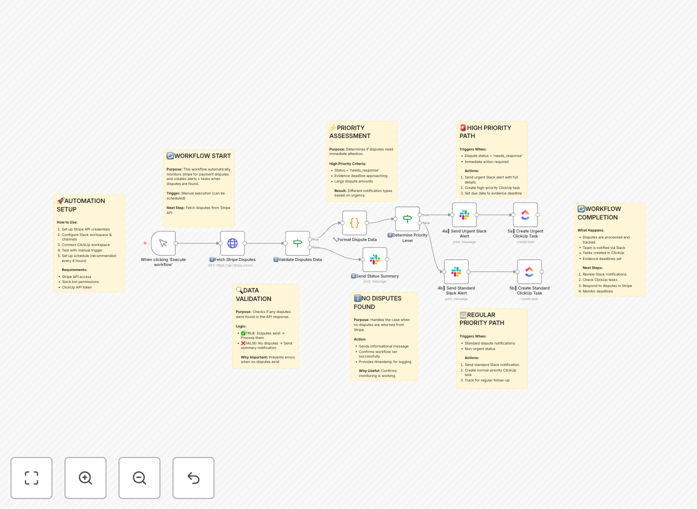
The workflow acts as your automated financial operations assistant, handling the entire dispute lifecycle from detection to task creation.
1. Trigger & Data Fetch
The workflow can be triggered on a schedule (e.g., every 4 hours) or manually. It connects to the Stripe API and retrieves a list of all active, open disputes in your account. It pulls essential data like customer details, transaction ID, amount, currency, reason code, and the critical evidence submission deadline.
2. Data Validation & Enrichment
It first checks if any new disputes exist. If not, it can send a simple "all clear" summary to a designated Slack channel for audit purposes. If disputes are found, it formats the raw data into a human-readable summary, calculating the time remaining until the deadline and converting amounts to your base currency if needed.
3. Priority Assessment Logic
This is the brain of the operation. Using simple "IF" conditions, the workflow categorizes each dispute. High-priority flags might be applied to disputes over a certain monetary threshold, those with "fraudulent" reason codes, or those with deadlines within the next 48 hours. This ensures your team focuses on what matters most.
4. High-Priority Alert Path
For urgent disputes, the workflow sends a formatted, attention-grabbing message to a specific Slack channel (e.g., #finance-alerts). The message includes all key details and a direct link to the Stripe dispute. Simultaneously, it creates a high-priority task in a designated ClickUp list, setting the due date to the Stripe deadline and populating the description with the dispute summary for immediate action.
5. Standard Case Path
For lower-priority or informational disputes, the workflow creates a standard-priority ClickUp task and may send a less urgent notification to a general updates channel in Slack. This maintains full visibility without causing alert fatigue for the team.
6. Completion & Logging
The workflow concludes by logging its actions, confirming that all discovered disputes have been processed and assigned. This creates a reliable audit trail for your finance team.
Who This Is For
This template is built for finance teams, payment operations specialists, and founders in SaaS, e-commerce, and any business relying on Stripe for payments. If you're manually checking the Stripe dashboard for disputes, copying information into Slack, and then creating tasks manually, this automation will save you hours per week and significantly reduce financial risk.
It's also ideal for scaling companies where the volume of transactions makes manual dispute management impossible, and for compliance-conscious businesses that need a bulletproof record of every dispute action taken.
What You'll Need
- A running n8n instance (cloud or self-hosted).
- A Stripe account with API keys (Secret Key).
- A Slack workspace where you can create an app and webhook URL for a channel.
- A ClickUp account with API access and a designated List/Space for tracking disputes.
- Basic familiarity with n8n to paste API credentials into the respective nodes.
Pro tip: Create a dedicated #stripe-disputes channel in Slack and a "Payment Disputes" folder in ClickUp before setting up this workflow. This keeps everything organized from day one.
Quick Setup Guide
Import and configure this workflow in under 15 minutes.
- Download & Import: Click the "Download Template" button above and import the JSON file into your n8n instance.
- Configure Stripe: In the 'Stripe' node, add your Stripe Secret Key from the Stripe Dashboard.
- Set Up Slack: Create a Slack App, enable incoming webhooks, and paste the generated Webhook URL into the 'Slack' node. Specify your channel name (e.g., #finance-alerts).
- Connect ClickUp: Generate a Personal API Token in your ClickUp settings and add it to the 'ClickUp' node. Enter the specific List ID where tasks should be created.
- Adjust Logic (Optional): Review the 'IF' node conditions. You may want to adjust the dollar amount or days-until-deadline that triggers a "High Priority" alert to match your business rules.
- Test & Activate: Click "Execute Workflow" to test. If a test dispute exists in Stripe, you should see an alert in Slack and a task in ClickUp. Once confirmed, activate the workflow to run on your desired schedule.
Key Benefits
Eliminate Missed Deadlines: Automated tracking ensures evidence is submitted before Stripe's cutoff, protecting your revenue from automatic losses.
Save 5-10 Hours Per Week: No more manual dashboard checks, copying data, or creating tasks. The workflow handles the entire operational overhead.
Improve Win Rates: Faster, more organized responses with all data in one place lead to stronger evidence compilation and higher dispute resolution success.
Centralize Visibility: Everyone from finance to customer support sees the same status in ClickUp, eliminating confusion and duplicate work.
Scale with Confidence: As your transaction volume grows, your dispute management process scales automatically without adding headcount or complexity.