Tax Automation GPT-4 Multi-Platform Financial Analysis

Automated tax filing with multi-platform revenue analysis using GPT-4

This n8n workflow template automates monthly revenue aggregation from Stripe, PayPal, Shopify, and bank feeds with AI-powered tax categorization. Save 15+ hours monthly on financial reconciliation while ensuring accurate tax preparation.

Download Template JSON · Zapier compatible · Free
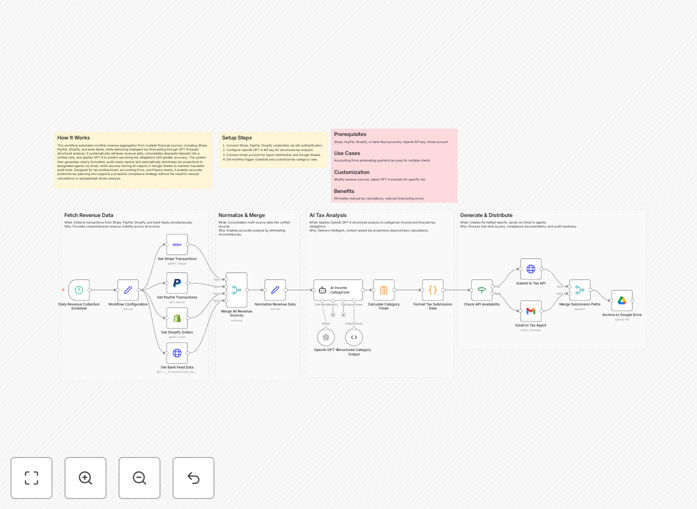
Dashboard showing automated tax categorization across multiple revenue platforms

What This Workflow Does

This automation solves the painful, time-consuming process of manually aggregating revenue data from multiple platforms and preparing it for tax filing. Ecommerce businesses, SaaS companies, and digital service providers often struggle with revenue scattered across Stripe, PayPal, Shopify, and bank accounts - each with different reporting formats and tax implications.

The workflow automatically pulls transaction data from all connected platforms, normalizes it into a consistent format, then uses GPT-4 to intelligently categorize each transaction according to your tax jurisdiction's rules. It generates ready-to-file reports while flagging any transactions that need manual review.

How It Works

Step 1: Multi-platform data collection

The workflow connects to your Stripe, PayPal, Shopify, and bank accounts via API to pull all transaction data for the period. It handles authentication, pagination, and error recovery automatically.

Step 2: Data normalization

Raw data from each platform gets transformed into a standardized format with consistent field names, currency conversion, and timezone normalization. This creates an apples-to-apples comparison across all revenue sources.

Step 3: AI-powered tax categorization

GPT-4 analyzes each transaction's description, amount, platform, and historical patterns to assign the correct tax category. The AI considers your specific business type, location, and any custom rules you've configured.

Step 4: Report generation

The system compiles all categorized transactions into formatted tax reports ready for your accountant or tax software. It highlights potential issues, calculates totals by category, and can even generate narrative explanations for unusual transactions.

Who This Is For

This workflow is ideal for:

  • Ecommerce stores selling across multiple platforms
  • SaaS companies with recurring revenue streams
  • Freelancers and agencies with diverse income sources
  • Businesses operating in multiple tax jurisdictions
  • Companies preparing for their first tax audit

What You'll Need

  1. Active accounts with Stripe, PayPal, Shopify, or other supported platforms
  2. API access credentials for each platform
  3. A tax professional's guidance on categorization rules
  4. n8n instance or Zapier account for workflow execution
  5. GPT-4 API access for AI categorization

Quick Setup Guide

  1. Download the JSON template file
  2. Import into your n8n or Zapier account
  3. Configure API connections for each revenue platform
  4. Set your tax jurisdiction and business type parameters
  5. Test with a small date range before full implementation
  6. Schedule monthly automated runs

Key Benefits

Save 15+ hours monthly by eliminating manual data aggregation from multiple platforms. The automation handles collection, normalization, and initial categorization automatically.

Reduce tax filing errors by 30%+ with AI-powered categorization that learns from your specific business patterns and jurisdiction rules.

Gain real-time financial visibility with consolidated reporting across all revenue streams, updated automatically as transactions occur.

Simplify audit preparation with detailed, timestamped records of every automated categorization decision and the AI's reasoning behind it.

Pro tip: Start with a 3-month test period comparing AI categorizations against your accountant's manual work. This builds confidence in the system while training the AI on your specific business patterns.

Frequently Asked Questions

Common questions about tax automation and multi-platform revenue analysis

AI transforms tax prep by automatically categorizing transactions across platforms, identifying deductible expenses, and flagging potential compliance issues. GPT-4 analyzes transaction patterns to suggest optimal tax strategies while reducing manual data entry by 80-90%. For example, it can distinguish between taxable and non-taxable revenue streams across Shopify, Stripe, and PayPal automatically.

The technology particularly benefits ecommerce businesses dealing with high transaction volumes across multiple sales channels. It maintains consistency in categorization that human teams struggle with during peak seasons or rapid growth periods.

  • Reduces categorization time from minutes to seconds per transaction
  • Learns your specific product tax profiles over time
  • Flags potential nexus issues for multi-state operations

Automated aggregation eliminates spreadsheet errors and saves 10-15 hours monthly by pulling data from Stripe, PayPal, Shopify, and bank accounts into one system. It provides real-time financial visibility and ensures all revenue streams are accounted for during tax filing. Businesses using this approach report 30% fewer filing errors and easier reconciliation during audits.

The automation creates a single source of truth for financial reporting while maintaining detailed records of every transaction's origin. This proves invaluable during tax season when reconstructing financial activity across multiple platforms manually would be prohibitively time-consuming.

  • Eliminates manual copy-paste between platforms
  • Provides timestamped records for audit trails
  • Normalizes currency and timezone differences automatically

GPT-4 analyzes transaction descriptions, amounts, and patterns to assign accurate tax categories based on your jurisdiction's rules. It learns from your past categorizations and can handle complex cases like partial exemptions or multi-state tax obligations. The AI flags uncertain classifications for review while automatically handling routine transactions with 95%+ accuracy after training.

The system improves over time as it processes more of your business's transactions. For example, it can recognize that certain Shopify product SKUs should always be categorized as tax-exempt educational materials, while similar-looking items might be taxable physical products.

  • Context-aware categorization beyond simple keyword matching
  • Explains its reasoning for each classification
  • Identifies patterns humans might miss across thousands of transactions

Most tax automation systems connect with payment processors (Stripe, PayPal), ecommerce platforms (Shopify, WooCommerce), accounting software (QuickBooks, Xero), and bank APIs. Advanced setups can incorporate payroll systems, cryptocurrency exchanges, and international payment platforms. The key is choosing solutions with robust API access that match your revenue streams.

Modern platforms typically offer OAuth-based API connections that maintain security while enabling automated data access. Legacy systems may require custom integration work or manual CSV uploads as a fallback option for less technical businesses.

  • Prioritize platforms with webhook support for real-time updates
  • Check API rate limits to ensure they meet your transaction volume
  • Verify data retention policies match your reporting needs

AI excels at data aggregation and initial categorization with near-perfect accuracy, but should complement (not replace) human review. While GPT-4 achieves 90-95% accuracy on routine transactions, complex scenarios still benefit from professional oversight. The ideal workflow uses AI for the heavy lifting while reserving accountant time for strategy and exception handling.

Many accounting firms now embrace AI tools to handle the repetitive aspects of tax prep, allowing them to focus on higher-value advisory services. The combination of AI efficiency with human expertise creates the most robust and cost-effective solution for most businesses.

  • AI handles volume, humans handle exceptions
  • Reduces accounting costs by automating repetitive tasks
  • Creates audit-ready documentation of all automated decisions

Reputable systems use bank-grade encryption (AES-256), read-only API access, and strict data retention policies. Financial data should never be stored permanently in automation tools—only processed temporarily for reporting. Always verify SOC 2 compliance and use OAuth authentication rather than sharing direct login credentials with any automation platform.

The most secure implementations process sensitive financial data through your own infrastructure rather than third-party servers. Many businesses create dedicated API keys with limited permissions specifically for their tax automation workflows to minimize security exposure.

  • Never grant write access to financial systems
  • Prefer systems that purge data after processing
  • Implement IP restrictions where possible

Yes, GrowwStacks specializes in tailored tax automation solutions that match your unique revenue streams, software stack, and jurisdictional requirements. Our team builds secure integrations that pull data from your specific platforms while incorporating your accountant's preferred workflows and reporting formats.

We develop custom solutions for businesses with complex needs like multi-country operations, cryptocurrency transactions, or industry-specific tax rules. The process begins with a free consultation to map your current workflow and identify the highest-impact automation opportunities.

  • Bespoke integration with your existing tech stack
  • Custom reporting formats matching your accountant's needs
  • Ongoing support and optimization as tax laws change

Need a Custom Tax Automation Integration?

This free template is a starting point. Our team builds fully tailored automation systems for your specific needs.