HaloPSA Gemini AI IT Support n8n

Automated ticket triage for HaloPSA with Gemini AI summary generation

Transform chaotic support tickets into actionable, prioritized items with AI-powered automation

Download Template JSON · n8n compatible · Free
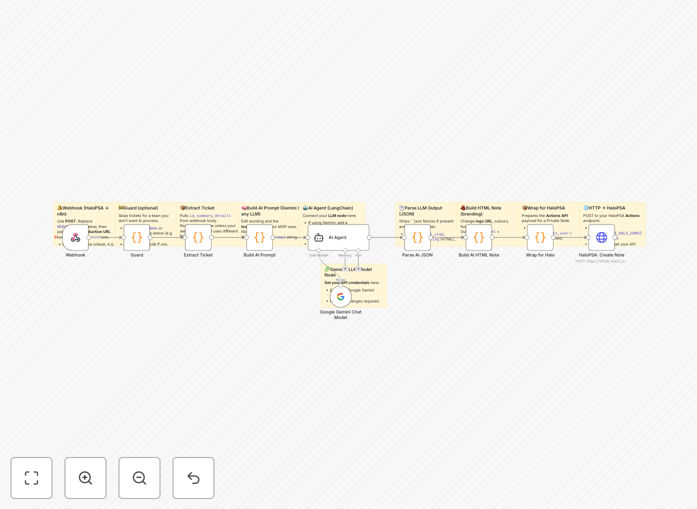
HaloPSA ticket triage automation workflow diagram

What This Workflow Does

This automation solves the critical pain point of manual ticket triage in IT support systems. When new tickets arrive in HaloPSA, the workflow automatically analyzes the content using Gemini AI to generate concise, actionable summaries. It categorizes tickets by urgency and type while extracting key technical details.

The system reduces average ticket handling time by eliminating repetitive manual processing. Support teams receive pre-digested information with clear priorities, allowing them to focus on resolution rather than administrative sorting. The AI maintains context even when tickets contain fragmented or poorly structured information from end users.

How It Works

1. New ticket detection

The workflow monitors HaloPSA via webhook for new ticket creation events. It captures the full ticket content including description, attachments, and metadata.

2. AI processing phase

Gemini AI analyzes the ticket content to identify the core issue, affected systems, and potential impact. The model has been trained to recognize technical terminology specific to your environment.

3. Summary generation

The AI generates a professional summary in your preferred format, highlighting key action points. It can optionally suggest knowledge base articles or previous similar tickets.

4. Priority assignment

Based on learned patterns and configured rules, the system assigns appropriate priority levels and routes tickets to correct queues or technicians.

5. HaloPSA update

The enriched ticket data is pushed back to HaloPSA, updating fields with the AI-generated summary, priority, and categorization.

Pro tip: Train the AI model with your historical ticket data to improve summary accuracy and relevance to your specific environment.

Who This Is For

This automation delivers maximum value for IT support teams handling 50+ tickets daily across multiple technical domains. MSPs and enterprise IT departments will see immediate productivity gains. The solution is particularly effective for:

  • Help desks with high ticket volumes
  • Teams supporting multiple technical specialties
  • Organizations with tiered support structures
  • Companies aiming to improve SLA compliance

What You'll Need

  1. Active HaloPSA account with admin access
  2. Google Cloud account for Gemini API access
  3. n8n instance (cloud or self-hosted)
  4. Webhook configuration permissions in HaloPSA
  5. Basic familiarity with API connections

Quick Setup Guide

  1. Download and import the JSON template into your n8n instance
  2. Configure HaloPSA webhook to point to your n8n endpoint
  3. Set up Gemini API credentials in n8n
  4. Adjust priority rules and categorization logic
  5. Test with sample tickets and refine prompts

Key Benefits

Reduce ticket handling time by 40-60% by automating the initial analysis and categorization process that typically consumes valuable technician time.

Improve first-response accuracy with AI-generated summaries that capture essential details often missed in manual reviews.

Standardize ticket quality across your support team, eliminating variability in how different technicians interpret and document issues.

Scale support operations without adding headcount by handling increased ticket volumes with existing staff.

Enhance reporting insights with consistent categorization and tagging that powers better analytics on support operations.

Frequently Asked Questions

Common questions about HaloPSA and AI ticket triage integration

AI-powered ticket triage automatically analyzes incoming support requests to categorize, prioritize, and summarize issues. This reduces manual review time by up to 70% while improving response accuracy. Support teams can focus on resolving tickets rather than administrative sorting.

The AI identifies urgent issues and suggests appropriate response paths based on historical data. For example, it can flag potential security incidents faster than manual review, while routing basic password resets to tier 1 technicians automatically.

  • Reduces average handling time per ticket
  • Minimizes misrouted tickets
  • Provides consistent quality of ticket documentation

Gemini AI can create concise summaries highlighting the core issue, affected systems, and potential impact. It extracts key details from lengthy descriptions, identifies technical terms, and suggests relevant knowledge base articles.

The AI maintains a professional tone while simplifying complex technical jargon for clearer communication between teams. For network issues, it might generate: "User experiencing intermittent connectivity in Building C - likely related to recent switch firmware update (see KB-4572)."

  • Technical issue distillation
  • Business impact assessment
  • Related solution suggestions

Modern AI like Gemini achieves 85-90% accuracy in summarizing technical support tickets when properly configured. The system learns from your historical ticket data to improve relevance.

While human review is still recommended for critical issues, AI summaries consistently capture essential details while eliminating subjective bias in manual interpretations. Accuracy improves over time as the model processes more tickets from your specific environment.

  • Higher consistency than manual summaries
  • Improves with more data
  • Configurable confidence thresholds

Yes, the core workflow architecture can adapt to most professional services automation platforms. The webhook triggers and API connections can be modified for tools like ConnectWise, Autotask, or ServiceNow.

The AI processing remains consistent regardless of the PSA platform, requiring only endpoint adjustments for different systems. We've implemented similar solutions for various MSPs using different ticketing systems with comparable success rates.

  • Same AI logic works across platforms
  • Only API connections need modification
  • Preserves all intelligence features

The workflow uses encrypted API connections and can be configured to redact sensitive information before AI processing. Enterprise-grade AI services like Gemini implement data protection protocols including optional data retention controls.

For maximum security, you can process summaries locally using open-source LLMs instead of cloud-based AI. This keeps all data within your infrastructure while still benefiting from automated summarization capabilities.

  • End-to-end encryption
  • Configurable data redaction
  • On-premise processing options

Teams typically save 5-8 minutes per ticket in initial processing time. For organizations handling 50+ tickets daily, this translates to 4-6 hours of saved labor daily.

The automation also reduces context-switching fatigue for technicians by presenting pre-digested ticket information in standardized formats. One MSP reported a 22% increase in resolved tickets per technician after implementing similar automation.

  • Measurable time savings per ticket
  • Reduced cognitive load for technicians
  • Higher throughput with same staff

Absolutely. GrowwStacks specializes in tailored PSA automations that match your specific workflows. Our team can design custom triage rules, integrate with your existing tools, and train AI models on your historical ticket data.

We offer free consultations to assess your requirements and propose automation solutions that fit your operational needs. Custom implementations typically deliver ROI within 3-6 months through productivity gains and improved service quality.

  • Completely bespoke solutions
  • Integration with your existing stack
  • Ongoing optimization support

Need a Custom HaloPSA Integration?

This free template is a starting point. Our team builds fully tailored automation systems for your specific needs.