Vapi AI Google Calendar Appointment Scheduling Voice AI

Automated voice appointment booking with Vapi AI and Google Calendar

Connect a Vapi AI voice agent to Google Calendar to capture contact details and auto-book appointments.

Download Template JSON · n8n compatible · Free
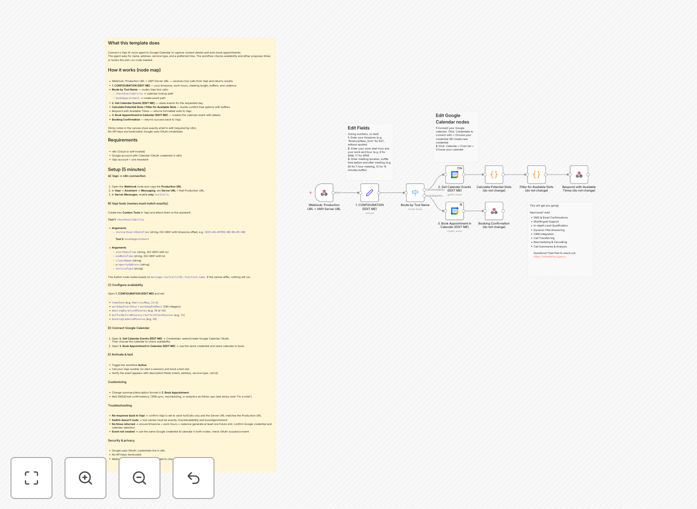
Vapi AI and Google Calendar integration workflow diagram

What This Workflow Does

This automation solves the challenge of manually scheduling appointments from phone inquiries. Traditional booking processes require staff to answer calls, collect information, check calendar availability, and manually create events - a time-consuming process prone to human error and missed opportunities.

The workflow connects Vapi AI's conversational voice agent to your Google Calendar, allowing callers to book appointments through natural conversation. The AI agent handles the entire interaction - asking for contact details, presenting available time slots, confirming the booking, and automatically creating the calendar event.

How It Works

1. Caller initiates conversation

The Vapi AI voice agent answers incoming calls with a professional greeting and explains it can help schedule appointments. The agent is configured with your business's specific scheduling policies and availability.

2. Information collection

The AI asks for necessary details like name, contact information, reason for appointment, and preferred time. It handles natural language responses and can ask clarifying questions if needed.

3. Calendar integration

The workflow checks your Google Calendar in real-time to verify availability. If the requested time isn't available, the AI suggests alternative slots based on your configured preferences.

4. Confirmation and booking

Once details are confirmed, the workflow creates the calendar event with all collected information and sends a confirmation to both the caller and your team. The entire process happens seamlessly without human intervention.

Who This Is For

This automation is ideal for service businesses that receive frequent appointment requests by phone:

  • Medical practices and clinics
  • Salons and spas
  • Consulting and professional services
  • Auto repair shops
  • Educational institutions

Pro tip: Configure your Vapi agent with multiple language options to serve diverse customer bases more effectively.

What You'll Need

  1. Active Vapi AI account with API access
  2. Google Calendar with proper sharing permissions
  3. n8n instance (cloud or self-hosted)
  4. Phone number configured in Vapi
  5. Business hours and scheduling rules defined

Quick Setup Guide

  1. Download and import the JSON template into your n8n instance
  2. Connect your Vapi and Google Calendar accounts
  3. Configure your business hours and appointment types
  4. Test the workflow with sample calls
  5. Deploy your Vapi phone number

Key Benefits

24/7 booking availability: Never miss an appointment request outside business hours. The AI handles calls anytime.

80% reduction in scheduling admin: Eliminate manual data entry and calendar management for your staff.

Improved customer experience: Callers get instant confirmation without waiting for callback or email.

Reduced no-shows: Automated reminders can be added to the workflow to decrease missed appointments.

Scalable operations: Handle unlimited concurrent booking calls without adding staff.

Frequently Asked Questions

Common questions about voice AI appointment booking integration

Modern voice AI like Vapi achieves over 90% accuracy for structured appointment conversations. The systems are specifically trained on scheduling dialogues and can handle variations in speech patterns. For complex cases, the workflow can be configured to escalate to human staff.

Real-world implementations show customers adapt quickly to speaking naturally with the AI. The system improves over time as it processes more interactions and learns your specific scheduling terminology.

  • Configure fallback options for unclear responses
  • Regularly review conversation logs to improve accuracy
  • Provide clear prompts to guide callers

Yes, the workflow can be configured to recognize different service types and allocate appropriate time slots. The AI asks clarifying questions when needed and can explain duration requirements to callers.

For example, a dental practice might have 30-minute cleanings and 60-minute procedures. The system automatically blocks the correct time based on the appointment type selected during the conversation.

  • Map each service type to its duration
  • Configure buffer times between appointments
  • Set different availability rules per service

The workflow can be extended to handle modifications by recognizing cancellation requests and checking the original booking. The AI verifies the caller's identity (usually by phone number or booking reference) before making changes.

For rescheduling, the system follows the same availability checking process as new bookings. Cancellations automatically free up the time slot and can trigger notifications to staff about the opening.

  • Implement authentication for appointment changes
  • Set cancellation policies (e.g., minimum notice period)
  • Notify staff of last-minute changes

Voice booking provides a more natural experience for customers who prefer phone communication or have accessibility needs. It handles complex scheduling scenarios more fluidly than form-based systems and can answer questions during the booking process.

While text systems work well for some users, voice AI captures the approximately 40% of customers who would otherwise call your business directly. The two methods can complement each other as part of an omnichannel strategy.

  • Voice converts more phone inquiries to bookings
  • Combine with text options for customer preference
  • Maintain consistent policies across channels

Yes, the workflow can be configured to manage group scheduling scenarios. The AI collects information about the number of attendees and any special requirements. It can check resource availability (like rooms or equipment) in addition to time slots.

For recurring group meetings, the system can set up series bookings with consistent intervals. All attendees receive calendar invitations with relevant details automatically included.

  • Define maximum group sizes per service
  • Set up resource-based availability checks
  • Configure automated attendee communications

The workflow can be extended to sync appointment data with most CRMs through additional API connections. Collected information gets written to both Google Calendar and your customer database, maintaining a single source of truth.

For healthcare applications, the system can check patient records before confirming bookings and flag any special requirements. Integration with EHR systems ensures compliance while automating the scheduling process.

  • Map CRM fields to collected appointment data
  • Set up two-way sync for updates
  • Implement proper data security protocols

Absolutely. GrowwStacks specializes in tailored voice AI solutions that integrate with your existing systems. Our team will design a custom workflow matching your specific scheduling rules, service offerings, and business processes.

We handle everything from Vapi agent training to multi-calendar coordination and CRM integration. Custom solutions typically deliver ROI within 3-6 months through reduced administrative costs and increased booking conversion rates.

  • Free consultation to assess your needs
  • Industry-specific customization available
  • Ongoing optimization and support

Need a Custom Voice Booking Integration?

This free template is a starting point. Our team builds fully tailored automation systems for your specific needs.