Google Calendar AI & GPT ElevenLabs Gmail Automation

Automated Voice Appointment Reminders with AI

Send personalized voice reminders for upcoming appointments by connecting Google Calendar, AI, and Gmail. Reduce no-shows and save hours of manual work.

Download Template JSON · n8n compatible · Free
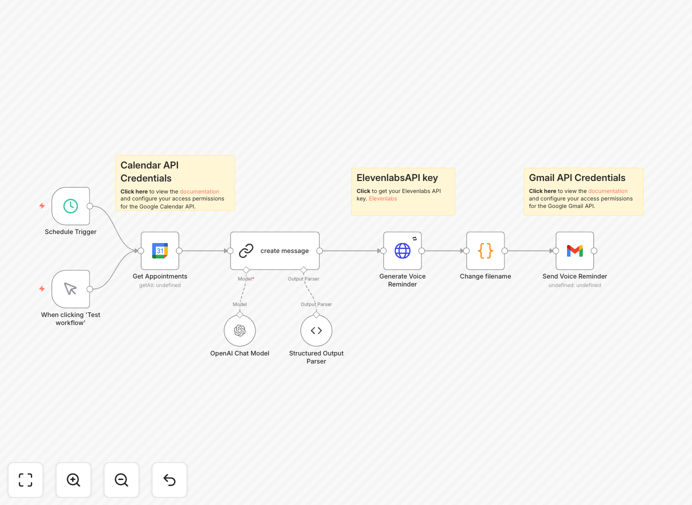
Visual diagram of the automated voice appointment reminder workflow integrating Google Calendar, AI, and Gmail

What This Workflow Does

Missed appointments are a silent revenue killer for service-based businesses. This workflow tackles that problem head-on by automating professional, personalized voice reminders. Instead of your staff spending hours calling clients, the system checks your Google Calendar for upcoming appointments, generates a natural-sounding voice message using AI, and emails it directly to your client with the details.

It transforms a manual, error-prone task into a seamless, reliable process. The integration of Google Calendar ensures real-time accuracy, while ElevenLabs provides high-quality, human-like audio that feels personal. This isn't just a text reminder—it's a voice message that commands attention and significantly increases the chance your client shows up.

How It Works

1. Trigger & Calendar Check

The workflow is triggered on a schedule (e.g., every morning at 9 AM). It connects to your Google Calendar and fetches all appointments scheduled for the next day. It filters for events with specific criteria, like those with a client email attached.

2. Data Extraction & Message Crafting

For each upcoming appointment, it extracts key details: client name, appointment time, location (or video link), and the purpose. This data is fed into an AI (like GPT) to generate a friendly, professional, and personalized reminder script.

3. Voice Generation

The personalized text script is sent to ElevenLabs' text-to-speech API. You can choose from various voices and tones to match your brand. The API returns a high-quality audio file (e.g., MP3).

4. Delivery via Email

The generated audio file is attached to an email. Using Gmail, the system sends the email to the client. The email body includes a written summary of the appointment and a polite note encouraging them to listen to the attached voice reminder.

Pro tip: Configure the workflow to run 24 hours before the appointment. This gives clients ample notice without being too early (they might forget) or too late (they might already have other plans).

Who This Is For

This automation is a game-changer for any business that runs on appointments. Medical practices and therapists can reduce patient no-shows. Consultants, coaches, and financial advisors can ensure their valuable time isn't wasted. Salons, spas, and repair services can improve daily scheduling efficiency. Real estate agents can keep property viewings on track. Essentially, if your revenue depends on people showing up, this workflow protects that revenue.

What You'll Need

  1. A Google Calendar with your appointments properly scheduled (including client email addresses where possible).
  2. An ElevenLabs account (free tier available) for generating the voice audio.
  3. Access to an AI/Language Model like OpenAI's GPT for scripting, or you can use a predefined template.
  4. A Gmail account or SMTP service configured to send emails.
  5. An n8n instance (self-hosted or cloud) to run the automation.

Quick Setup Guide

  1. Download the template using the button above and import it into your n8n workspace.
  2. Configure credentials for Google Calendar, ElevenLabs, and Gmail in n8n's credentials management.
  3. Adjust the trigger schedule to match your preferred reminder timing (e.g., "At 9:00 AM every weekday").
  4. Customize the AI prompt in the relevant node to tailor the voice message script for your business tone.
  5. Perform a test run by creating a dummy appointment in your calendar and activating the workflow once to see the end-to-end result.

Key Benefits

Reduce no-shows by up to 70%. Voice reminders are more memorable and personal than text or email alone, dramatically improving attendance rates.

Recover 5-10 hours of staff time weekly. Eliminate the tedious task of manual phone calls or reminder messages, freeing your team for higher-value work.

Enhance professional client experience. Sending a personalized voice message demonstrates care and technological sophistication, improving your brand perception.

Ensure consistency and reliability. The automation runs exactly as programmed, eliminating human error like forgetting to send a reminder or calling the wrong number.

Scalable client communication. Whether you have 10 or 1000 appointments per week, the system handles the volume effortlessly without additional cost or effort.

Frequently Asked Questions

Common questions about appointment reminder automation and integration

Automated voice reminders significantly reduce no-show rates, improve client engagement, and save administrative time. They provide a personal touch compared to text, increasing the likelihood of clients remembering and attending appointments, which directly impacts revenue and customer satisfaction.

For example, a medical clinic using this system can cut down on empty slots, ensuring better resource utilization and patient care continuity. The time saved on manual calls can be redirected to patient care or other critical tasks.

AI, like GPT, can personalize reminder messages based on client history, appointment type, and even tone. It can generate natural, conversational scripts that are then converted to human-like speech using services like ElevenLabs, making reminders feel more genuine and less robotic than pre-recorded messages.

This means a reminder for a dental check-up can sound different from one for a business consultation, all automatically. The AI can also adapt the language based on past client interactions, adding a layer of personalization that scales.

Yes, this automation is highly adaptable. Medical clinics, law firms, consulting services, salons, real estate agencies, and educational institutions all benefit. The core process—checking a calendar, generating a message, and sending a reminder—is universal, while the message content and timing can be customized.

The key is in the configuration. A salon might set reminders 48 hours in advance with an option to reschedule, while a B2B consultant might send a reminder 1 hour before a video call with the link embedded in the message.

SMS reminders are quick and have high open rates but are limited in length. Email allows for detailed information and attachments (like the voice file). Voice reminders are the most personal and attention-grabbing, cutting through digital noise. A combined approach using voice with a follow-up email is often most effective.

Voice has a unique psychological impact; hearing a message requires active listening and is harder to ignore than scanning a text. For important appointments, this multi-channel approach ensures the message is received and retained.

Modern automation platforms like n8n provide highly reliable, fault-tolerant connections between these services. The workflow can include error handling (e.g., if the AI service is down, send a standard text reminder) and logging to ensure every appointment is processed, making the system more reliable than manual reminders.

These platforms use API connections that are constantly monitored and retry failed operations. This creates a system that is often more dependable than a human employee who might get sick or make a mistake.

The main costs are for the AI voice generation (ElevenLabs has a free tier) and the automation platform hosting. Using a self-hosted, open-source platform like n8n eliminates ongoing SaaS fees. Compared to the revenue lost from no-shows and staff time spent on manual calls, the setup cost is typically very low.

Consider the math: one missed $200 appointment per week pays for a lot of AI credits. The return on investment is usually realized within the first month of operation through recovered revenue and saved labor.

Yes, GrowwStacks specializes in building tailored automation systems. We can customize this workflow for your specific scheduling software, add multi-language support, integrate with your CRM, set up complex rules for different appointment types, and ensure it scales with your business volume.

Our team will work with you to understand your unique process, design a solution that fits seamlessly into your operations, and handle the technical implementation from start to finish.

  • Integration with your existing CRM (Salesforce, HubSpot, etc.)
  • Multi-step reminder sequences (e.g., voice + SMS + email)
  • Advanced reporting on reminder effectiveness and no-show rates

Need a Custom Voice Appointment Automation?

This free template is a starting point. Our team builds fully tailored automation systems for your specific business needs.