What This Workflow Does
This automation solves the common problem of important discussions getting lost in active WhatsApp groups. Remote teams especially struggle to track decisions, action items, and key conversations across time zones and busy message threads.
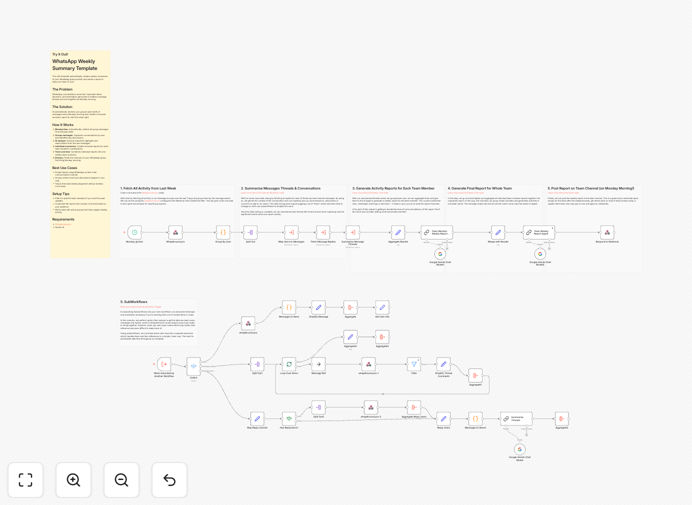
The workflow automatically collects the past week's messages, analyzes them using Gemini AI, and generates two types of reports: individual participation summaries and a comprehensive team overview. These reports help managers spot engagement patterns and ensure follow-through on decisions.
How It Works
1. Message Collection
The system connects to your WhatsApp group via API and retrieves all messages from the defined period (default is weekly). It preserves message metadata including sender, timestamp, and reply chains.
2. AI Processing
Gemini AI analyzes conversations to identify key discussion threads, decisions made, and action items. The model is configured to maintain context across messages and recognize important content versus casual chatter.
3. Report Generation
The system compiles individual participation metrics and a team summary highlighting key outcomes. Reports are formatted for clarity with visual indicators for important items requiring follow-up.
4. Distribution
Completed reports are posted back to the WhatsApp group and optionally emailed to team members. The system includes controls to redact sensitive information before sharing.
Who This Is For
This automation delivers the most value for:
- Remote teams using WhatsApp as a primary communication channel
- Project managers tracking team engagement and decisions
- Departments with compliance requirements for meeting documentation
- Leads managing multiple concurrent initiatives across groups
What You'll Need
- WhatsApp Business API access or whapAround.pro account
- Google Cloud account with Gemini API enabled
- n8n instance (cloud or self-hosted)
- 5 minutes to configure the workflow settings
Pro tip: Create separate workflows for different team groups to maintain focus in each report. The template supports easy duplication.
Quick Setup Guide
- Download and import the JSON template into your n8n instance
- Connect your WhatsApp account in the credentials section
- Add your Gemini API key in the AI node configuration
- Set your preferred schedule (default is weekly on Mondays)
- Test with a small group before rolling out company-wide
Key Benefits
Save 5+ hours weekly that managers typically spend manually reviewing chats and compiling notes.
Reduce missed action items by 60% with systematic tracking of decisions and assignments.
Improve remote team alignment with consistent documentation of discussions across time zones.
Gain valuable engagement insights from participation metrics and conversation analysis.
Maintain compliance with automated records of team decisions and discussions.