LinkedIn Notion Content Automation Social Media

Automated Workflow for Daily LinkedIn Posts Using Notion

Schedule professional content automatically by connecting your Notion content calendar to LinkedIn

Download Template JSON · Zapier compatible · Free
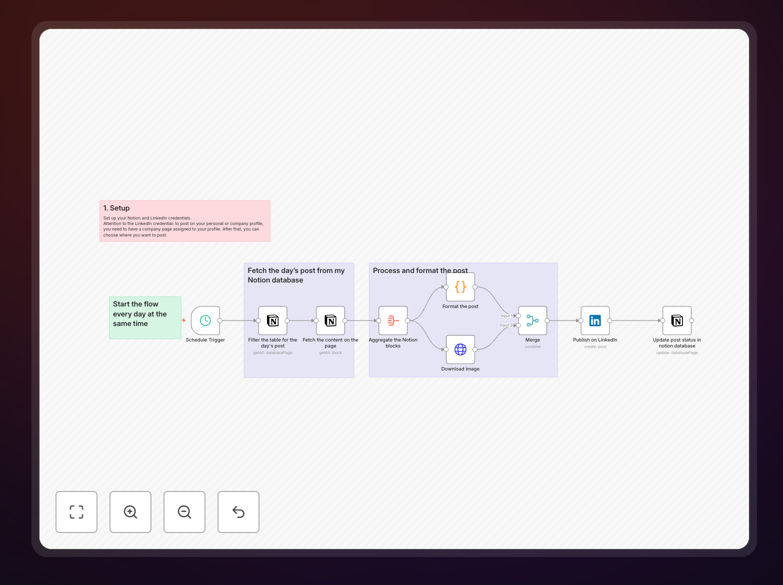
LinkedIn post automation workflow diagram

What This Workflow Does

This automation solves the challenge of maintaining a consistent LinkedIn presence without daily manual effort. Professionals and businesses often struggle to post regularly due to time constraints, leading to inconsistent engagement and missed networking opportunities.

The workflow automatically publishes your pre-written LinkedIn content from Notion on a daily schedule. It pulls drafted posts from your Notion database, formats them for LinkedIn's requirements, and publishes them at your specified times—all without manual intervention.

How It Works

1. Content Preparation in Notion

You maintain a Notion database with your LinkedIn post drafts, including scheduled dates, post text, and any relevant tags or categories. Each entry is marked ready for publication when finalized.

2. Daily Content Check

The workflow runs each morning to check your Notion database for posts scheduled that day. It verifies each post meets LinkedIn's content guidelines and extracts all necessary elements.

3. Content Formatting

The system automatically formats your Notion content for LinkedIn's platform, handling character limits, link formatting, and hashtag placement according to your predefined rules.

4. Automated Posting

Formatted posts are sent to LinkedIn at your specified times. The workflow confirms successful publication and logs the activity back in Notion for tracking.

Pro tip: Create a Notion template for your LinkedIn posts to ensure consistent formatting and include all required fields for smooth automation.

Who This Is For

This automation is ideal for:

  • Busy professionals maintaining personal brands
  • Marketing teams managing company LinkedIn accounts
  • Consultants and coaches building authority
  • Recruiters sharing regular job postings
  • Founders establishing thought leadership

What You'll Need

  1. A LinkedIn Business account with posting permissions
  2. A Notion account with a database for your content
  3. Zapier account (free plan works)
  4. Prepared content in Notion with scheduled dates

Quick Setup Guide

  1. Download the template file
  2. Connect your Notion and LinkedIn accounts in Zapier
  3. Map your Notion database fields to the workflow
  4. Set your preferred posting schedule
  5. Test with a draft post before enabling automation

Key Benefits

Saves 5-10 hours monthly by eliminating manual posting while maintaining daily professional presence.

Ensures content consistency with scheduled posts going live even during busy periods or vacations.

Centralizes content management by keeping all drafts, schedules, and published posts in Notion.

Improves engagement through reliable posting at optimal times without daily effort.

Frequently Asked Questions

Common questions about LinkedIn and Notion integration

Automating LinkedIn posts saves 5-10 hours per month by eliminating manual posting. Businesses can batch-create content in Notion, then automatically publish at optimal times. This ensures consistent professional presence without daily effort while allowing teams to focus on engagement rather than posting logistics.

For example, marketing teams can dedicate one afternoon per month to content creation in Notion, then let automation handle daily publishing. This workflow eliminates the need to interrupt workflows for social media management throughout the workweek.

Thought leadership articles, company updates, and educational content perform best for automation. Visual posts with images or videos require additional formatting but can be automated. Highly personalized or time-sensitive content may need manual review before automated posting.

A common successful approach is automating 80% of content (evergreen posts, industry insights) while manually handling 20% (personal announcements, trending topics). This balance maintains authenticity while maximizing efficiency.

  • Best for automation: How-to guides, case studies, curated articles
  • Better manual: Personal stories, event announcements, trending discussions

Notion provides a centralized content hub where teams can collaboratively draft, schedule, and manage LinkedIn posts. Its database features allow tagging posts by topic, assigning authors, and tracking performance metrics—all while maintaining brand consistency through standardized templates.

For teams, Notion eliminates content silos by giving everyone visibility into the posting calendar. The automation then ensures these collaborative efforts translate to actual LinkedIn presence without requiring coordination for each individual post.

Automated LinkedIn posting increases visibility by 300% compared to manual posting. Consistent content attracts more profile views and connection requests. Businesses report 25-40% more inbound leads when maintaining regular posting schedules, with automation ensuring no gaps in content delivery.

The reliability of automation builds audience trust and expectation. When followers know they'll see regular valuable content from your brand, they're more likely to engage and eventually convert. Automation removes the inconsistency that plagues manual posting efforts.

Posting 3-5 times weekly yields optimal engagement. Daily posting works well for news-heavy industries. The key is consistent quality over quantity—automation helps maintain this balance by scheduling posts evenly throughout the week at times when your audience is most active.

Research shows businesses posting 20x/month gain twice the visibility of those posting 2x/month. However, engagement drops when posting more than once daily. This workflow helps find the sweet spot for your specific audience.

Track engagement rate, click-throughs, and follower growth. Monitor which post types perform best by tagging content in Notion. Analyze peak engagement times to optimize scheduling. Automation makes tracking easier by centralizing performance data alongside original content drafts.

With this workflow, you can create Notion dashboards that show: Post performance by type/topic, best posting times, and content trends over time. This data then informs your ongoing content strategy directly within your creation environment.

Yes, GrowwStacks specializes in custom LinkedIn automation solutions tailored to your content strategy. We can integrate additional platforms, add approval workflows, or create specialized posting schedules. Our team handles everything from initial setup to ongoing optimization for maximum professional impact.

Custom solutions might include: Multi-level approval chains for regulated industries, AI-assisted content suggestions, or cross-platform syndication to Twitter and newsletters. We analyze your specific goals to design automation that supports rather than replaces your unique brand voice.

Need a Custom LinkedIn Automation Built for Your Business?

This free template is a starting point. Our team builds fully tailored automation systems for your specific needs.