What This Workflow Does
Manual certificate creation for workshops, training sessions, and events is time-consuming, error-prone, and delays attendee confirmation. This comprehensive automation solves these problems by transforming raw registrations into verified, credentialed attendees within minutes.
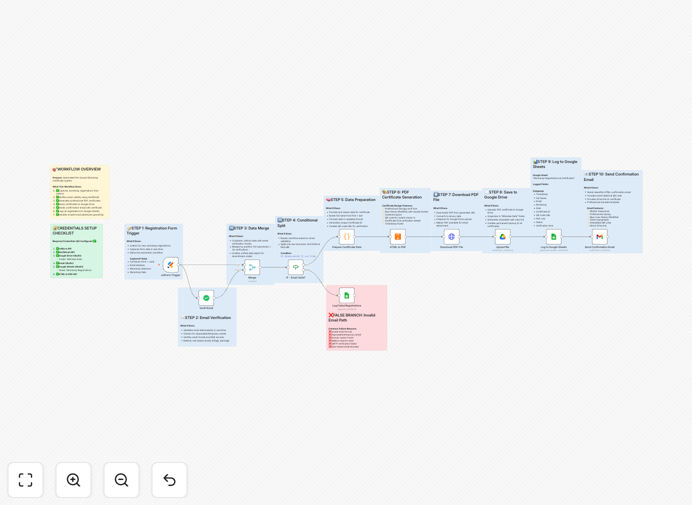
The system captures registrations from JotForm, validates each email address in real-time to prevent fraud and bounces, generates beautiful branded PDF certificates with unique QR codes, saves them to organized Google Drive folders, and sends professional confirmation emails with download links. All successful and failed registrations are logged in Google Sheets for complete tracking and reporting.
This end-to-end solution eliminates hours of manual work per event, ensures only legitimate attendees receive credentials, and provides a polished, professional experience that increases show-up rates and attendee satisfaction.
How It Works
1. Registration Capture & Email Validation
The workflow triggers when a new submission arrives in your JotForm. It immediately sends the attendee's email to the VerifiEmail API to verify deliverability, check for disposable addresses, and validate domain authenticity. Invalid emails are routed to a separate tracking sheet for follow-up.
2. Certificate Generation & Branding
For verified emails, the system merges attendee data (name, event details, date) with your custom HTML certificate template. It generates a unique certificate ID and QR code, then converts the design to a professional PDF using HTMLCSStoPDF. The QR code can link to event details, check-in pages, or verification URLs.
3. Secure Storage & Organization
Each certificate is saved to a designated Google Drive folder with a consistent naming convention (e.g., "EventName_AttendeeName_CertificateID.pdf"). The system creates subfolders by event date or type automatically, making retrieval and management simple. File permissions are set appropriately for sharing.
4. Professional Email Delivery
A branded HTML email is sent via Gmail with the certificate attached or linked. The email includes the attendee's name, event details, a preview of the QR code, and clear instructions. Mobile-responsive design ensures perfect display on all devices, with tracking for opens and clicks if configured.
5. Comprehensive Logging & Reporting
Every registration attempt—successful or failed—is recorded in Google Sheets with timestamps, verification status, certificate links, and email sent status. This creates an audit trail for attendance tracking, reporting to stakeholders, and follow-up communications with registrants who need assistance.
Who This Is For
This automation is ideal for training companies, workshop organizers, conference managers, educational institutions, webinar hosts, and corporate event planners. Anyone who regularly issues certificates, confirmations, or credentials to attendees can benefit.
Specifically valuable for: professional certification programs requiring verification, paid workshops needing instant confirmation, free events wanting to reduce no-shows, educational courses issuing completion certificates, and corporate training departments managing employee development tracking.
What You'll Need
- JotForm Account – For creating and hosting your registration form
- VerifiEmail API Key – For real-time email validation (free tier available)
- Google Workspace Account – For Gmail, Drive, and Sheets integration
- HTMLCSStoPDF Account – For converting certificate designs to PDF
- n8n Instance – Self-hosted or cloud version to run the workflow
Pro tip: Use the free tiers of VerifiEmail and HTMLCSStoPDF for testing. Most small to medium events (under 100 registrations) can operate entirely on free plans.
Quick Setup Guide
1. Import the template – Download the JSON file and import it into your n8n instance.
2. Configure credentials – Set up connections for JotForm, VerifiEmail, Google Services, and HTMLCSStoPDF in n8n's credentials management.
3. Customize templates – Modify the HTML certificate template and email template to match your branding. Update placeholders for attendee data.
4. Set up Google Drive – Create the target folder in Drive and note its ID. Update the workflow with this folder ID.
5. Test with a submission – Submit a test registration through your JotForm and verify the entire flow works correctly.
6. Activate the workflow – Turn on the workflow and watch it process registrations automatically 24/7.
Key Benefits
Save 2-3 hours per event by eliminating manual certificate creation, email drafting, and file management. What used to take an afternoon now happens automatically in seconds.
Increase attendance rates by 15-25% through professional, instant confirmations that build excitement and reduce last-minute cancellations. Attendees feel valued immediately.
Eliminate bounced emails and fake registrations with real-time validation before any resources are spent on certificate generation or communication.
Scale effortlessly from 10 to 10,000 attendees without additional work. The system processes each registration independently with consistent quality and speed.
Maintain perfect organization with automatically named, timestamped certificates in Google Drive and comprehensive tracking in Sheets for reporting and analytics.