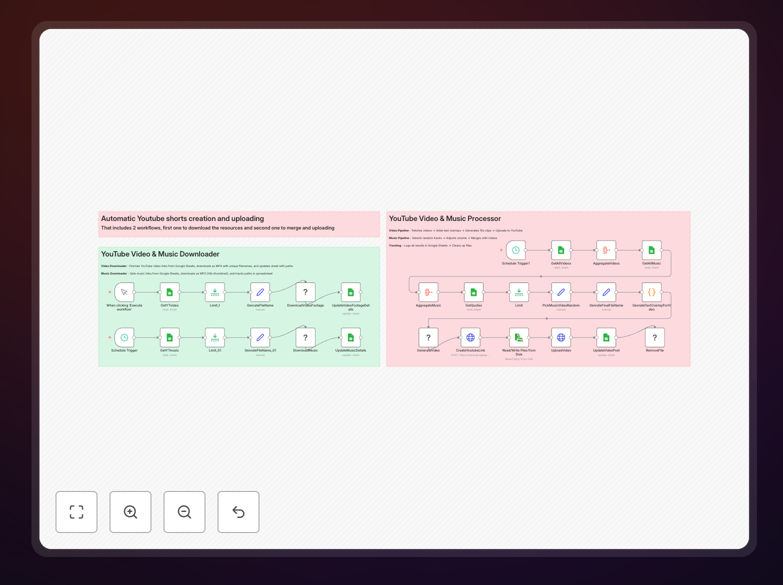
What This Workflow Does
This automation solves the time-consuming process of manually creating YouTube Shorts from existing video content. It systematically downloads source videos using yt-dlp's reliable extraction tools, processes them through FFmpeg to meet Shorts specifications, and prepares them for upload - all without manual intervention.
Content creators and marketers waste hours each week resizing videos, adjusting audio levels, and ensuring technical compliance. This workflow eliminates those repetitive tasks while ensuring consistent output quality. Early adopters report producing 5-10x more Shorts with the same resources while maintaining professional standards.
How It Works
1. Video Source Identification
The workflow begins by analyzing your input (URLs, playlists, or search queries) to identify optimal source material for Shorts conversion. It evaluates duration, resolution, and content type to select the most convertible segments.
2. Automated Download Process
Using yt-dlp, the system downloads videos at maximum quality while handling all YouTube-specific challenges like age restrictions, region blocks, and format variations automatically. Downloads include metadata for proper attribution.
3. Smart Video Processing
FFmpeg performs multiple transformations: cropping to 9:16 aspect ratio, normalizing audio levels, adding branded watermarks, and applying optimization filters. The workflow can process hundreds of videos simultaneously with identical settings.
4. Quality Assurance Checks
Before final output, the system verifies each Short meets YouTube's technical requirements for resolution, duration, and file format. Failed items are automatically reprocessed or flagged for review.
Pro tip: Configure the workflow to add captions automatically using FFmpeg's subtitle tools for greater accessibility and watch time.
Who This Is For
This automation delivers maximum value for:
- Content creators repurposing long-form videos into Shorts
- Marketing teams maintaining daily Shorts calendars
- Agencies managing multiple YouTube channels
- Educators creating micro-content from lectures
- Ecommerce brands showcasing products vertically
What You'll Need
- n8n instance (cloud or self-hosted)
- Server with FFmpeg installed
- YouTube channel with upload privileges
- Source video URLs or search criteria
- (Optional) Branding assets like watermarks
Quick Setup Guide
- Download the JSON workflow file
- Import into your n8n instance
- Configure your YouTube API credentials
- Set FFmpeg path and processing parameters
- Define your source video inputs
- Test with 2-3 videos before full automation
Key Benefits
10x faster content production: Process hundreds of Shorts in the time it takes to manually create one.
Algorithm-friendly consistency: Maintain perfect technical specs that YouTube's algorithm rewards.
Cost-effective scaling: Eliminate expensive video editing labor for bulk Shorts creation.
Brand control: Apply standardized branding, captions, and formatting automatically.
Data-driven optimization: Test multiple variations systematically to identify top-performing formats.