Google Drive File Management n8n

Automatic File Renaming with Timestamp Format for Google Drive

Streamline your cloud storage with this powerful Google Drive File Renamer automation built with n8n. The workflow watches a specific Google Drive folder and automatically renames files with consistent timestamp format.

Download Template JSON · Zapier compatible · Free
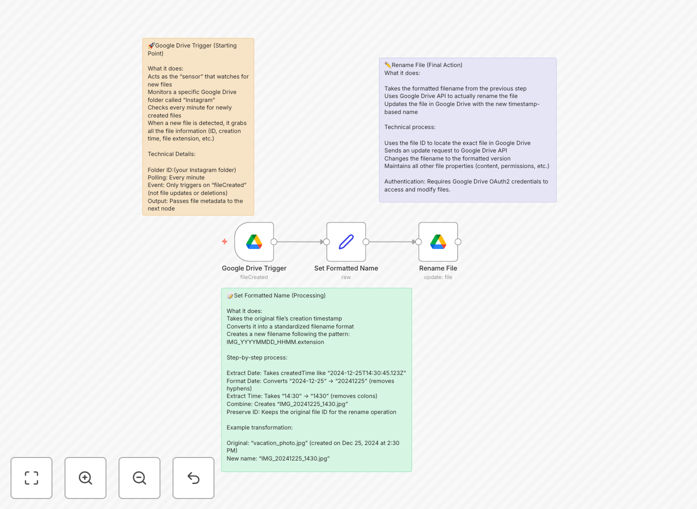
Google Drive file renaming automation workflow interface

What This Workflow Does

This automation solves the common problem of disorganized files in Google Drive by automatically renaming them with a consistent timestamp format. Many businesses struggle with files uploaded files have inconsistent naming conventions, making them difficult to search and manage later.

The workflow monitors a specified Google Drive folder in Google Drive and instantly renames any new files added to it. The new filename includes the original name plus a standardized timestamp, creating a uniform naming structure across all your documents.

How It Works

1. Folder Monitoring

The workflow continuously checks your designated Google Drive folder for new files. You can set the frequency of checks based on your needs, from every minute to hourly.

2. File Identification

When a new file is detected, the automation captures its current name and metadata. This ensures the renaming process preserves all original file information while adding the standardized timestamp.

3. Timestamp Application

The system applies your preferred timestamp format (like YYYY-MM-DD_HH-MM) to the filename. This creates consistent, searchable filenames that include when the file was added to Drive Drive.

4. Automatic Renaming

Finally, the workflow updates the filename in Google Drive while maintaining all file permissions and sharing settings. The original file owner receives a notification of the change. .

Who This Is For

This automation is ideal for teams that collaborate on Google Drive and need better file organization. Marketing agencies, legal firms, accounting firms, legal practices, and any business that handles numerous client documents will benefit most.

It's particularly useful for compliance-focused industries where audit trails are important, as the timestamped filenames create an automatic record of when files were added to the system.

What You'll Need

  1. A Google Workspace account with Drive access
  2. Access to n8n (self-hosted or cloud version)
  3. Permission to create automation workflows in your organization
  4. A dedicated folder in Google Drive for the automated renaming

Quick Setup Guide

  1. Download the template file
  2. Import it into your n8n instance
  3. Connect your Google Drive account
  4. Specify the folder to monitor
  5. Set your preferred timestamp format
  6. Activate the workflow

Key Benefits

Save 2-3 hours per week that would otherwise be spent manually renaming files or searching for documents with inconsistent names.

Reduce human error by eliminating manual filename entry where typos and inconsistencies often occur.

Improve team collaboration with standardized filenames that everyone can understand and search easily.

Create audit trail through automatic timestamping of all important documents.

Scale effortlessly as your file volume grows without additional administrative overhead.

Pro tip: Combine this with other Google Drive automations like this with Slack notifications to keep your team informed about important file updates.

Frequently Asked Questions

Common questions about Google Drive integration and automation

Automating file renaming automation saves significant time and reduces errors in document management. Manual renaming is tedious and prone to inconsistencies that make files harder to find later.

For example, a marketing agency receiving client assets from multiple team members can ensure all files follow the same naming convention automatically. This eliminates confusion when searching and reduces onboarding time for new employees learning the system.

  • Saves 2-5 hours per week on file management weekly
  • Eliminates naming convention inconsistencies
  • Makes files instantly searchable

Timestamped filenames create an automatic audit trail and chronological organization of documents. They provide context about when a file was added or modified without needing to the system without opening it.

In industries like accounting or legal services, timestamped files help demonstrate compliance with record-keeping requirements. For example, tax documents automatically renamed with their submission date make year-end audits much simpler to manage.

  • Creates chronological sorting
  • Creates automatic compliance documentation
  • Provides context at a glance

Automation transforms chaotic digital storage into organized systems that scale with your business. Automated workflows enforce consistency where manual processes often fail.

A real estate agency, a construction firm receiving daily project updates can automatically organize files by project name, date, and type without any manual intervention. This ensures all team members access the mostakeholders can find what they need instantly.

  • Eliminates manual organization tasks
  • Scales effortlessly with business growth
  • Reduces training time for new employees

Yes, the timestamp format is fully customizable to match your business requirements. The workflow template includes the most common formats but can be modified to any date/time configuration.

For international teams, you might configure different formats for different regions, or include timezone information. The flexibility allows the automation to adapt to your specific needs while maintaining consistency.

  • Supports any date/time format combination
  • Can include additional metadata like project codes
  • Can vary formats by folder or team

Beyond file renaming, businesses commonly automate document approval workflows, automatic backup systems, and cross-platform synchronization. These all help businesses operate more efficiently while reducing administrative overhead.

For example, many companies set up automated workflows that move completed contracts to a signed documents folder, notify stakeholders, and update CRM records—all without manual intervention. This creates seamless processes that would otherwise require manual steps.

  • Document approval chains
  • Automatic backup systems
  • CRM integration workflows

Automated workflows with Google Drive maintain the same security level as manual access controls and security as manual processes. The automation only has permissions you explicitly grant, and all actions are logged in Drive's audit trail.

For sensitive documents, you can configure workflows to only access specific folders and maintain existing sharing restrictions. Many financial institutions use such automations while benefiting from automation's efficiency.

  • Uses Google's existing security framework
  • Respects folder permissions
  • All actions are logged

Absolutely! GrowwStacks specializes in building custom Google Drive automation solutions tailored to specific business processes. Our team designs workflows that integrate with your existing systems and match your exact operational needs.

For example, we've built custom solutions for document-heavy industries that automatically classify files, route them to the right teams, update multiple systems, and enforce complex business rules. These go far beyond basic renaming to transform entire document workflows.

  • 100% customized to your workflow
  • Integrates with your existing tools
  • Solves your unique challenges

Need a Custom Google Drive Integration?

This free template is a starting point. Our team builds fully tailored automation systems for your specific needs.