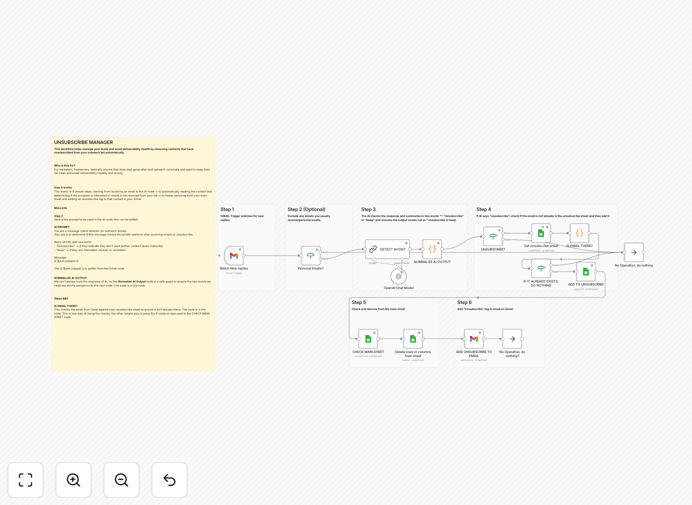
What This Workflow Does
For freelancers, agencies, and sales teams running cold email campaigns, maintaining a clean contact list isn't just good practice—it's essential for deliverability. This n8n workflow solves a critical but tedious problem: automatically detecting when someone replies to your outreach asking to be removed, and instantly cleaning them from your master list.
Instead of manually scanning replies for "unsubscribe," "remove me," or "opt out," this automation uses AI to understand the intent behind email responses. When a recipient asks to stop receiving emails, the workflow intelligently identifies the request, verifies it, and moves their contact from your active outreach sheet to an "unsubscribed" sheet—all without you lifting a finger.
The result? Your sender reputation stays protected, spam complaints drop, and your email campaigns continue reaching the right people. You save hours each week on manual list hygiene while ensuring compliance and respect for your audience's preferences.
How It Works
The workflow operates on a simple but powerful sequence that combines email monitoring, AI analysis, and spreadsheet management.
1. Monitor Incoming Replies
The automation starts by watching your connected Gmail inbox for new replies to your sent outreach emails. It triggers whenever a new message arrives, capturing the sender's email address and the full text of their reply.
2. AI-Powered Intent Analysis
The email content is sent to OpenAI (or another AI model) with a specific prompt asking: "Does this email contain a request to unsubscribe or be removed from a mailing list?" The AI evaluates the language, context, and sentiment, returning a clear classification.
3. Data Validation & Standardization
A Code node processes the AI's response to ensure consistency. It converts various outputs ("yes," "unsubscribe," "remove") into a standardized "unsubscribe" or "keep" flag, preventing errors in the next steps.
4. Check Existing Unsubscribe List
Before taking action, the workflow checks your "Unsubscribed" Google Sheet to see if this contact is already listed. This prevents duplicate entries and unnecessary processing.
5. Update Both Spreadsheets
If the contact is new to the unsubscribe list, the workflow performs two simultaneous actions: it adds their email and relevant details to your "Unsubscribed" sheet, and removes them from your "Active Outreach" or "Master List" sheet. This keeps both lists perfectly synchronized.
6. Optional Gmail Labeling
As a final organizational step, you can configure the workflow to add an "Unsubscribed" label to the original email thread in Gmail. This creates a visual audit trail and helps with future reference.
Who This Is For
This template is specifically designed for businesses and individuals who rely on email outreach for growth. If you're a freelancer managing cold email campaigns for clients, this automation ensures you maintain pristine sender reputations across multiple accounts. For lead generation specialists and sales development representatives, it eliminates the manual grunt work of list cleaning, letting you focus on conversations that matter.
Marketing agencies running bulk campaigns will find this essential for scaling operations while maintaining compliance. Even solopreneurs and small business owners doing their own outreach benefit from the protection against spam complaints and the time saved. Essentially, anyone who sends professional emails that could generate "please remove me" replies needs this workflow.
What You'll Need
- Gmail Account with API access enabled (or a service account with appropriate permissions).
- Google Sheets with two sheets: one for your active outreach list and one for unsubscribed contacts.
- OpenAI API Key (or access to another LLM provider) for the intent detection analysis.
- n8n Instance (cloud or self-hosted) to run the workflow.
- Basic understanding of how to set up credentials in n8n for Gmail and Google Sheets.
Pro tip: Use a dedicated Gmail account for your outreach campaigns. This isolates your sending reputation and makes credential management cleaner within n8n.
Quick Setup Guide
You can have this automation running in under 15 minutes. Follow these steps:
- Download the template using the button above and import it into your n8n instance.
- Set up credentials in n8n for Gmail (OAuth2) and Google Sheets (Service Account recommended).
- Replace the placeholder Google Sheet IDs in the "Google Sheets" nodes with your actual spreadsheet IDs.
- Add your OpenAI API key to the "OpenAI Chat Model" node credentials.
- Configure the Gmail trigger to watch the correct inbox and adjust the polling interval if needed (default is every 5 minutes).
- Test the workflow by sending a test reply with "unsubscribe" to your monitored inbox and verify the sheets update correctly.
- Activate the workflow and let it run automatically.
Key Benefits
Protect Your Sending Reputation: Internet Service Providers (ISPs) like Gmail and Outlook track complaint rates. Automatically removing unsubscribes before they can mark you as spam is the single most effective way to maintain high deliverability for all your future campaigns.
Save 5+ Hours Per Week: Manually checking replies and updating spreadsheets is incredibly time-consuming, especially across multiple client accounts or large lists. This automation handles it instantly, 24/7.
AI Understands Context, Not Just Keywords: Unlike simple filters that miss phrases like "please take me off your list," the AI detects intent, catching nuanced unsubscribe requests you might otherwise miss.
Maintain a Clean, Actionable CRM: Your active outreach sheet only contains engaged, relevant contacts. This improves your team's efficiency and the accuracy of your campaign metrics.
Scalable for Multiple Clients or Campaigns: Duplicate and modify this workflow for different Gmail accounts and Google Sheets. It's a reusable system that grows with your business.