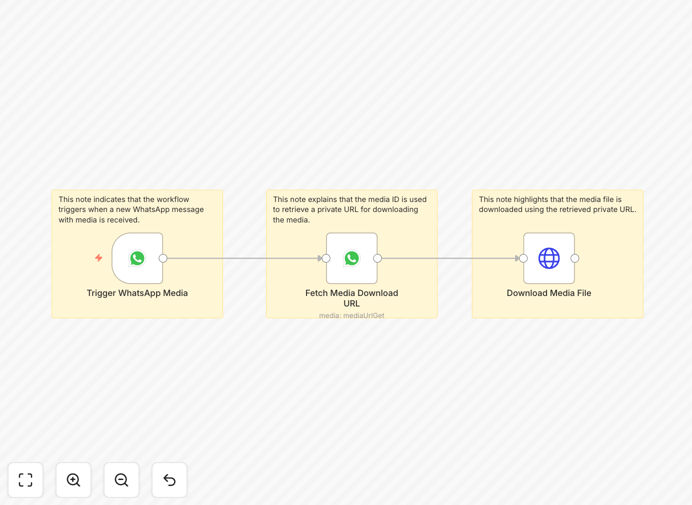
What This Workflow Does
This n8n workflow solves a common challenge for businesses using WhatsApp Business - automatically capturing and storing media files (images, videos, documents) that customers send through messages. Instead of manually downloading each file, this automation handles the entire process seamlessly.
The workflow listens for incoming WhatsApp messages containing media attachments, extracts the file URLs from WhatsApp's API, downloads the actual media content, and stores it in your preferred HTTP storage destination (like a cloud server or CDN). This ensures all customer-submitted media is systematically archived without manual intervention.
How It Works
1. WhatsApp Message Trigger
The workflow starts when WhatsApp Business receives a new message containing media. The WhatsApp Business API detects this event and passes the message details to n8n.
2. Media URL Extraction
n8n parses the incoming message to identify media attachments and extracts the temporary download URLs provided by WhatsApp's servers.
3. File Download
The workflow then downloads the actual media file from WhatsApp's servers using the extracted URL before it expires (WhatsApp media URLs are typically valid for only a short period).
4. HTTP Storage
Finally, the downloaded file is uploaded to your configured HTTP storage endpoint, which could be a cloud storage bucket, private server, or content delivery network.
Who This Is For
This automation is ideal for:
- Customer support teams receiving product images/videos via WhatsApp
- E-commerce businesses collecting order proofs/payments through WhatsApp
- Service providers who need to archive client-submitted documents
- Marketing teams gathering user-generated content
What You'll Need
- An active WhatsApp Business API account
- n8n instance (self-hosted or cloud)
- HTTP storage endpoint configured to receive files
- Basic understanding of n8n workflows
Quick Setup Guide
- Download and import the JSON template into your n8n instance
- Configure the WhatsApp Business trigger with your API credentials
- Set up your HTTP storage endpoint details in the workflow
- Test with a media message to verify file download and storage
- Activate the workflow for production use
Key Benefits
Never lose customer-submitted media: Automatically archives all WhatsApp media files before the temporary links expire.
Eliminate manual downloads: Saves hours of staff time previously spent manually saving files from WhatsApp.
Centralized storage: All media gets stored in your designated location with consistent naming and organization.
Scalable solution: Handles any volume of incoming media without additional effort from your team.