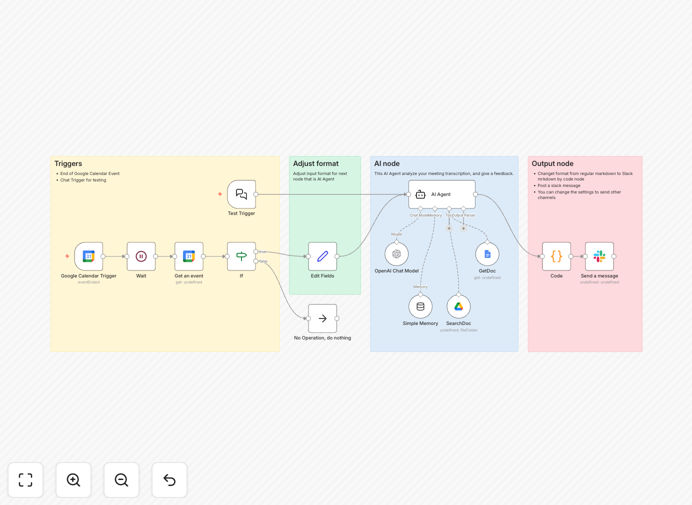
What This Workflow Does
This automation solves the common challenge of ineffective meetings by providing data-driven feedback. Managers waste hours manually analyzing meetings, while teams often repeat the same unproductive patterns without structured improvement.
The workflow automatically retrieves meeting minutes from Google Drive, applies AI analysis across multiple effectiveness dimensions, and delivers constructive feedback directly to Slack. It transforms subjective impressions into actionable insights that improve meeting culture over time.
How It Works
Step 1: Retrieve Meeting Minutes
The workflow connects to Google Drive using OAuth and retrieves specified meeting documents either by URL or search parameters.
Step 2: AI Analysis
Natural language processing evaluates speaking time distribution, decision clarity, action items, and sentiment patterns to calculate an effectiveness score.
Step 3: Feedback Generation
The system generates structured feedback highlighting strengths and specific improvement opportunities in Japanese or English.
Step 4: Slack Delivery
Personalized feedback gets delivered to designated Slack channels with @mentions for relevant participants.
Who This Is For
This workflow benefits:
- Team leaders conducting regular meetings
- HR professionals improving meeting culture
- Remote teams optimizing collaboration
- Companies scaling meeting effectiveness
What You'll Need
- Google Drive with meeting minutes
- Slack workspace
- n8n instance (cloud or self-hosted)
- 5 minutes for initial setup
Quick Setup Guide
- Download the JSON template
- Import into your n8n instance
- Connect Google Drive and Slack
- Configure meeting search parameters
- Set feedback delivery preferences
Pro tip: Start with analyzing 1-2 meetings per week to establish baselines before scaling to all meetings.
Key Benefits
Saves 3-5 hours per week by automating manual meeting analysis that managers typically perform.
Improves decision quality by identifying patterns in meeting dynamics that impact outcomes.
Scales meeting culture across distributed teams with consistent, data-driven feedback.
Enhances participation by highlighting speaking time imbalances and engagement opportunities.
Documents improvements with historical data showing meeting effectiveness trends over time.