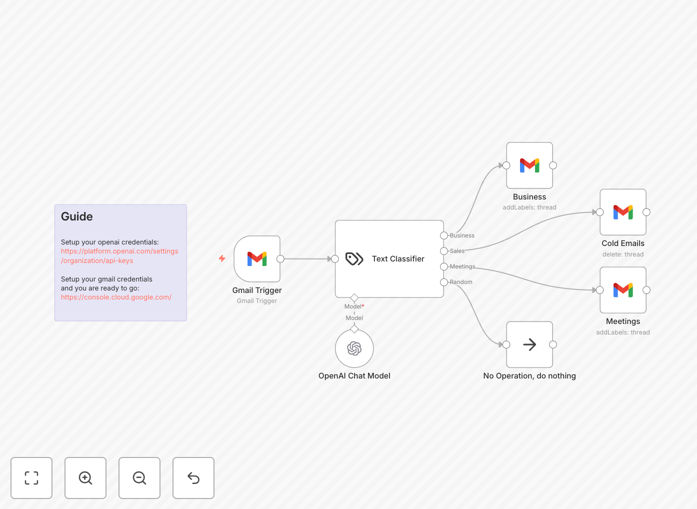
What This Workflow Does
Email overload is a universal business problem. Professionals spend 5-10 hours weekly sorting through inboxes, missing important messages while drowning in noise. This intelligent automation solves that by applying AI understanding to your email stream.
The workflow monitors your Gmail inbox in real-time, reads each incoming email's content using OpenAI's GPT-4 mini model, and automatically categorizes it into four practical buckets: Business (work-related correspondence), Meetings (calendar invitations and scheduling), Cold Emails (sales pitches and unsolicited outreach), and Random (personal emails and newsletters). It then applies appropriate Gmail labels and organizes emails accordingly.
How It Works
1. Gmail Trigger Activation
The workflow starts with a Gmail trigger node that monitors your inbox for new messages. It can be configured to check at specific intervals or watch for real-time updates via webhook, ensuring no email is missed.
2. Content Extraction & Preparation
Each email's subject, body, sender information, and metadata are extracted and formatted into a clean prompt for the AI classifier. The system strips away signatures, disclaimers, and formatting noise to focus on the core message.
3. AI-Powered Classification
The OpenAI Chat Model (GPT-4 mini) analyzes the email content and assigns it to the most appropriate category based on context, intent, and language patterns. The AI understands nuance—distinguishing between a genuine business inquiry and a sales pitch, or between a meeting request and a casual "let's chat" suggestion.
4. Smart Routing & Labeling
Based on the classification result, the workflow routes the email through different branches. Business emails get labeled "Work" and can trigger task creation. Meeting emails are labeled "Calendar" and can sync to your scheduling system. Cold emails go to "Sales/Outreach" for later review. Random emails are labeled "Personal/Misc."
5. Fallback Handling
A "No Operation" path catches any emails that can't be confidently classified, ensuring nothing is lost. These can be flagged for manual review or sent to a separate holding folder.
Who This Is For
This automation is ideal for busy professionals, entrepreneurs, sales teams, customer support managers, and anyone receiving 50+ emails daily. It's particularly valuable for:
- Solopreneurs managing both business and personal communications
- Sales teams needing to separate genuine leads from cold outreach
- Executives who must prioritize critical business correspondence
- Remote teams coordinating across multiple time zones
- Agency owners handling client communications and internal discussions
What You'll Need
- A Gmail account (personal or Google Workspace)
- OpenAI API key (from platform.openai.com)
- n8n instance (self-hosted or cloud)
- Basic understanding of API credentials setup
- Google Cloud Console access for Gmail API configuration
Pro tip: Start with a secondary email account or create a filter to process only emails from the last 24 hours initially. This lets you test the system's accuracy without affecting your entire inbox history.
Quick Setup Guide
- Import the template: Download the JSON file and import it into your n8n instance via the workflow import function.
- Configure credentials: Set up your Gmail OAuth2 credentials in n8n's credentials management. Then add your OpenAI API key.
- Adjust categories: Review the classification categories in the OpenAI node. Modify or add categories that match your specific needs.
- Test with sample emails: Use the workflow's manual trigger to test with sample email content before activating the Gmail trigger.
- Activate & monitor: Turn on the workflow and monitor its classifications for the first few days. Adjust confidence thresholds if needed.
Key Benefits
Save 5 - 10 hours monthly on email sorting and prioritization. What used to be a daily chore becomes an automated background process.
Never miss critical emails again. Business correspondence and meeting requests are immediately highlighted and separated from noise.
Improve response times by 40-60% for important messages. When emails are automatically categorized, you can prioritize responses based on category urgency.
Create structured archives for compliance and reference. All emails are properly labeled from arrival, making retrieval and auditing straightforward.
Reduce mental fatigue from constant context switching. Your inbox becomes a sorted stream rather than a chaotic pile.