Gmail Google Gemini AI Email Automation Productivity n8n

Automatically Classify & Label Gmail Emails with AI

Free n8n workflow that uses Google Gemini AI to intelligently sort your inbox into categories like High Priority, Work Related, and Promotions—saving hours of manual email management.

Download Template JSON · n8n compatible · Free
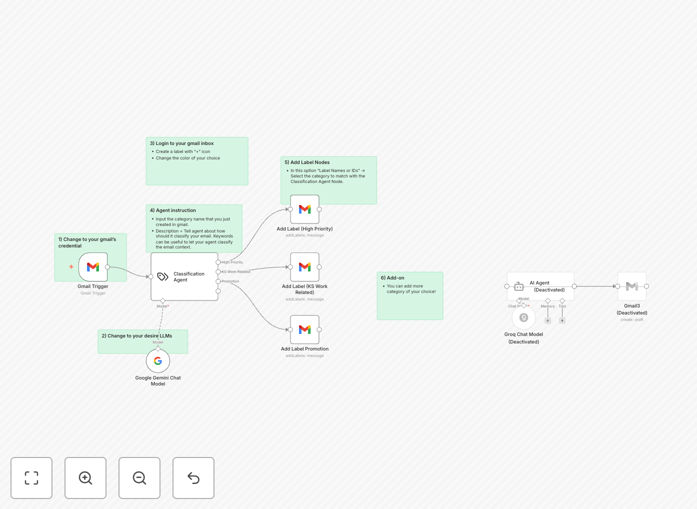
AI Email Classification Workflow Diagram showing Gmail integration with Google Gemini AI

What This Workflow Does

Email overload is a universal productivity killer. The average professional spends 28% of their workweek managing email—that's over 11 hours per week lost to inbox triage. This AI-powered automation solves that problem by transforming your Gmail into a self-organizing system.

The workflow automatically analyzes every incoming email using Google Gemini AI, classifies it into meaningful categories (High Priority, Work Related, Promotions, Finance, Newsletters, etc.), and applies the appropriate Gmail labels. What would normally require constant manual attention now happens instantly and consistently, 24/7.

Beyond simple filtering, this solution understands context. It can distinguish between an urgent client request and a routine update, between a work-related discussion and a personal message, between a valuable promotion and spam. The result is an inbox that surfaces what matters while organizing the rest.

How It Works

The automation follows a logical sequence that mimics how an efficient assistant would process your email, but with AI-powered intelligence at every step.

Step 1: Trigger on New Email

The workflow activates instantly when any new email arrives in your Gmail inbox. It captures the full email content including subject, body, sender information, and attachments.

Step 2: AI-Powered Classification

The email content is sent to Google Gemini AI (or your preferred LLM) with a carefully crafted prompt that asks it to categorize the message. The AI analyzes the language, context, sender relationship, and urgency signals to determine the most appropriate category.

Step 3: Conditional Logic & Label Application

Based on the AI's classification, the workflow follows specific pathways. High Priority emails might trigger additional notifications. Work-related emails get labeled for project context. Promotions are sorted away from your primary view. Each category receives its designated Gmail label automatically.

Step 4: Continuous Learning & Refinement

The system can be configured to learn from your corrections. If you move an email to a different folder, that feedback can be used to improve future classifications, making the system smarter over time.

Pro tip: Start with 3-5 broad categories (High Priority, Work, Personal, Promotions, Newsletters) rather than dozens of specific labels. This makes the system more accurate and easier to manage. You can always add more granular categories later as the AI proves its accuracy.

Who This Is For

This automation delivers value to anyone drowning in email, but it's particularly transformative for specific roles and industries:

Busy Professionals & Executives who receive hundreds of emails daily and need urgent matters to surface immediately. The High Priority classification alone can save critical response time on important client communications or internal emergencies.

Sales & Marketing Teams managing lead inquiries, client communications, and promotional campaigns. Automatic categorization helps separate genuine leads from general inquiries and keeps campaign analytics organized.

Customer Support Departments where email triage determines response priority. The AI can help identify urgent support tickets, feature requests, and billing inquiries for appropriate routing.

Agencies & Consultants managing multiple client accounts. Each client's communications can be automatically labeled, making it easy to maintain separate contexts and ensure nothing falls through the cracks.

Remote Teams & Distributed Companies where consistent email organization improves collaboration. When everyone uses the same labeling system, delegation and handoffs become much smoother.

What You'll Need

  1. A Gmail account (personal or Google Workspace) with access to enable API connections.
  2. n8n instance (cloud or self-hosted) where you'll import and run this workflow.
  3. Google Gemini API access or alternative LLM credentials (OpenAI, Anthropic Claude, etc.).
  4. Basic familiarity with n8n or willingness to follow our setup guide below.
  5. Pre-defined Gmail labels for your desired categories (create these in Gmail first for best results).

Quick Setup Guide

Getting this automation running takes about 15 minutes if you follow these steps:

  1. Download the template using the button above and save the JSON file to your computer.
  2. Import into n8n by navigating to your n8n instance, clicking "Workflows" → "Import from file" and selecting the downloaded JSON.
  3. Configure Gmail connection by clicking the Gmail trigger node, adding your Google account credentials, and authorizing the necessary permissions.
  4. Set up AI credentials in the Google Gemini node (or your chosen LLM node) with your API key and preferred model settings.
  5. Customize categories by editing the classification prompt to match your desired email categories and business context.
  6. Test and activate by turning on the workflow and sending a test email to yourself. Verify the classification and labeling work correctly.
  7. Monitor and refine for the first few days, making adjustments to the prompt based on any misclassifications.

Pro tip: Run the workflow in "Test" mode for the first 24 hours before fully activating it. This lets you see how it would classify your emails without actually applying labels, giving you confidence in its accuracy before going live.

Key Benefits

Recover 5+ hours weekly previously spent manually sorting email. That's 250+ hours annually returned to productive work or personal time.

Never miss urgent communications thanks to AI's ability to detect urgency signals and priority context that simple keyword filters would miss.

Maintain consistent organization across your entire team with automated labeling that follows the same rules for everyone, improving collaboration and accountability.

Reduce email stress and decision fatigue by letting AI handle the constant triage decisions that drain mental energy throughout the day.

Scale your email management as your business grows. The system handles 10 emails or 10,000 with the same efficiency, unlike manual approaches that break down under volume.

Gain valuable insights from your email patterns. Over time, you can analyze which categories receive the most traffic, when urgent emails typically arrive, and how your communication patterns evolve.

Frequently Asked Questions

Common questions about AI email automation and integration

AI email classification automatically sorts incoming messages into categories like High Priority, Work, or Promotions, saving you from manual inbox triage. This reduces decision fatigue, ensures urgent emails get immediate attention, and keeps promotional content out of your main view.

Most professionals spend 28% of their workweek on email management—that's over 11 hours weekly. AI classification can reclaim 30-60 minutes daily by eliminating constant inbox checking and manual sorting. The mental energy saved from not making hundreds of micro-decisions about each email can be redirected to higher-value work.

  • Reduces daily email management time by 40-60%
  • Ensures urgent communications receive immediate attention
  • Creates consistent organization without manual effort

Integrating Gmail with AI models like Google Gemini enables contextual understanding of email content beyond simple keyword matching. The AI can interpret intent, sentiment, and urgency, leading to more accurate categorization that adapts to your communication patterns.

Traditional rule-based filters fail with nuanced language, sarcasm, or indirect requests. AI models understand that "When you get a chance" often means medium priority, while "Need this ASAP" signals urgency regardless of keyword presence. This creates a self-organizing inbox that improves as it learns from your email behavior and corrections.

  • Understands context and nuance beyond keywords
  • Adapts to your unique communication patterns
  • Handles ambiguous language and indirect requests

Yes, automated email labeling creates consistent categorization across team members, making shared inbox management more efficient. When everyone uses the same labeling system, it's easier to delegate, follow up, and maintain visibility on communications.

For customer support teams, automatic labeling by issue type (billing, technical, feature request) ensures proper routing. Sales teams benefit from lead quality categorization. Project teams can automatically tag emails by client or project. This consistency eliminates confusion about email status and ownership, especially during handoffs or escalations.

  • Creates uniform organization across team members
  • Simplifies delegation and handoff processes
  • Provides visibility into email status and ownership

AI classification is significantly more accurate than static rule-based systems because it understands context and nuance. While manual rules might catch 60-70% of relevant emails based on keywords, AI models achieve 85-95% accuracy by analyzing multiple factors.

The AI considers sender relationships (emails from your boss vs. newsletters), historical patterns (you always label similar emails as "Project X"), language cues (urgency indicators), and content meaning. It also improves over time as it learns from your corrections, whereas manual rules require constant tweaking as new email patterns emerge.

  • Achieves 85-95% accuracy vs. 60-70% for rules
  • Learns and improves from corrections
  • Adapts to new email patterns automatically

Businesses with high email volume benefit most: agencies managing multiple clients, sales teams handling lead inquiries, support departments processing tickets, and executives receiving numerous internal updates. Any organization where email triage consumes significant daily time will see immediate productivity gains.

Professional services firms (consultants, lawyers, accountants) benefit from automatic client communication organization. E-commerce businesses can separate customer inquiries from vendor communications. Tech companies can categorize bug reports, feature requests, and partnership inquiries automatically. The common thread is communication volume that overwhelms manual management.

  • High-volume email environments (100+ daily emails)
  • Teams with shared inboxes or delegation needs
  • Businesses where response time impacts customer satisfaction

Choose automation platforms that process data securely and offer self-hosting options. Configure the system to only analyze necessary email metadata and content, exclude sensitive threads, and ensure AI providers have strong data protection policies.

For maximum security, self-host n8n on your infrastructure so email data never leaves your network. Use AI providers that offer data processing agreements and don't retain training data. Implement exclusion rules for emails containing sensitive keywords or from specific senders. Always review classifications before implementing fully automated actions on critical communications like legal or financial emails.

  • Self-host automation tools for maximum data control
  • Choose AI providers with strong privacy commitments
  • Exclude sensitive communications from automated processing

Yes, GrowwStacks specializes in building custom email automation systems tailored to your specific business workflows. We can create solutions that integrate with your existing tools, adapt to your unique categorization needs, and scale with your growing communication requirements.

Our team works with you to understand your email patterns, priority communications, and team collaboration needs. We then design and implement a system that automatically categorizes emails, routes them appropriately, and even triggers follow-up actions in your CRM, project management tools, or support systems. The result is a seamless email management experience that feels purpose-built for your business.

  • Tailored to your specific email patterns and business needs
  • Integrates with your existing software stack
  • Includes training and ongoing support

Need a Custom Email Automation?

This free template is a starting point. Our team builds fully tailored automation systems for your specific business needs.