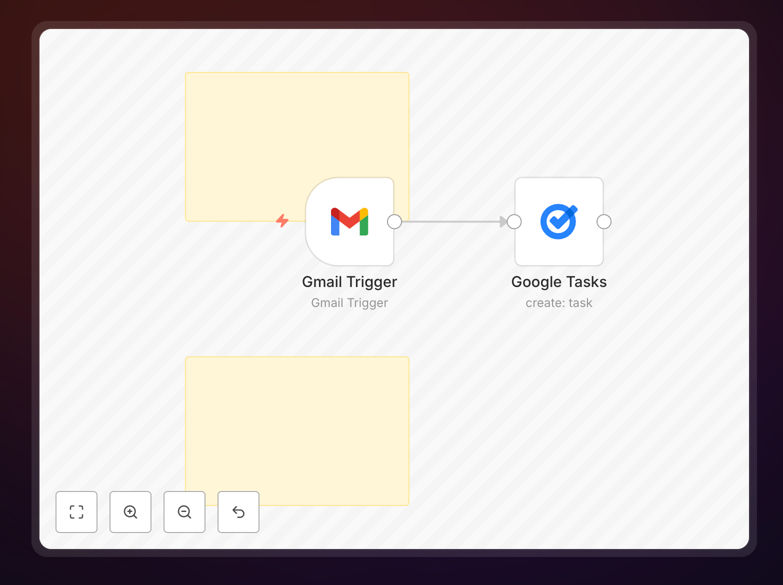
What This Workflow Does
This automation solves the common productivity challenge of important emails getting buried in your inbox. When you label an email as "To-Do" in Gmail, the workflow automatically creates a corresponding task in Google Tasks with all relevant details. The subject becomes the task title, the body becomes notes, and any mentioned dates are captured as due dates.
Professionals waste an average of 5 minutes per flagged email manually copying information between systems. This workflow eliminates that friction while ensuring no action item falls through the cracks. It's particularly valuable for client-facing roles, project managers, and anyone juggling multiple ongoing conversations that require follow-up.
How It Works
1. Email Detection
The workflow monitors your Gmail account for new emails with the "To-Do" label. This trigger ensures only emails you've manually flagged as actionable get processed.
2. Content Extraction
Key information is extracted from the email including subject line, sender, body text, and any attachments. The system intelligently parses dates mentioned in the email to suggest due dates.
3. Task Creation
A new task is created in your Google Tasks list with the email subject as the title. The full email content is included as notes, preserving important context. If dates were detected, they're set as the task due date.
Who This Is For
This workflow benefits anyone who uses Gmail and Google Tasks to manage their workload. It's especially valuable for:
- Busy professionals managing client communications
- Project managers tracking action items from team emails
- Executives who need to delegate emails as tasks
- Freelancers juggling multiple client requests
Pro tip: Combine this with Gmail filters to automatically label emails from important clients as "To-Do", creating tasks without any manual intervention.
What You'll Need
- A Gmail account with emails labeled "To-Do"
- Google Tasks access (part of Google Workspace)
- n8n instance (cloud or self-hosted)
- 5 minutes to import and configure the workflow
Quick Setup Guide
- Download the JSON template file
- Import into your n8n instance
- Connect your Gmail and Google Tasks accounts
- Test by labeling an email as "To-Do"
- Monitor the Tasks list for your new item
Key Benefits
Reduces context switching by keeping task management within your existing workflow. No need to alt-tab between email and task apps.
Ensures nothing falls through the cracks with automatic capture of all flagged emails. Studies show manual systems miss 20% of action items.
Saves 1-2 hours weekly by eliminating manual copying between systems. The average professional processes 15-20 actionable emails daily.
Maintains full context with the original email content attached to each task. No more guessing what "Follow up about the project" referred to.