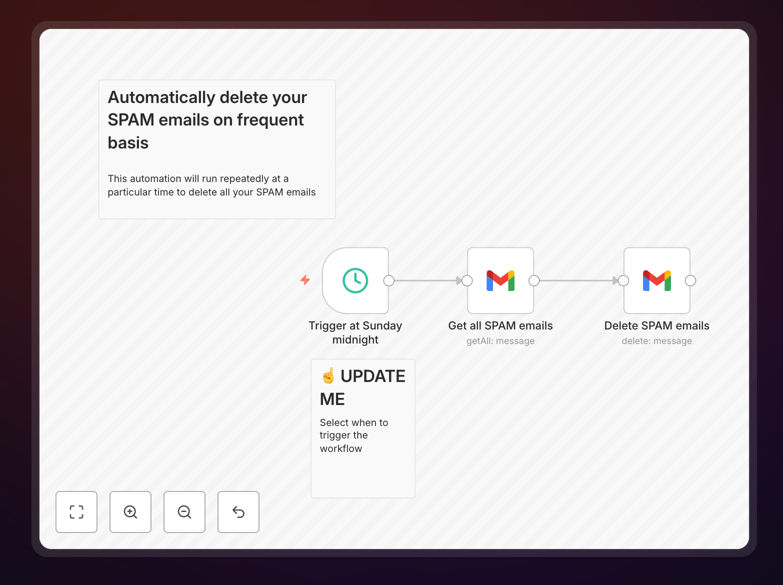
What This Workflow Does
Spam emails are more than just annoying—they clutter your inbox, waste your time, and can even pose security risks if you accidentally interact with them. Manually cleaning your spam folder is a repetitive task that most people put off until it becomes a problem.
This n8n workflow automates the entire process. It connects to your Gmail account on a schedule you define (daily, weekly, or monthly), identifies all emails in your spam folder, and permanently deletes them. You save 15-30 minutes per week of manual cleanup time while ensuring your email storage doesn't get filled with unwanted messages.
The automation runs completely in the background. Once configured, you'll never need to think about spam cleanup again. It's particularly valuable for businesses managing multiple email accounts, freelancers who want to maintain professional inbox hygiene, and anyone who values their time more than manual email maintenance.
How It Works
1. Schedule Trigger
The workflow starts with a schedule trigger that you configure based on your preferences. You can set it to run daily at 2 AM, every Monday morning, or on the first of each month—whatever fits your email usage patterns.
2. Gmail Connection
Using secure OAuth2 authentication, the workflow connects to your Gmail account. This is a one-time setup where you authorize n8n to access only the spam folder (not your entire inbox), following Google's security best practices.
3. Spam Email Retrieval
The workflow queries Gmail's API to retrieve all emails currently in your spam folder. It can filter by date range if you want to keep recent spam for review or delete everything older than a specific period.
4. Batch Deletion
Emails are processed in batches to avoid API rate limits. The workflow permanently deletes each spam email, ensuring they don't count against your storage quota. A log is created for tracking purposes.
5. Notification (Optional)
You can add a notification step to receive a summary report via email, Slack, or another channel. This tells you how many emails were deleted and confirms the automation ran successfully.
Who This Is For
This automation is ideal for small business owners who manage their own email and don't have IT support. It's perfect for freelancers and consultants who need to maintain professional email hygiene but hate administrative tasks. Marketing agencies managing multiple client accounts will appreciate the time savings across multiple inboxes.
Busy professionals in any industry who receive high volumes of email will benefit from automated spam management. Remote teams can implement this as a standard practice to ensure all team members maintain clean inboxes without manual oversight. Even individuals who simply want to reduce digital clutter and save time will find immediate value.
Pro tip: Before automating full deletion, run the workflow in "test mode" for a week to review what gets caught. This helps ensure legitimate emails aren't accidentally marked as spam.
What You'll Need
- A Gmail account (personal or Google Workspace)
- n8n instance (cloud or self-hosted)
- Google Cloud Project with Gmail API enabled (one-time setup)
- OAuth2 credentials from Google Developer Console
- Basic understanding of how to import workflows into n8n
Quick Setup Guide
Follow these steps to get your spam automation running in under 15 minutes:
- Download the template using the button above and save the JSON file to your computer.
- Import into n8n by going to your n8n instance, clicking "Workflows" → "Import from file" and selecting the downloaded JSON.
- Configure Google OAuth by setting up a Gmail node with your credentials. Follow n8n's documentation for Gmail OAuth setup if needed.
- Set your schedule by editing the Schedule Trigger node. Choose daily, weekly, or monthly based on your email volume.
- Test the workflow by executing it once manually. Check that it accesses only the spam folder and doesn't affect other emails.
- Activate the workflow once testing is complete. It will now run automatically according to your schedule.
Key Benefits
Save 15+ hours annually that would otherwise be spent manually cleaning spam folders. For businesses with multiple accounts, this multiplies to significant time savings across the team.
Prevent storage issues by automatically clearing spam before it accumulates. Gmail provides 15GB free storage shared across Drive, Photos, and Gmail—spam can consume this surprisingly quickly.
Reduce security risks associated with phishing emails that might slip into spam. Automatic deletion minimizes the chance of accidental interaction with malicious content.
Maintain professional email hygiene without ongoing effort. Clean inboxes project professionalism and help ensure important emails don't get lost in clutter.
Extendable foundation for more advanced email automation. Once this basic workflow is running, you can add features like spam analysis, reporting, or integration with other systems.