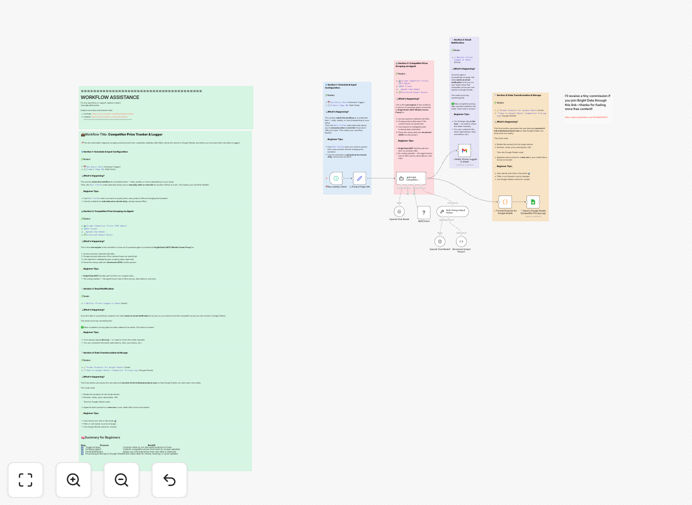
What This Workflow Does
This automation solves a critical business problem: staying competitive in dynamic markets without dedicating hours to manual price checking. Traditional competitor monitoring involves visiting multiple websites daily, recording prices in spreadsheets, and trying to spot trends—a process that's slow, inconsistent, and misses sudden price changes that can impact your revenue.
The workflow automatically scrapes competitor websites using Bright Data's MCP (Managed Collector Platform) to extract current pricing, product details, and promotional offers. It then processes this data, identifies changes from previous monitoring sessions, and logs everything into Google Sheets for easy analysis. The system operates on a schedule you define—daily, hourly, or weekly—providing consistent, reliable market intelligence without manual effort.
Beyond simple price tracking, the automation can alert you when competitors drop prices significantly, when new products enter your price range, or when market positioning shifts. This transforms price monitoring from a reactive, manual task into a proactive strategic function that informs your pricing decisions, promotional planning, and product development.
How It Works
Step 1: Data Collection via Bright Data MCP
The workflow begins by sending configured requests to Bright Data's Managed Collector Platform. This service handles the web scraping complexity—managing proxies, bypassing anti-bot measures, and maintaining session consistency—to reliably extract pricing data from competitor websites without getting blocked. You define which competitor URLs to monitor and what product identifiers to look for.
Step 2: Data Processing and Change Detection
Raw scraped data undergoes processing to extract clean pricing information, product names, and any promotional details. The system compares current prices against previously recorded values from Google Sheets, calculating percentage changes and flagging significant movements. This step transforms raw HTML into structured business intelligence with clear change indicators.
Step 3: Google Sheets Integration and Historical Logging
Processed data flows into your configured Google Sheets spreadsheet, with separate tabs or columns for different competitors, date-stamped entries for historical tracking, and calculated fields showing price trends over time. The automation maintains a clean, queryable database of market pricing that your team can access without technical expertise.
Step 4: Alerting and Notification Options
Based on your configured thresholds, the workflow can trigger alerts when competitors make significant price changes. These can be delivered via email, Slack, or other notification channels, ensuring your pricing team responds quickly to market movements rather than discovering them days or weeks later.
Pro tip: Start by monitoring 3-5 key competitors for your top 10 products. This focused approach delivers immediate value while you refine your monitoring parameters before scaling to broader coverage.
Who This Is For
This automation benefits e-commerce businesses needing to match or beat competitor pricing, SaaS companies monitoring subscription tier positioning, retailers tracking seasonal price fluctuations, manufacturers understanding distributor pricing, and any business where market price intelligence impacts revenue. Marketing teams use it to plan promotions, product managers use it to position features against price points, and sales teams use it to understand competitive landscape during negotiations.
The workflow particularly suits businesses experiencing manual price tracking pain points: inconsistent data across team members, missed price changes affecting sales, hours wasted on repetitive website visits, or lack of historical data to identify market trends. If you've ever discovered a competitor's price change too late to respond effectively, this automation solves that problem systematically.
What You'll Need
- Bright Data Account: Access to Bright Data's MCP service for reliable web scraping (free trial available).
- Google Sheets Setup: A Google account with Sheets access and a prepared spreadsheet template.
- n8n Instance: Either n8n.cloud account or self-hosted n8n installation.
- Competitor URLs: List of competitor product pages or pricing pages to monitor.
- Product Identifiers: Clear understanding of what product names/SKUs to track across competitors.
Pro tip: Create a dedicated Google Sheet with separate tabs for each competitor before importing the workflow. This organization makes data analysis much easier once automation begins populating it.
Quick Setup Guide
- Download and Import: Download the JSON template file and import it into your n8n instance via the workflow import function.
- Configure Bright Data Node: Add your Bright Data API credentials to the MCP Client node and test connection.
- Set Up Google Sheets: Connect your Google account via OAuth and specify your target spreadsheet ID.
- Define Competitor Parameters: Edit the workflow to include your specific competitor URLs and product identifiers.
- Test and Schedule: Run a manual test to verify data collection, then set your preferred monitoring schedule (daily recommended).
Key Benefits
Eliminate 5-10 hours weekly of manual price checking that typically involves visiting multiple websites, recording data, and trying to spot trends. This time savings alone often justifies the automation investment within weeks.
Respond to price changes within hours instead of days or weeks by receiving automated alerts when competitors adjust pricing. This speed advantage can directly impact sales and market share during competitive periods.
Maintain consistent, error-free price intelligence across your entire product catalog and competitor set. Automated systems don't miss entries, transpose numbers, or skip monitoring sessions due to workload.
Build historical pricing databases that reveal market trends, seasonal patterns, and competitor pricing strategies over time—intelligence impossible to gather manually with consistency.
Scale monitoring effortlessly from a few products to hundreds without additional time investment. Once configured, adding more competitors or products involves simple parameter changes rather than hiring additional staff.