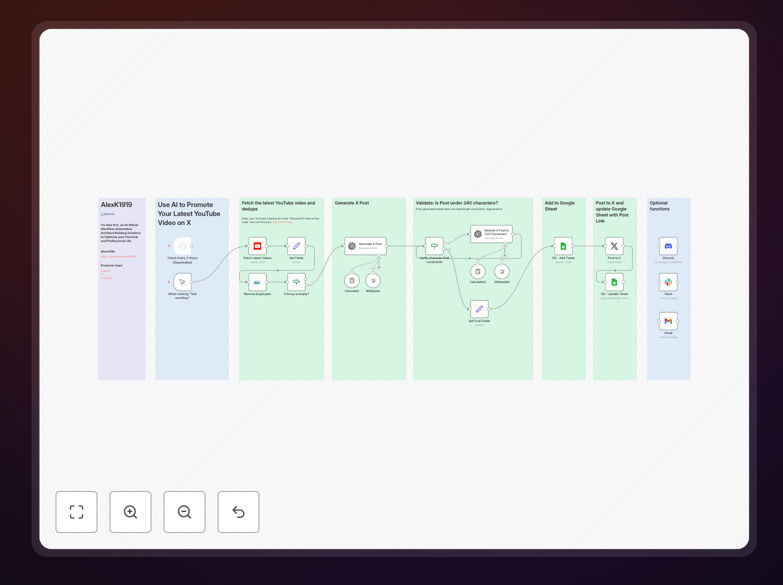
What This Workflow Does
For content creators and marketers, promoting new YouTube videos across social platforms is a repetitive, time-consuming task that's easy to forget. This automation solves that by automatically detecting your latest YouTube uploads and sharing them on X (formerly Twitter) with engaging, AI-crafted posts.
The workflow fetches your newest video, uses OpenAI's GPT-4 to generate a compelling post under 280 characters, validates the character count, publishes to X, and logs everything to Google Sheets for tracking. It turns a 15-minute manual process into a fully automated system that runs in the background, ensuring your content gets maximum visibility the moment it goes live.
Beyond basic sharing, this template includes smart features like duplicate prevention, error handling for API limits, and optional notifications via Discord, Slack, or email. It's designed for reliability—so you can focus on creating content while the automation handles promotion.
How It Works
The workflow follows a logical sequence to ensure smooth, error-free execution from video detection to social posting.
1. Trigger & Video Fetch
The process begins either on a schedule (e.g., every 2 hours) or via manual trigger. It connects to the YouTube API using your channel ID, retrieves your most recent uploads, and filters out any videos that have already been processed to prevent duplicate posts.
2. AI Content Generation
For each new video, the workflow sends the video title and description to OpenAI's GPT-4. The AI generates a human-like, engaging post optimized for X's platform—keeping it under 220 characters to leave room for the video URL and hashtags. If the initial draft exceeds the limit, the system automatically requests a rewrite.
3. Validation & Logging
Before posting, the workflow validates the final text length and structure. It then creates a record in your designated Google Sheet, logging the video title, generated post, timestamp, and initial status as "Ready to Post." This creates an audit trail for all automated activity.
4. Social Publishing & Update
The validated post is published to your connected X account via the X API. Once successful, the workflow updates the Google Sheet record with the live post URL and changes the status to "Published." If configured, it can also send success notifications to your team via Discord, Slack, or email.
Who This Is For
This automation is ideal for YouTube creators, content marketing teams, agencies managing multiple channels, and businesses using video as a core part of their strategy. If you publish regularly and want to ensure every video gets promoted without manual effort, this workflow eliminates that repetitive task.
It's particularly valuable for solo creators who wear multiple hats, small teams without dedicated social media managers, and organizations looking to maintain consistent cross-platform presence. The Google Sheets logging also makes it perfect for teams that need to track promotional activities for reporting or client communications.
What You'll Need
- n8n instance (cloud or self-hosted)
- YouTube API credentials with access to your channel
- OpenAI API key (GPT-4 access recommended)
- X Developer Account with API keys for posting
- Google Sheets with edit permissions for logging
- Optional: Discord webhook, Slack app, or Gmail account for notifications
Pro tip: Use a dedicated Google Sheet as your "social media command center." Add columns for engagement metrics later, and you'll have a complete history of what was posted when, making performance analysis much easier.
Quick Setup Guide
Import and configure this workflow in under 15 minutes:
- Download & Import: Click the download button above to get the JSON file. In your n8n instance, go to Workflows → Import from File and select the downloaded template.
- Configure Credentials: Set up credentials for YouTube, OpenAI, X, and Google Sheets in n8n's credentials management. Use the accounts you want the automation to post from.
- Set Your Channel ID: In the "Fetch Latest Videos" node, replace the placeholder with your YouTube Channel ID (found in your YouTube account's advanced settings).
- Connect Your Sheet: Update the Google Sheets node with the URL of your tracking sheet. The template includes a sample structure you can duplicate.
- Test & Activate: Execute the workflow once manually to verify all connections work. Then enable the schedule trigger or keep it manual based on your preference.
Key Benefits
Save 5+ hours monthly by eliminating manual copy-pasting between YouTube and X. The automation handles everything from fetching to posting in seconds.
Increase engagement consistency by ensuring every video gets promoted immediately after going live, catching the initial algorithm boost on both platforms.
Maintain brand voice with AI-generated posts that can be tuned to match your specific tone, whether professional, casual, or humorous.
Gain valuable insights through automatic Google Sheets logging, creating a searchable database of all your social promotions for future analysis.
Scale effortlessly as your channel grows—the same workflow handles 1 video or 100 without additional effort from your team.