What This Workflow Does
This n8n workflow solves a common but time-consuming problem: manually downloading and organizing email attachments. It automatically monitors your Gmail inbox for new emails containing attachments and saves those files directly to a designated folder in your Google Drive.
For businesses and professionals, this means invoices, client documents, reports, and photos sent via email are instantly archived in a structured cloud storage system. No more searching through crowded inboxes or risking lost files. The automation runs continuously in the background, ensuring your digital filing happens without any manual effort.
The workflow is particularly valuable for roles that handle high volumes of document exchanges—accountants receiving invoices, project managers getting deliverables, sales teams collecting contracts, or support staff gathering screenshots. It transforms email from a passive repository into an active filing system.
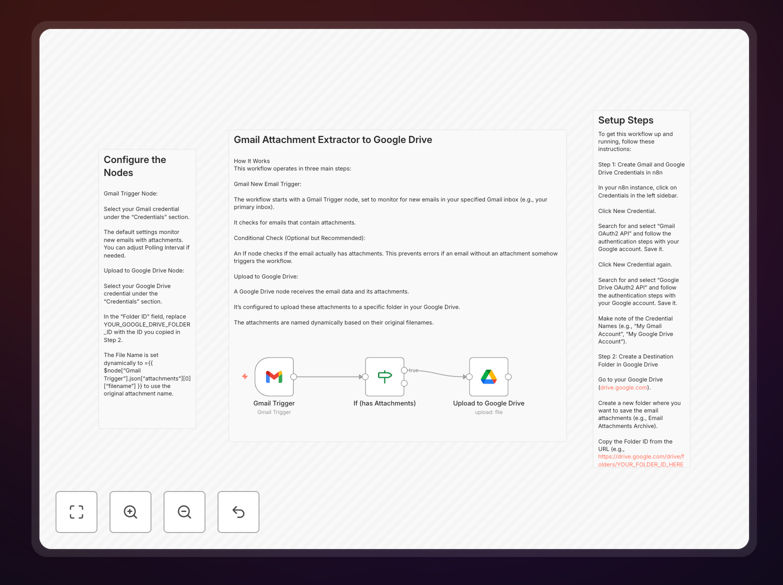
How It Works
The automation follows a logical three-step process that mimics what a human would do, but with perfect consistency and speed.
Step 1: Gmail Trigger & Filter
The workflow starts with a Gmail trigger node that polls your inbox at regular intervals. It's configured to detect only new emails that contain attachments, ignoring newsletters and text-only messages. This filtering happens at the API level, making the process efficient.
Step 2: Conditional Validation
An "If" node performs a safety check to confirm attachments are actually present before proceeding. This prevents errors if an email somehow triggers without files. It's a simple but crucial quality control step that ensures reliability.
Step 3: Google Drive Upload
The validated attachments are passed to a Google Drive node, which uploads them to your specified folder. The files retain their original names and metadata. You can configure the folder structure—for example, creating subfolders by date, sender, or file type.
Who This Is For
This template delivers immediate value to several business roles and scenarios. Freelancers and consultants who receive project files and invoices from multiple clients can automatically organize them without manual sorting. Small business owners can ensure all financial documents (receipts, invoices, tax forms) are systematically archived for accounting purposes.
Administrative and support teams handling customer documents, forms, or support tickets with attachments will eliminate the repetitive download-and-file routine. Remote teams sharing files via email can maintain a centralized, searchable repository in Google Drive that everyone can access with appropriate permissions.
Even individual professionals managing personal documents—like travel receipts, insurance paperwork, or family photos—will appreciate the automatic organization. The common thread is anyone who receives more than a handful of important attachments per week.
What You'll Need
- A running n8n instance – either self-hosted or via n8n.cloud
- Gmail account with access to the inbox you want to monitor
- Google Drive account with storage space for saved attachments
- OAuth credentials configured in n8n for both Gmail and Google Drive APIs
- Destination folder created in Google Drive (optional but recommended)
Pro tip: Create separate Google Drive folders for different types of attachments (e.g., "Invoices," "Client Contracts," "Reports") and modify the workflow to route files based on sender or subject keywords for even better organization.
Quick Setup Guide
Getting this automation running takes about 10 minutes if you have your credentials ready.
- Download and import the JSON template file into your n8n instance.
- Create credentials in n8n for Gmail OAuth2 API and Google Drive OAuth2 API, following the authentication prompts with your Google account.
- Update the workflow nodes to use your newly created credentials.
- Configure the Google Drive node with your destination folder ID (found in the folder's URL).
- Test the workflow by sending yourself an email with a test attachment and activating the workflow.
- Toggle to active once testing confirms files are saving correctly.
Key Benefits
Eliminate manual filing time completely. What typically takes 5-10 minutes per day of downloading, renaming, and moving files now happens automatically. Over a year, that's 30-60 hours recovered per employee for more valuable work.
Never lose important attachments again. Emails get buried, deleted accidentally, or lost during inbox cleanup. This workflow creates a permanent, searchable archive in Google Drive where files are safe and easily retrievable.
Improve compliance and audit readiness. Financial documents, contracts, and compliance materials are systematically organized with timestamps. This creates a clear paper trail that simplifies audits, tax preparation, and legal reviews.
Enable team collaboration on received files. Once in Google Drive, attachments can be shared with team members, commented on, or processed through other workflows. It breaks files out of individual email silos.
Scale effortlessly with volume increases. Whether you receive 5 attachments or 500 per day, the automation handles them all with identical reliability. There's no fatigue factor or quality degradation as volume grows.