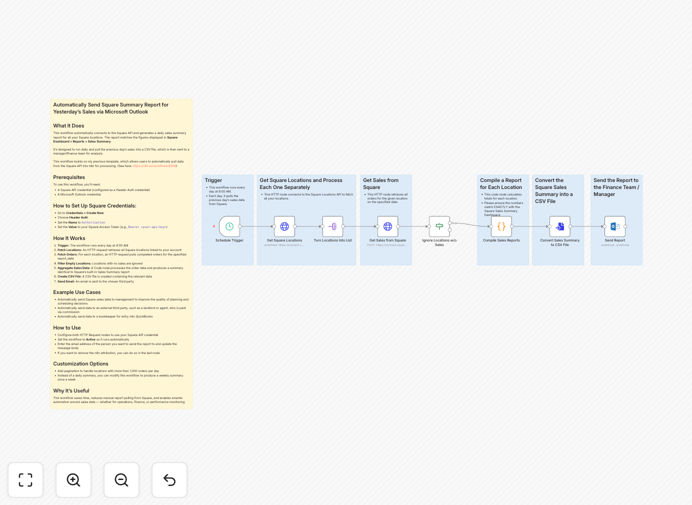
What This Workflow Does
Manual sales reporting is a time-consuming task that pulls retail managers, restaurant owners, and service providers away from revenue-generating activities. This automation solves that problem by connecting your Square point-of-sale system directly to Microsoft Outlook, creating a hands-free daily reporting system.
The workflow automatically extracts yesterday's sales data from all your Square locations, processes it into a professional summary matching Square's built-in reports, and emails it to designated recipients every morning. This ensures management, finance teams, or external stakeholders receive accurate sales insights without manual intervention.
How It Works
1. Daily Trigger & Data Collection
The workflow activates automatically each morning, connecting to the Square API to retrieve all business locations and their completed orders from the previous day. It handles authentication securely and processes multiple locations simultaneously.
2. Data Processing & Aggregation
Sales data from each location is aggregated using a custom code node that replicates Square's official Sales Summary report format. The system calculates totals, averages, and key metrics while filtering out locations with zero sales activity.
3. Report Generation & Delivery
Processed data is converted into a clean CSV file attachment, then sent via Microsoft Outlook to your specified recipients. The email includes a formatted summary and the detailed data file for further analysis in spreadsheets or accounting software.
Who This Is For
This automation is ideal for retail store owners, restaurant managers, service businesses, and multi-location operators using Square for payments. It's particularly valuable for businesses that need to share sales data with managers who aren't directly accessing Square Dashboard, or for companies requiring daily sales reports for commission calculations, financial planning, or performance tracking.
What You'll Need
- Square API credentials with access to your sales data (configured as Header Auth)
- Microsoft Outlook account with sending permissions
- n8n instance (cloud or self-hosted) to run the workflow
- Recipient email addresses for report distribution
Quick Setup Guide
- Download the template and import it into your n8n workspace
- Configure Square API credentials using Header Auth with your access token
- Set up Microsoft Outlook credentials in n8n
- Update the email recipient and customize the message body as needed
- Activate the workflow and test with a manual trigger
- Schedule it to run daily at your preferred time (default: 4:00 AM)
Pro tip: Start by testing the workflow manually during business hours to verify data accuracy before enabling the daily schedule. This ensures your reports match what you see in Square Dashboard.
Key Benefits
Save 2-3 hours weekly by eliminating manual data extraction, calculation, and email preparation. This time can be redirected to customer service, staff training, or business development activities.
Ensure consistent reporting with error-free data delivered at the same time every day, even when you're busy with operations or away from the business.
Improve decision-making with timely access to sales performance data, enabling faster responses to trends and better resource allocation.
Reduce administrative overhead for managers and finance teams who no longer need to manually compile reports for analysis or commission calculations.
Create audit trails through automatically archived email reports that provide historical sales data accessible for accounting, tax preparation, or performance reviews.