Telegram OpenAI Whisper Google Sheets Google Drive AI Transcription

Automatically Transcribe Telegram Voice Messages with OpenAI Whisper & Google Workspace

Free n8n workflow template: Convert voice messages to searchable text instantly, save transcripts to Google Sheets, and backup audio to Google Drive automatically.

Download Template JSON · n8n compatible · Free
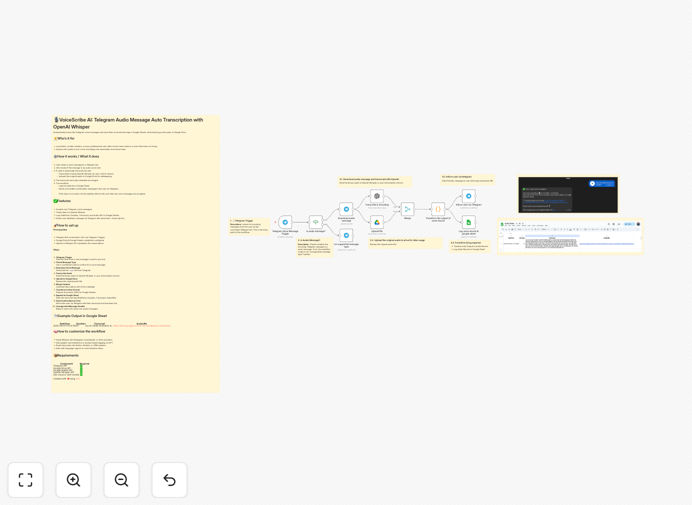
Telegram voice message transcription workflow diagram showing integration between Telegram, OpenAI Whisper, Google Sheets, and Google Drive

What This Workflow Does

For professionals who think on their feet—journalists, content creators, consultants, and busy executives—voice messages are a quick way to capture ideas, interviews, and notes. But turning those audio snippets into usable, searchable text has always been a manual, time-consuming process. This automation solves that problem completely.

The workflow automatically converts Telegram voice messages into transcribed text using OpenAI's powerful Whisper AI, stores the transcripts in Google Sheets for easy searching and organization, and backs up the original audio files to Google Drive for safekeeping. What used to take minutes per message now happens instantly and automatically, creating a structured knowledge base from your voice notes.

How It Works

1. Voice Message Detection

When someone sends a voice message to your Telegram bot, the workflow immediately detects it and validates that it's an audio file. If it's not a voice message, the bot politely informs the user that only audio is accepted.

2. Audio Download & Transcription

The system downloads the .oga audio file from Telegram and sends it to OpenAI's Whisper API for transcription. Whisper converts the speech to text with impressive accuracy, even handling different accents and background noise well.

3. Storage & Organization

Once transcribed, the system uploads the original audio to a designated Google Drive folder for permanent backup. Simultaneously, it extracts key metadata—timestamp, duration, transcript text, and the Drive URL—and appends this as a new row in your Google Sheet.

4. User Notification

The workflow sends a confirmation message back to the user via Telegram, including their transcript and a download link to the audio file. This creates a complete feedback loop that keeps users informed.

Pro tip: You can easily modify this workflow to add speaker identification, automatic summarization using GPT, or routing transcripts to other systems like Notion or your CRM.

Who This Is For

This automation is perfect for content creators who record ideas on the go, journalists conducting remote interviews, consultants capturing client conversations, executives dictating meeting notes, or any professional who needs to convert spoken ideas into organized, searchable text. If you regularly send voice messages and later wish you had them in written form, this workflow eliminates that friction completely.

What You'll Need

  1. A Telegram bot token (free to create via BotFather)
  2. Google Workspace account with Sheets and Drive API access
  3. OpenAI API key with access to Whisper transcription
  4. n8n instance (cloud or self-hosted)
  5. A Google Sheet prepared with columns for Date, Duration, Transcript, and Audio URL

Quick Setup Guide

1. Import the template into your n8n instance using the downloaded JSON file.

2. Configure credentials for Telegram, Google Sheets, Google Drive, and OpenAI in n8n's credential management.

3. Update node settings with your specific Telegram bot token, Google Sheet ID, and Drive folder path.

4. Test the workflow by sending a voice message to your Telegram bot and verifying the transcript appears in your Google Sheet.

5. Activate the workflow and start capturing voice notes automatically.

Pro tip: Start with a test Google Sheet and a small Telegram group before rolling out to your entire team. This lets you verify everything works perfectly before scaling.

Key Benefits

Save 5-10 hours weekly on manual transcription work. What takes 4-5 minutes per minute of audio manually happens instantly with automation.

Create searchable knowledge bases from voice conversations. Suddenly, all those interview insights and brainstorming sessions become findable and referenceable.

Improve content creation workflow by turning spoken ideas directly into written content. Podcasters, writers, and creators can capture inspiration anywhere and have it ready for editing.

Enhance client service with accurate records of conversations. Consultants and agencies can provide transcripts alongside meeting summaries for complete transparency.

Scale without adding administrative work as your team grows. The system handles any volume of voice messages without additional effort.

Frequently Asked Questions

Common questions about voice message transcription automation and integration

The most efficient way is to use an automation platform like n8n that connects your messaging apps (like Telegram) with AI transcription services (like OpenAI Whisper) and storage systems (like Google Sheets and Drive). This creates a seamless pipeline where voice messages are automatically converted to searchable text and organized without manual intervention.

Unlike standalone transcription apps, this integrated approach keeps everything within your existing workflow. The transcription happens in real-time, the data stays in your controlled environment, and you can easily extend the automation to trigger other business processes based on the transcribed content.

Modern AI transcription services like OpenAI Whisper achieve over 95% accuracy for clear audio in common languages. For business voice notes, this accuracy is sufficient for creating searchable archives, meeting minutes, and content outlines. The key advantage is speed—transcription happens instantly versus hours of manual work.

Accuracy can be improved by ensuring good recording quality and using services that allow custom vocabulary training. For critical legal or medical transcripts, human review is still recommended, but for most business purposes, AI transcription provides excellent results at a fraction of the cost and time.

Yes, automated transcription is excellent for client interviews and meetings. The workflow can be modified to include speaker identification, timestamping, and automatic summarization. This creates a complete record that's searchable and shareable, saving hours of manual note-taking while ensuring no important details are missed.

Always obtain consent before recording conversations, and consider adding a step that automatically redacts sensitive information. The transcripts can then feed directly into your CRM, project management tools, or client reporting systems.

Security is crucial when transcribing business communications. Use reputable AI services with data privacy commitments, encrypt audio files during transfer, store transcripts in secure cloud storage with access controls, and implement data retention policies. Always inform participants when conversations are being recorded and transcribed.

For highly sensitive information, consider using on-premise transcription solutions or adding a manual review step before storage. The automation can be configured to flag certain keywords for special handling or automatically apply access restrictions based on content.

Professionals who regularly record voice notes can save 5-10 hours weekly with automation. Manual transcription takes 4-5 minutes per minute of audio, while automated systems process instantly. This time savings allows focus on analysis and action rather than transcription, dramatically increasing productivity for content creators, journalists, and consultants.

The real value extends beyond time savings to better information utilization. When transcripts are instantly available and searchable, insights don't get lost, follow-up happens faster, and knowledge becomes institutional rather than individual.

Yes, modern AI transcription supports multiple languages and can be customized for specific vocabulary or accents. You can configure the workflow to detect language automatically or specify it based on the sender. This makes the system versatile for international teams or multilingual content creation.

For specialized terminology (technical, medical, legal), you can train custom models or add post-processing steps that correct common transcription errors. The workflow can also route different languages to different storage locations or team members based on content.

Voice transcription can feed into numerous business processes: automatically create tasks from action items, generate meeting summaries for CRM entries, convert ideas into content calendars, extract insights for data analysis, or trigger follow-up workflows based on discussed topics. The transcribed text becomes structured data for endless automation possibilities.

For example, you could automatically create Trello cards when someone says "action item," send calendar invites when dates are mentioned, or update sales pipelines when deal progress is discussed. The transcription becomes the trigger for your entire workflow automation ecosystem.

Yes, GrowwStacks specializes in building custom voice transcription automations tailored to specific business needs. We can integrate with your existing tools, add custom processing logic, implement security protocols, and create dashboards for managing transcribed content. Our team handles everything from design to deployment and training.

We'll work with you to understand your unique workflow, identify integration points with your current systems, and build a solution that saves time while improving information accessibility. Whether you need multi-language support, specialized vocabulary handling, or complex post-processing, we can create the perfect automation for your requirements.

  • Integration with your existing CRM and project management tools
  • Custom security and compliance configurations
  • Training and ongoing support for your team

Need a Custom Voice Transcription Automation?

This free template is a starting point. Our team builds fully tailored automation systems for your specific business needs.