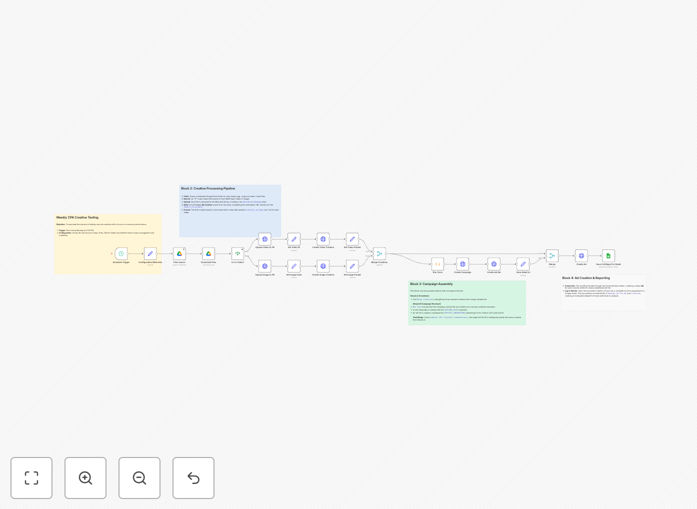
What This Workflow Does
This workflow solves the tedious, error-prone process of manually testing ad creatives on Meta Ads. Digital marketers, performance agencies, and e-commerce brands waste hours each week uploading assets, creating campaigns, and setting up tracking—only to struggle with inconsistent naming and incomplete performance data.
The automation creates a complete pipeline: from creative files in Google Drive to fully configured (but paused) ad campaigns in your Meta Ads account. It systematically processes images and videos, builds proper ad creatives with destination URLs, creates campaigns and ad sets with correct objectives, and logs every detail in Google Sheets for data-driven analysis.
Instead of manual setup, you get a repeatable, scalable system that maintains consistency, eliminates errors, and provides the audit trail needed to identify winning creatives faster.
How It Works
1. Configuration & Scheduling
The workflow runs on a weekly schedule (configurable). A central "Configuration" Set node stores your Meta Ad Account ID, Facebook Page ID, and Pixel ID—making adaptation for different projects simple.
2. Creative Ingestion & Processing
It scans a designated Google Drive folder for new image and video files. Using an IF node, it branches logic based on file type. Each file uploads to the Meta Ads library, and a corresponding Ad Creative builds with your predefined destination URL.
3. Campaign & Ad Set Assembly
The workflow creates a single new Campaign with an OUTCOME_SALES objective. It then creates a single Ad Set optimized for OFFSITE_CONVERSIONS (like "Add to Cart"), using your Pixel ID from configuration. A Merge node combines the Ad Set ID with every creative from the previous step.
4. Ad Creation & Data Logging
The workflow iterates through prepared data, creating a unique Ad for each creative. Upon successful creation, it appends a new row to Google Sheets, logging CampaignID, AdSetID, AdID, CreativeID, FileName, MimeType, and Timestamp—creating a complete performance audit trail.
Who This Is For
This workflow is ideal for digital marketing teams at e-commerce brands, performance marketing agencies, SaaS companies running user acquisition campaigns, and any business scaling their Meta Ads testing. If you're currently testing 5+ creatives weekly, managing multiple ad accounts, or struggling with manual setup errors, this automation will transform your process.
It's particularly valuable for teams wanting to implement systematic testing frameworks, maintain brand consistency across campaigns, and make data-driven decisions based on comprehensive performance logs rather than guesswork.
What You'll Need
- Meta Ads Account with admin access to your Ad Account ID, Facebook Page ID, and Pixel ID.
- Google Account with access to Google Drive (for creative assets) and Google Sheets (for performance logging).
- n8n instance (cloud or self-hosted) with credentials configured for Meta Ads and Google services.
- Google Drive folder organized for creative assets (images and videos).
- Google Sheet with columns: CampaignID, AdSetID, AdID, CreativeID, FileName, MimeType, Timestamp.
Quick Setup Guide
- Download and import the template JSON file into your n8n instance.
- Configure credentials for Meta Ads and Google services in n8n.
- Open the "Configuration" Set node and enter your specific Ad Account ID, Page ID, and Pixel ID.
- Update the Google Sheets node to point to your spreadsheet and sheet name.
- Verify URLs in the HTTP Request nodes reference your configuration variables correctly.
- Set your schedule in the Schedule Trigger node (weekly recommended).
- Save and activate the workflow. Test with a few creative files first.
Pro tip: Start with a small test folder in Google Drive containing 2-3 creatives. Verify the workflow creates paused campaigns correctly and logs data to your sheet before scaling to your full creative library.
Key Benefits
Save 10-15 hours weekly per team member by eliminating manual uploads, campaign creation, and spreadsheet logging. That's 40-60 hours monthly redirected to strategic work like creative development and budget optimization.
Systematically test 5-10x more creatives with the same resources. Automation handles the repetitive setup, allowing you to experiment with more variations, identify winning elements faster, and optimize ROAS based on actual data.
Eliminate naming inconsistencies and tracking errors that plague manual processes. Every campaign follows identical naming conventions, every ad set uses correct pixel tracking, and every creative has proper destination URLs.
Create comprehensive performance audit trails automatically logged in Google Sheets. Know exactly which creative (by file name) drove conversions through which ad set—enabling true data-driven decisions rather than guessing.
Scale your testing process seamlessly as your business grows. The same workflow handles 10 creatives or 100, maintaining consistency and logging while freeing your team from linear time increases.