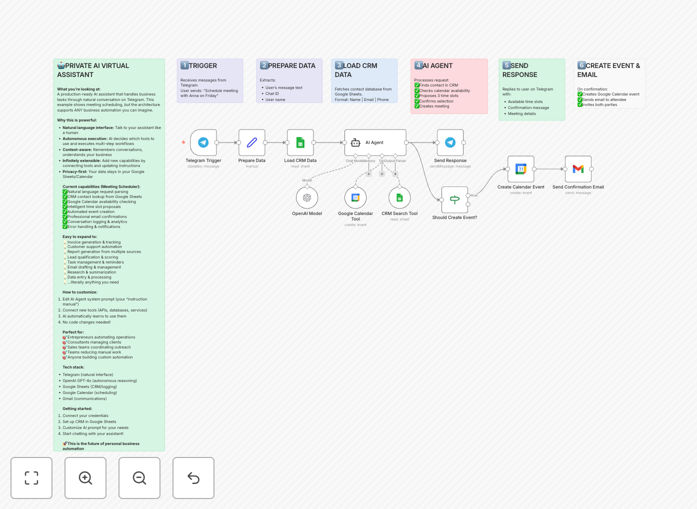
What This Workflow Does
This template solves the tedious, time-consuming process of scheduling meetings. Instead of endless email chains, calendar links, and back-and-forth to find a time, this automation lets anyone book a meeting through simple conversation on Telegram. A user sends a message like, "Schedule a meeting with Alex tomorrow at 2 PM." The AI assistant takes over: it finds Alex's contact details, checks both parties' Google Calendar availability, suggests available slots, and upon confirmation, creates the calendar event and sends a professional email—completely autonomously.
The business value is immense. For founders, sales teams, consultants, and agencies, it eliminates administrative drag. It turns what was a 5–10 minute manual task into a zero-touch process that happens in seconds, 24/7. Beyond scheduling, this template demonstrates a powerful pattern: building AI agents that can use real business tools (CRM, calendar, email) to execute complex multi-step tasks through natural language.
How It Works
The workflow is a sophisticated chain of decisions handled by an AI agent, not a rigid, linear script. Here’s the step-by-step process:
1. User Request via Telegram
A user messages your Telegram bot with a natural language request. The workflow captures the message content, chat ID, and user info.
2. AI Agent Analysis & Decision
The core of the system: an OpenAI GPT-4o-mini agent receives the user's request and a list of available "tools" (CRM search, calendar check, event creation). The AI autonomously decides which tools to use and in what order to complete the task.
3. CRM Contact Lookup
The AI uses the "Search CRM" tool, which queries a Google Sheet (or could be a database) to find the requested contact's name and email address.
4. Calendar Availability Check
The AI uses the "Check Calendar" tool to query Google Calendar for free slots within a specified time range (default is business hours 9 AM–4 PM). It finds three available options.
5. Proposal to User & Confirmation
The AI formats a friendly response with the three time options and sends it back to the user on Telegram. The user replies with their choice (e.g., "Option 2").
6. Event Creation & Notification
Upon confirmation, the AI uses the "Create Calendar Event" tool to add the meeting to Google Calendar with both parties invited. It then triggers a "Send Confirmation Email" tool via Gmail to notify the attendee professionally.
Who This Is For
This automation is ideal for any business or professional who schedules meetings regularly and wants to reclaim lost time.
- Founders & Executives: Streamline meeting bookings with investors, partners, and team leads without an assistant.
- Sales & Business Development Teams: Let prospects book discovery calls instantly via a simple link to your Telegram bot, reducing friction and speeding up the sales cycle.
- Consultants, Coaches & Freelancers: Offer a seamless booking experience to clients, available around the clock, projecting professionalism and efficiency.
- Agencies: Manage client onboarding and check-in meetings without the internal coordination overhead.
- IT & Operations Teams: Implement this as a internal tool for employees to schedule resources, book rooms, or set up support calls.
What You'll Need
- A Telegram Bot Token: Created for free via BotFather on Telegram.
- OpenAI API Account: With access to GPT-4o-mini (cost-effective for this use case).
- Google Cloud Project with OAuth2 Credentials: Enabled for Google Sheets (CRM), Google Calendar, and Gmail.
- A Google Sheet: Set up as a simple CRM with columns for Name, Email, and other contact details.
- An n8n Instance: Either self-hosted or using n8n.cloud to import and run the workflow.
Pro tip: Start with a test Google Sheet and a personal calendar. Use the free tiers of OpenAI and n8n.cloud to prototype without any upfront cost. Once the workflow is validated, scale it to your team's main calendar and CRM.
Quick Setup Guide
You can have this automation running in under 30 minutes by following these steps:
- Download & Import: Click the "Download Template" button above to get the JSON file. In your n8n instance, go to Workflows → Import from File and select the downloaded JSON.
- Configure Credentials: In the n8n workflow, set up credentials for Telegram Bot, OpenAI, Google Sheets, Google Calendar, and Gmail. n8n will guide you through the OAuth2 process for Google services.
- Update Resource IDs: In the "Google Sheets" node, replace the placeholder Spreadsheet ID with the ID of your actual CRM Google Sheet. In the "Google Calendar" nodes, ensure the correct Calendar ID is set (usually your primary email).
- Customize the AI Agent Prompt: Review the system prompt in the "AI Agent" node. You can adjust the assistant's tone, timezone assumptions, and business hour preferences to match your needs.
- Activate & Test: Turn the workflow ON. Send a test message to your Telegram bot: "Schedule a meeting with [Name from your Sheet] next Monday at 11 AM." Watch the magic happen.
Key Benefits
Eliminates 5–10 minutes of administrative work per meeting. This adds up to hours per week for busy professionals, time that can be redirected to high-value strategic work or business growth.
Provides a 24/7 booking interface for clients and prospects. Never miss a booking opportunity due to time zones or after-hours requests. The AI assistant is always on, improving customer experience and response times.
Reduces scheduling errors and double-bookings. By directly interfacing with Google Calendar, the automation ensures real-time availability checks, eliminating the human error of overlooking existing appointments.
Creates a centralized, auditable record. Every scheduled meeting is automatically created in your calendar and can be logged back to your CRM, ensuring data consistency and making follow-up and reporting effortless.
Demonstrates a scalable pattern for any AI agent. This template is a blueprint. The same architecture—AI + tools + natural language interface—can be adapted to automate customer support, invoice generation, data entry, or report generation, multiplying its value across your business.