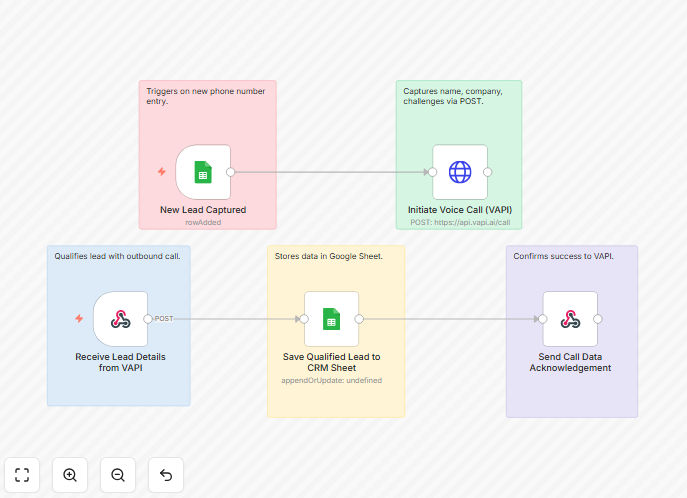
What This Workflow Does
Manual B2B lead qualification is time-consuming and inconsistent. Sales representatives spend hours calling leads, asking the same qualification questions, and manually logging responses in spreadsheets or CRMs. This process delays follow-up with hot leads and creates data entry bottlenecks.
This automated workflow solves that problem by using VAPI's AI voice API to conduct initial qualification calls automatically. When a new lead's phone number is added to your system, the workflow initiates a conversational AI call that asks predefined qualification questions about the lead's needs, budget, timeline, and challenges. The structured responses are then automatically logged to a Google Sheet, creating a searchable database of qualified leads ready for sales team follow-up.
The system operates 24/7, ensures consistent questioning across all leads, and provides immediate response to inbound inquiries—significantly increasing engagement rates compared to manual follow-up that might take hours or days.
How It Works
Step 1: Lead Detection
The workflow monitors for new lead phone numbers from your lead source—this could be a web form submission, CRM update, or spreadsheet addition. When a new number is detected, it triggers the qualification process.
Step 2: AI Voice Qualification
Using the VAPI API, the system initiates an outbound call to the lead. The AI agent follows a predefined conversation script asking key qualification questions: "What challenges are you trying to solve?", "What's your timeline for a solution?", "What's your approximate budget range?", and "Who's involved in the decision-making process?"
Step 3: Response Processing
The AI transcribes and analyzes the lead's responses, extracting structured data points. The system categorizes responses, identifies buying signals, and calculates a preliminary qualification score based on your business criteria.
Step 4: Data Logging
All collected information—lead name, company, challenges, budget indication, timeline, and qualification score—is automatically appended to a Google Sheet. The sheet serves as a centralized qualification database that your sales team can access in real-time.
Step 5: Notification & Follow-up
Highly qualified leads (based on your scoring thresholds) can trigger immediate notifications to your sales team via Slack, email, or your CRM, ensuring prompt follow-up on the hottest opportunities.
Who This Is For
This automation is ideal for B2B companies with consistent lead inflow that need to scale their qualification process. Specifically:
SaaS companies receiving 50+ demo requests monthly who want to pre-qualify leads before scheduling sales calls. B2B service agencies (marketing, consulting, development) that need to assess client fit before proposal work. Inside sales teams managing high volumes of inbound leads who want to prioritize their calling efforts. Startups with limited sales resources that need to maximize efficiency from small teams. Companies with complex sales cycles requiring multiple qualification criteria before engaging sales reps.
What You'll Need
- VAPI API account - For AI voice call capabilities (sign up at vapi.ai)
- Google Sheets access - A Google account with Sheets API enabled
- Lead source integration - Connection to your lead source (webhook, CRM, or form)
- n8n instance - Self-hosted n8n or n8n.cloud account
- Qualification criteria - Clear definition of what makes a lead "qualified" for your business
Pro tip: Start with a simple qualification script focusing on 3-4 key questions (budget, authority, need, timeline). You can expand complexity once the basic workflow is running smoothly. Test with team phone numbers first to refine the conversation flow.
Quick Setup Guide
- Import the template - Download the JSON file above and import it into your n8n instance.
- Configure VAPI credentials - Add your VAPI API key to the HTTP Request node using credential fields (never hardcode).
- Set up Google Sheets - Create a new Sheet with columns for Name, Company, Phone, Challenges, Budget, Timeline, and Qualification Score. Authorize n8n to access it.
- Connect your lead source - Modify the trigger to match how you receive new lead phone numbers (webhook, CRM webhook, or scheduled check).
- Customize the conversation - Adjust the VAPI call script in the workflow to match your specific qualification questions.
- Test with a known number - Run the workflow with a team member's phone number to verify the call flows and data logging work correctly.
- Go live - Once testing is successful, activate the workflow to start qualifying incoming leads automatically.
Key Benefits
Save 10-15 hours per week per sales rep by eliminating manual qualification calls. That's 40-60 hours monthly that can be redirected to closing deals rather than screening leads.
Improve lead response time from hours to minutes, increasing engagement rates by 3-5x. Leads contacted within 5 minutes are 21x more likely to convert than those contacted in 30 minutes.
Ensure consistent qualification criteria across all leads, eliminating human bias and variation in questioning. Every lead gets asked the same questions in the same way.
Create searchable qualification database in Google Sheets that your entire team can access. Filter and sort leads by budget, timeline, or qualification score to prioritize follow-up.
Scale qualification without hiring additional SDRs. The AI handles initial screening 24/7, allowing your existing team to focus on higher-value conversations.