Instagram Google Drive n8n Video Backup Metadata

Back up Instagram videos to Google Drive with JSON metadata catalog

Automatically preserve your Instagram video content with full metadata in a searchable format

Download Template JSON · n8n compatible · Free
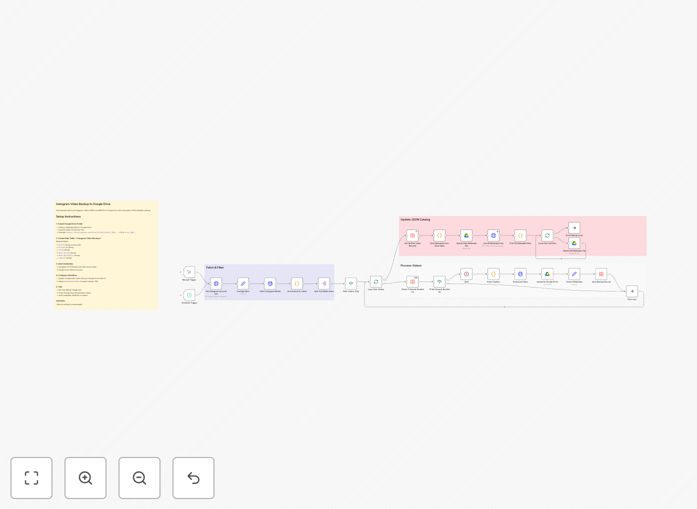
Instagram video backup workflow diagram showing Google Drive integration

What This Workflow Does

This n8n workflow solves the critical problem of content preservation for Instagram creators and marketers. Instagram provides no reliable backup solution, leaving valuable video content vulnerable to platform changes, account issues, or accidental deletion. The automation securely copies all your Instagram videos to Google Drive while creating a detailed JSON catalog of metadata.

Beyond simple backup, the workflow transforms your video library into a searchable asset. Each video is saved with its original metadata including captions, hashtags, engagement metrics, and timestamps. This creates business continuity protection while enabling advanced content management capabilities outside Instagram's ecosystem.

How It Works

1. Instagram API Connection

The workflow authenticates with your Instagram account through the API, ensuring secure access without storing login credentials. It checks for new videos since the last backup cycle, respecting Instagram's rate limits.

2. Video Download & Processing

Each video is downloaded at original quality and temporarily stored for processing. The system verifies file integrity before proceeding to the next steps, preventing corrupted backups.

3. Metadata Extraction

The workflow extracts all available post data including captions, hashtags, timestamps, comments count, and engagement metrics. This data is structured into a standardized JSON format for consistency.

4. Google Drive Upload

Videos are uploaded to your specified Google Drive folder with proper naming conventions. The system creates subfolders by date for organization and maintains version control of updated files.

5. JSON Catalog Creation

A master JSON file is updated with all metadata, creating a searchable index of your video content. This file can be imported into databases, spreadsheets, or custom applications for analysis.

Pro tip: Schedule this workflow to run daily during low-traffic hours to avoid Instagram API rate limits while ensuring no content gaps.

Who This Is For

This solution is ideal for Instagram creators, marketing agencies, and businesses that rely on video content. Content creators benefit from preserving their work portfolio. Social media managers maintain client content archives. E-commerce brands protect product videos and tutorials. Anyone needing to comply with content retention policies will find this invaluable.

What You'll Need

  1. An n8n instance (cloud or self-hosted)
  2. Instagram professional account with API access
  3. Google Drive account with sufficient storage
  4. Basic understanding of JSON data structure

Quick Setup Guide

  1. Download the template file and import it into your n8n workspace
  2. Configure Instagram API credentials in the first node
  3. Set up Google Drive authentication in the upload nodes
  4. Specify your target folder structure in Google Drive
  5. Test with a small batch of videos before full automation
  6. Schedule the workflow according to your posting frequency

Key Benefits

Content Protection: Never lose valuable Instagram videos due to platform changes or account issues. Your content remains accessible even if Instagram access is disrupted.

Searchable Archive: The JSON metadata catalog lets you quickly find videos by date, hashtag, or keyword without scrolling through Instagram's interface.

Business Continuity: Maintain access to marketing assets and historical content regardless of Instagram's platform status or policy changes.

Content Repurposing: Easily locate top-performing videos for reuse in other marketing channels or compile highlight reels from your archive.

Data Ownership: Take control of your content data rather than relying solely on Instagram's analytics and storage systems.

Frequently Asked Questions

Common questions about Instagram video backup and Google Drive integration

Backing up Instagram videos to Google Drive protects your content from accidental deletion or account issues while providing searchable metadata. Instagram doesn't offer reliable long-term storage, and videos can disappear if accounts get hacked or disabled. Google Drive offers secure cloud storage with version history and easy sharing options.

The JSON metadata catalog makes your content searchable by date, hashtags, or captions. Marketing teams use this to analyze performance trends or repurpose evergreen content. The backup serves as an independent archive separate from Instagram's ecosystem.

  • Protects against Instagram account suspension
  • Enables content analysis outside Instagram
  • Simplifies compliance with data retention policies

The workflow saves comprehensive metadata including post captions, hashtags, timestamps, engagement metrics (likes/comments), and video details. This creates a searchable database of your video content that's separate from Instagram's platform. You can later filter videos by date range, specific hashtags, or performance metrics.

The JSON format makes this data easily parseable for reporting or content repurposing. For businesses, this means being able to track campaign performance over time or identify your most effective content themes. The structured data can feed into custom dashboards or analytics tools.

  • Includes both post details and engagement metrics
  • Standardized format for easy analysis
  • Enables custom reporting beyond Instagram Insights

The workflow can be scheduled to run daily, weekly, or on-demand based on your needs. For active accounts, we recommend daily backups to capture all new content. The automation checks your Instagram account for new videos since the last backup, ensuring no duplicates. You can also trigger manual backups before making major account changes.

n8n's scheduling features let you set optimal run times to avoid API rate limits. The workflow includes error handling to retry failed downloads and resume interrupted processes. For agencies managing multiple accounts, the schedule can be staggered across clients.

  • Daily recommended for active accounts
  • Manual triggers available for special cases
  • Smart detection of new content only

Yes, that's one of the key benefits. Since videos and metadata are stored independently in your Google Drive, you retain access even if Instagram suspends your account. This is crucial for businesses using Instagram for marketing. The backups include original video files at full quality, not compressed versions.

You can quickly repost content or migrate to another platform if needed. The metadata helps reconstruct your posting history and performance data. For legal or compliance purposes, having timestamped proof of your content can be invaluable during account disputes.

  • Full access regardless of Instagram status
  • Original quality video preservation
  • Timestamps verify content ownership

The JSON catalog transforms your video library into a searchable database. You can quickly find videos by date, hashtag, or keyword without scrolling through Instagram. Marketing teams use this to repurpose top-performing content or analyze trends. Developers can build custom interfaces on top of the JSON data.

The structured format also simplifies compliance with data retention policies. You can generate reports showing when specific content was posted and how it performed. For content calendars and strategic planning, having all historical data in one place enables better decision-making.

  • Enables advanced search capabilities
  • Supports custom reporting and analysis
  • Future-proofs your content archive

The workflow can be configured to backfill your existing Instagram videos during initial setup. We recommend processing your last 6-12 months of content initially, then maintaining ongoing backups. For large accounts, the automation handles batch processing to avoid API limits. All historical videos get the same metadata treatment as new posts.

You can prioritize specific time periods or content types for initial backup. The system tracks progress to prevent duplicate processing. For accounts with thousands of videos, we suggest staggering the historical backup over several days.

  • Comprehensive backfill options available
  • Progress tracking prevents duplicates
  • Batch processing for large archives

Absolutely! GrowwStacks specializes in custom Instagram automation solutions. We can build workflows with additional features like automatic transcriptions, thumbnail generation, or integration with your CMS. Our team handles complex requirements like multi-account management, compliance logging, and enterprise security.

For agencies and brands, we create tailored solutions that fit into existing martech stacks. This might include Slack notifications for new backups, integration with digital asset management systems, or custom reporting dashboards. We ensure the solution scales with your content volume and team workflows.

  • Multi-account management solutions
  • Enterprise-grade security options
  • Integration with existing tools

Need a Custom Instagram Backup Solution?

This free template is a starting point. Our team builds fully tailored automation systems for your specific needs.