What This Workflow Does
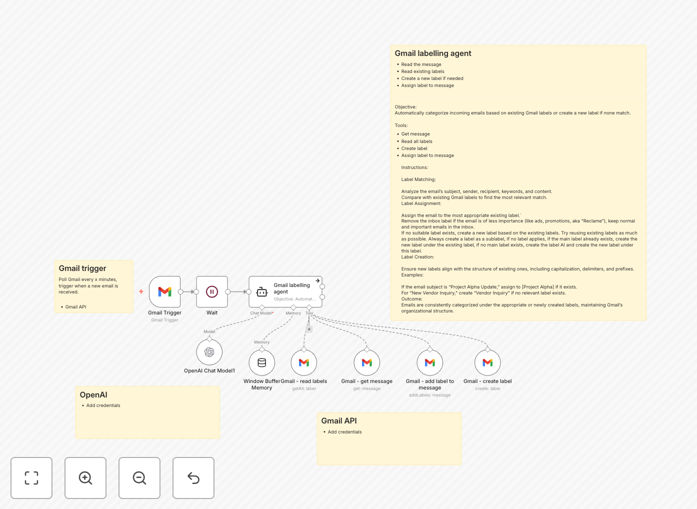
This automation solves the time-consuming problem of manually organizing emails by automatically applying smart labels to incoming Gmail messages using AI. The workflow connects your Gmail account to OpenAI's language model to analyze email content and intelligently categorize each message.
By automating email labeling, you'll spend less time sorting messages and more time responding to what matters. The system works continuously in the background, applying consistent categorization rules to all incoming emails based on their content, sender, and context.
How It Works
1. Email Retrieval
The workflow periodically checks your Gmail inbox via the Gmail API for new, unlabeled messages. It retrieves the email subject, sender, and body content while maintaining security and privacy.
2. AI Analysis
Each email's content is sent to OpenAI's API where the language model analyzes the text and determines the most appropriate category based on your predefined label structure.
3. Label Application
The workflow then applies the determined label to the email in Gmail. You can configure it to skip labeling if confidence is below a certain threshold or apply multiple labels when appropriate.
4. Logging & Error Handling
All actions are logged for review, and the workflow includes error handling to manage API limits, connectivity issues, or unexpected email formats.
Who This Is For
This workflow benefits professionals and teams who receive high volumes of emails requiring categorization. Ideal users include:
- Customer support teams needing to triage inquiries
- Sales professionals organizing leads and follow-ups
- Executives managing communications across departments
- Freelancers separating client work from administrative emails
What You'll Need
- A Gmail account with API access enabled
- An OpenAI API key with available credits
- An n8n instance (cloud or self-hosted)
- Basic understanding of Gmail labels
Quick Setup Guide
- Download the JSON workflow file
- Import it into your n8n instance
- Configure your Gmail and OpenAI API credentials
- Define your desired label categories in the workflow
- Set your preferred checking frequency
- Test with sample emails and adjust as needed
Key Benefits
Save 1-2 hours per week by eliminating manual email sorting while maintaining an organized inbox.
Improve response times to important messages with automatic prioritization through labeling.
Reduce email stress with consistent categorization that follows your business rules.
Gain insights into your email patterns through the automated labeling system.