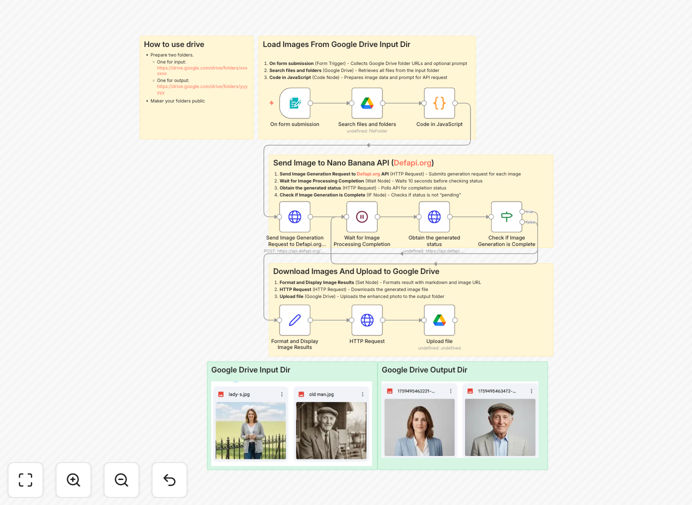
What This Workflow Does
This n8n workflow solves the time-consuming challenge of manually processing employee or customer photos for official ID badges, directories, and compliance documentation. HR departments, schools, and organizations often receive inconsistent photos that need standardized formatting, background removal, lighting adjustments, and facial alignment to meet professional requirements.
The automation connects Google Drive with the Nano Banana API (powered by Gemini AI) to batch-process uploaded photos into polished ID portraits. It handles everything from file conversion to AI-powered enhancement, delivering ready-to-use images that meet institutional standards without manual editing.
How It Works
1. File collection from Google Drive
The workflow monitors a designated Google Drive folder for new photo uploads. It automatically detects image files regardless of original format or quality.
2. Batch processing initiation
When new files appear, the workflow groups them for batch processing. This allows handling dozens or hundreds of photos simultaneously rather than individually.
3. AI enhancement via Nano Banana API
Each photo gets processed through Gemini AI's image enhancement capabilities. The AI automatically adjusts lighting, removes blemishes, aligns facial features, and applies professional background treatments.
4. Format standardization
The enhanced images get converted to uniform dimensions, file formats, and naming conventions suitable for your ID system requirements.
5. Delivery to output folder
Finished photos move to a designated output folder in Google Drive, ready for integration with your HR systems or badge printing software.
Who This Is For
This workflow delivers the most value for organizations that regularly process large volumes of ID photos:
- HR departments onboarding new employees
- Universities creating student IDs
- Healthcare facilities issuing staff badges
- Government agencies processing official documents
- Event organizers producing attendee credentials
Pro tip: Combine this with a simple photo upload form (like Google Forms) to let employees/subjects submit their own photos while ensuring professional results.
What You'll Need
- An n8n instance (cloud or self-hosted)
- Google Drive account with API access
- Nano Banana API key (Gemini AI access)
- Designated input/output folders in Google Drive
- Basic understanding of n8n workflow imports
Quick Setup Guide
- Download the JSON template file
- Import into your n8n instance
- Configure Google Drive node with your folder IDs
- Add your Nano Banana API credentials
- Test with sample photos in your input folder
- Activate the workflow for continuous processing
Key Benefits
Save 90% of photo editing time by automating what would otherwise require manual Photoshop work for each image. Process hundreds of photos in the time it would take to manually edit one.
Ensure consistent professional quality across all ID photos, eliminating variability from different photographers, lighting conditions, or mobile cameras.
Reduce HR administrative workload by removing the need to coach employees on photo requirements or reject submissions that don't meet standards.
Scale effortlessly during peak periods like onboarding seasons or event registrations when photo volume spikes dramatically.
Maintain compliance automatically with institutional requirements for ID photos regarding dimensions, backgrounds, and facial visibility.