What This Workflow Does
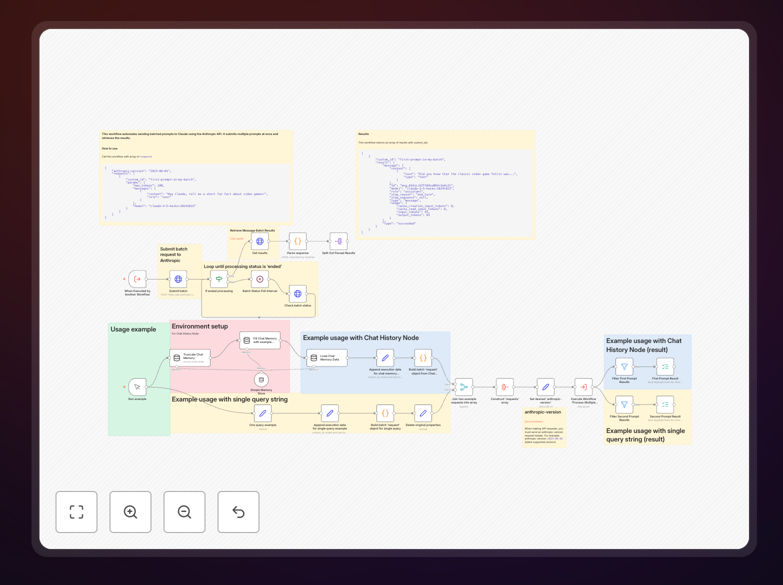
This workflow solves the inefficiency of sending AI prompts one by one. Instead of making hundreds of individual API calls to Anthropic's Claude models, you can process multiple prompts in a single batch request. The template handles the entire batch process: submitting prompts, polling for completion, retrieving results, and outputting each response as a separate item for further processing.
Businesses dealing with large-scale content generation, data analysis, or customer support automation can reduce processing time by 70-90% while cutting API costs through optimized token usage. Whether you're generating product descriptions, analyzing customer feedback, or creating marketing content, this workflow transforms how you interact with AI at scale.
How It Works
1. Input Preparation
The workflow expects properly formatted prompt data including the Anthropic API version and an array of request objects. Each request contains the prompt text, model parameters, and configuration settings required by Claude's batch API endpoint.
2. Batch Submission
All prepared prompts are sent in a single POST request to Anthropic's /v1/messages/batches endpoint. This creates a batch job that processes all prompts simultaneously on Anthropic's servers, rather than sequentially.
3. Status Polling
The workflow automatically checks the batch job status at regular intervals. It waits for the processing to complete before proceeding, handling the asynchronous nature of batch operations without manual intervention.
4. Results Retrieval
Once processing is complete, the workflow fetches the results file from the provided URL. Results are typically returned in JSON Lines format containing all individual responses.
5. Output Processing
The workflow parses the batch results and splits them into individual items, making each AI response available for downstream processing, saving to databases, or integration with other business systems.
Pro tip: For maximum efficiency, batch similar types of prompts together. Grouping prompts with comparable complexity and length ensures more consistent processing times and better resource utilization.
Who This Is For
This template is ideal for content teams needing to generate hundreds of product descriptions or blog posts, research organizations processing large datasets with AI analysis, marketing agencies creating personalized content at scale, e-commerce businesses automating catalog updates, and customer support teams generating response templates. Developers and data scientists working with AI at scale will find this workflow eliminates the bottleneck of sequential API calls.
What You'll Need
- An active n8n instance (cloud or self-hosted)
- Anthropic API account with Claude access and batch API permissions
- Valid Anthropic API key with sufficient credits
- Basic understanding of JSON data structures for prompt formatting
- Source data or system to generate the prompts you want to process
Quick Setup Guide
- Import the template JSON file into your n8n instance
- Create Anthropic API credentials in n8n with your API key
- Assign the credentials to the three HTTP Request nodes in the workflow
- Review the input format requirements in the workflow notes
- Activate the workflow so it can be called by other workflows
- Create a separate workflow to prepare your prompts and trigger this batch processor
- Test with a small batch before scaling to production volumes
Important: Always check Anthropic's current batch API limits and pricing. Batches can contain up to 100,000 requests but have total size restrictions. Monitor your token usage through Anthropic's dashboard.
Key Benefits
Dramatic time savings: Process hundreds of prompts in minutes instead of hours by eliminating sequential API call overhead and connection establishment delays.
Cost efficiency: Reduce API costs through optimized token usage and consolidated requests. Batch processing often qualifies for better rate limits and pricing tiers compared to individual calls.
Scalability: Handle increasing volumes without redesigning your automation. The batch approach scales linearly with your needs, from dozens to thousands of daily prompts.
Reliability: Built-in error handling and retry logic ensures completion even with temporary API issues. The workflow manages the entire batch lifecycle automatically.
Integration ready: Outputs are formatted for immediate use in other systems. Each result is a separate item that can be saved to databases, sent to CRMs, or processed by other automation steps.