Bitrix24 Webhooks Project Management n8n Automation

Bitrix24 Task Form Widget & Webhook Integration

Extend Bitrix24 tasks with custom widgets that display relevant information and enable seamless interaction through webhook-powered automation.

Download Template JSON · n8n compatible · Free
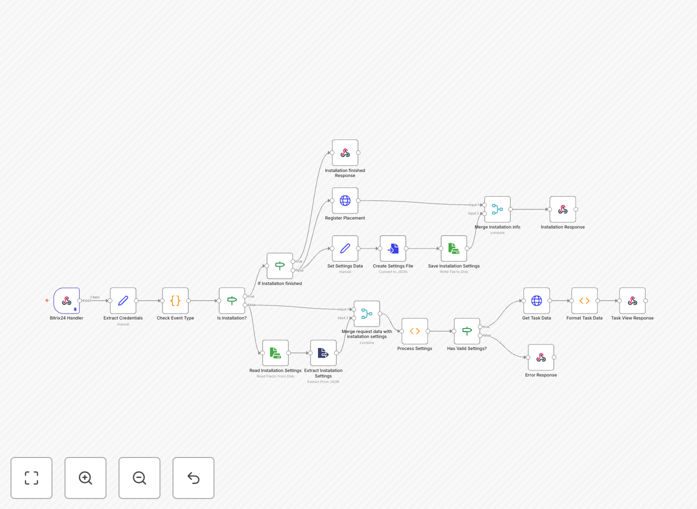
Bitrix24 task widget automation workflow diagram showing webhook integration and custom interface

What This Workflow Does

This automation template solves a common business challenge: Bitrix24's native task interface often lacks the specific data displays and interactive elements teams need for efficient project management. Teams waste time switching between tabs, copying data manually, and missing real-time updates.

The workflow creates custom task widgets that embed directly into Bitrix24 task forms, displaying relevant information like customer details, project timelines, approval statuses, or external system data. It processes incoming webhook requests from Bitrix24, validates authentication securely, manages application installation, and serves customized HTML interfaces that transform how teams interact with tasks.

Beyond simple display, this automation enables two-way interaction. Users can trigger actions directly from the widget—approving requests, updating statuses, or fetching additional data—creating a seamless experience that keeps work flowing without leaving Bitrix24.

How It Works

The workflow acts as a middleware layer between Bitrix24 and your custom business logic, handling authentication, data processing, and interface delivery.

1. Webhook Reception & Validation

Bitrix24 sends task events (creation, updates, status changes) to your configured webhook endpoint. The workflow first validates the incoming request using secure token authentication, ensuring only authorized Bitrix24 instances can trigger your automation.

2. Task Data Processing

Once authenticated, the workflow extracts relevant task information—assignee, due dates, custom fields, related entities—and enriches it with data from connected systems. This might include pulling customer records from your CRM, fetching project budgets from accounting software, or retrieving document statuses from cloud storage.

3. Custom Widget Generation

The processed data feeds into HTML template nodes that generate responsive, branded widget interfaces. These widgets display information in easily digestible formats: progress bars for timelines, color-coded status indicators, interactive buttons for common actions, and real-time data visualizations relevant to the specific task type.

4. Placement Registration & Serving

The workflow manages the technical registration of your widget within Bitrix24's application framework, ensuring it appears in the correct task contexts. When users open tasks, Bitrix24 calls your endpoint, and the workflow serves the appropriate widget interface based on task parameters, user roles, and business rules.

5. User Interaction Handling

When users interact with widget elements (clicking approve buttons, requesting more information, updating fields), those actions trigger follow-up webhooks back to your workflow. The automation processes these interactions, updates connected systems accordingly, and refreshes the widget display—all without page reloads or manual data entry.

Who This Is For

This template is ideal for businesses already using Bitrix24 for project management but needing more specialized task interfaces. Project managers who spend hours manually compiling task status reports will save significant time. Development teams building client portals can embed customer-specific data directly into tasks. Operations managers overseeing approval workflows can create interactive checklists that reduce follow-up emails by 70%.

Marketing agencies managing client deliverables, software teams tracking bug resolution, consulting firms monitoring milestone completion, and any organization using Bitrix24 with complementary systems (CRM, accounting, document management) will benefit. If your team currently uses multiple tabs, spreadsheets, or manual updates alongside Bitrix24 tasks, this automation creates a unified interface that eliminates context switching.

What You'll Need

  1. Bitrix24 account with administrator access to configure webhooks and custom applications
  2. n8n instance (cloud or self-hosted) to run the workflow
  3. Webhook endpoint accessible from Bitrix24 (public URL for n8n webhook trigger)
  4. Authentication tokens from Bitrix24 for secure API communication
  5. Basic understanding

Quick Setup Guide

Import this template and configure it in under 30 minutes:

  1. Download and import the JSON template into your n8n instance
  2. Configure Bitrix24 webhook in your Bitrix24 settings pointing to your n8n webhook URL
  3. Set authentication credentials in the workflow using your Bitrix24 access tokens
  4. Customize HTML templates to match your branding and display requirements
  5. Test with sample tasks to verify widget displays correctly
  6. Deploy the application within Bitrix24 and register the task placement
  7. Monitor initial usage and gather team feedback for iterative improvements

Pro tip: Start with a simple widget displaying just 2-3 key data points. Once users adopt it, gradually add more features based on actual usage patterns rather than assumptions.

Key Benefits

80% reduction in manual data lookup time by displaying relevant information directly within tasks. Team members no longer need to search through multiple systems or request updates from colleagues.

Real-time task status visibility for stakeholders without requiring status meetings or update emails. Project dashboards update automatically as tasks progress through the workflow.

Consistent data across platforms as the automation synchronizes information between Bitrix24 and connected systems. Changes in one system automatically reflect in others, eliminating version conflicts.

Custom business logic implementation beyond Bitrix24's native capabilities. You can build approval chains that involve external systems, conditional notifications based on complex rules, or automated document generation tied to task milestones.

Scalable team adoption with intuitive interfaces that require minimal training. The widget approach feels native to Bitrix24 users while providing powerful extended functionality.

Frequently Asked Questions

Common questions about Bitrix24 automation and integration

A Bitrix24 task widget is a custom interface element you can embed within task forms to display additional data, trigger actions, or integrate external tools. Businesses use them to show relevant customer information, project timelines, approval statuses, or external system data directly inside tasks, eliminating tab-switching and manual lookups.

For example, a support team could see customer purchase history while handling a ticket, or a project manager could view budget utilization alongside task details. This context enrichment reduces errors and accelerates resolution times by keeping all relevant information in one place.

Webhooks allow Bitrix24 to send real-time data to external systems when events occur, like task creation or status changes. This enables automated workflows that sync tasks with other apps, send notifications, update dashboards, or trigger processes in other software without manual intervention, creating a connected business ecosystem.

Unlike polling APIs that check for changes periodically, webhooks provide instant notification. When a task status changes in Bitrix24, your n8n workflow immediately receives the update and can trigger corresponding actions in Slack, update a Google Sheet, create a follow-up task in Asana, or send an SMS alert—all within seconds.

Automating Bitrix24 task workflows reduces manual data entry by 60-80%, ensures data consistency across platforms, accelerates project timelines through instant notifications, provides stakeholders with real-time task insights, and enables custom business logic beyond Bitrix24's native capabilities, especially for complex approval chains or multi-system integrations.

Beyond efficiency gains, automation creates audit trails for compliance, standardizes processes across teams, and reduces human error in repetitive tasks. It also frees team members from administrative work, allowing them to focus on higher-value activities that require human judgment and creativity.

Yes, this n8n template uses visual workflow building with pre-configured nodes for Bitrix24 webhooks, HTTP requests, and data processing. You mainly need to configure your Bitrix24 webhook endpoints and authentication tokens. The template handles the complex logic, allowing business users to implement custom task widgets through configuration rather than coding.

The visual interface shows data flowing between nodes, making it easy to understand and modify. You can adjust field mappings, change display templates, and add conditional logic using dropdown menus and form inputs rather than writing code. Technical support is available for complex customizations.

You can connect Bitrix24 tasks to CRM systems like Salesforce or HubSpot, project tools like Jira or Asana, communication platforms like Slack or Teams, databases like PostgreSQL or MySQL, document systems like Google Drive or SharePoint, and any API-enabled software. This creates unified workflows where task updates automatically sync across your entire tech stack.

Common integration patterns include: syncing task deadlines with calendar apps, creating support tickets from task comments, updating accounting software with billable hours logged in tasks, triggering document generation when tasks reach specific milestones, and notifying stakeholders in preferred channels based on task priority or type.

The template includes secure token validation, encrypted data transmission via HTTPS, and proper authentication handling. You implement access controls within Bitrix24's webhook settings, validate incoming requests, and can add additional security layers like IP whitelisting. When properly configured, it maintains enterprise-grade security while enabling cross-system automation.

Best practices include using unique tokens per integration, regularly rotating credentials, validating payload signatures, implementing rate limiting to prevent abuse, and logging all integration activity for audit purposes. The workflow can be deployed within your private network for additional security if needed.

Minimal maintenance is needed once configured. Monitor webhook delivery logs for failures, update authentication tokens when rotated, and occasionally review workflow performance. The n8n platform provides monitoring dashboards, error notifications, and version control for workflows. Most maintenance involves updating connections if external APIs change or adding new data fields as business needs evolve.

Regular health checks include verifying webhook delivery rates, testing widget responsiveness after Bitrix24 updates, and ensuring data mappings remain accurate as task structures change. Plan for quarterly reviews of automation performance and user feedback collection to identify improvement opportunities.

Yes, GrowwStacks specializes in building custom Bitrix24 automations tailored to specific business processes. Our team analyzes your current workflows, designs integrated solutions connecting Bitrix24 with your other systems, implements secure webhook integrations, and provides ongoing support.

We've built custom task management systems, approval workflows, data synchronization pipelines, and real-time dashboard integrations for clients across industries. Our approach starts with understanding your unique business requirements, then designing automation that solves your specific pain points while remaining maintainable and scalable as your needs evolve.

  • End-to-end implementation from discovery to deployment
  • Integration with your existing software ecosystem
  • Training and documentation for your team
  • Ongoing support and optimization services

Need a Custom Bitrix24 Automation?

This free template is a starting point. Our team builds fully tailored automation systems for your specific business needs.