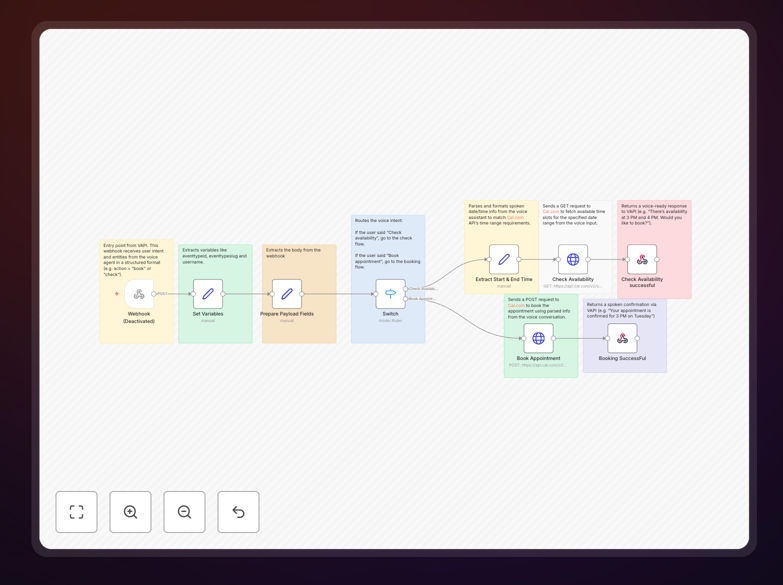
What This Workflow Does
This automation solves the universal business problem of phone-based appointment scheduling. Instead of staff answering calls, taking messages, and playing phone tag, this system lets customers book appointments through natural voice conversation with an AI assistant.
The workflow connects VAPI (voice AI platform) with Cal.com (scheduling software) through n8n. When a customer calls or speaks to your voice agent, the AI understands whether they want to check availability or book an appointment. It then fetches real-time availability from your calendar or creates a new booking—all through a conversational interface that feels human.
For service businesses like clinics, salons, consultancies, or repair services, this means capturing appointments 24/7 without increasing staff workload. It eliminates missed calls, reduces administrative time by 5–10 hours weekly, and provides a modern customer experience that converts more inquiries into booked revenue.
How It Works
The automation follows a logical conversation flow that mimics how a human receptionist would handle a booking request.
1. Voice Input & Intent Detection
A customer calls your published phone number or interacts with your voice AI widget. VAPI transcribes their speech and detects their intent—whether they're asking "What times are available?" or "I'd like to book an appointment for next Tuesday."
2. Webhook Trigger & Data Processing
VAPI sends the conversation data to n8n via a webhook. The workflow extracts key information: customer name, preferred date/time, service type, and contact details. It cleans and structures this data for the next steps.
3. Calendar Integration & Logic Branching
Based on the detected intent, the workflow branches. If the user wants availability, it queries Cal.com's API for open slots. If they want to book, it validates the requested time against actual availability.
4. Appointment Creation & Confirmation
For booking requests, the workflow creates a new event in Cal.com with all details. It generates a confirmation message with date, time, and any preparation instructions, then sends this back to VAPI for voice delivery to the customer.
5. Follow-up & Data Sync
After successful booking, the workflow can trigger additional actions: send SMS/email confirmations, add the contact to your CRM, schedule reminder messages, or notify your team via Slack.
Pro tip: Start with simple booking scenarios (single service, standard duration) before adding complexity like multiple team members, different service types, or custom booking rules. This keeps the conversation flow manageable during initial testing.
Who This Is For
This automation delivers the most value to service-based businesses that handle frequent appointment requests by phone:
Healthcare providers: Medical clinics, dental offices, therapy practices, and wellness centers can reduce front-desk burden while maintaining HIPAA-compliant scheduling.
Professional services: Consultants, coaches, financial advisors, and legal professionals can capture qualified leads outside business hours and appear more responsive.
Beauty & personal care: Salons, spas, barbershops, and fitness studios can minimize no-shows with automated confirmations and fill last-minute cancellations faster.
Home services: HVAC, plumbing, electrical, and repair businesses can schedule service calls immediately when customers call, reducing callback delays and missed opportunities.
Education & training: Tutors, instructors, and training providers can let students book sessions based on real-time availability without administrative back-and-forth.
What You'll Need
- VAPI account: Sign up for VAPI to create your voice AI agent. You'll need at least the Starter plan to connect external webhooks.
- Cal.com account: A Cal.com account with API access. The free tier works for testing; paid plans offer more events and team features.
- n8n instance: Either n8n.cloud (simplest) or self-hosted n8n. The workflow uses common nodes included in all installations.
- Phone number or voice widget: Either a dedicated phone number through VAPI/Twilio or a website voice widget where customers can initiate conversations.
- Calendar setup: Your Cal.com calendar configured with your availability, services, meeting durations, and buffer times.
Quick Setup Guide
Follow these steps to implement this voice scheduling system in under an hour:
- Download and import: Download the template file and import it into your n8n instance via the "Import from File" option.
- Configure webhook: Copy the webhook URL from n8n's Webhook node and paste it into your VAPI agent's webhook settings.
- Add Cal.com credentials: Create a new HTTP Header Auth credential in n8n with your Cal.com API key (found in Cal.com Settings → API).
- Test with simulator: Use VAPI's conversation simulator to test basic phrases like "Can I book for tomorrow?" and "What's available next week?"
- Deploy phone number: Connect a phone number to your VAPI agent or embed the voice widget on your website.
- Monitor and refine: Review conversation logs to identify common misunderstandings and adjust your VAPI prompt or n8n logic accordingly.
Pro tip: Create a test calendar in Cal.com specifically for automation testing. This prevents real appointments from being affected while you fine-tune the system.
Key Benefits
24/7 appointment capture: Never miss a booking opportunity because your business is closed or staff are busy. The system handles calls at any hour, converting inquiries into revenue even while you sleep.
80% reduction in phone administration: Free your team from repetitive scheduling tasks. What used to take 10 minutes of back-and-forth now happens automatically in under 60 seconds.
Improved customer experience: Modern customers expect instant, self-service options. Voice booking feels futuristic yet familiar—like talking to a helpful assistant who never gets flustered or forgets details.
Reduced no-shows: Automated confirmations and reminders sent via the customer's preferred channel (voice, SMS, email) significantly decrease missed appointments, protecting your revenue.
Scalable growth: Handle 10x more booking inquiries without adding staff. The system scales effortlessly during promotional periods or seasonal peaks when call volumes spike.
Valuable conversation data: Every interaction generates transcripts and metadata you can analyze to understand customer preferences, common questions, and booking patterns.