What This Workflow Does
This automation solves the critical business problem of manual, time-consuming knowledge management and inconsistent support responses. Internal teams waste hours searching through documentation or answering repetitive questions, while customers receive varying information from different agents.
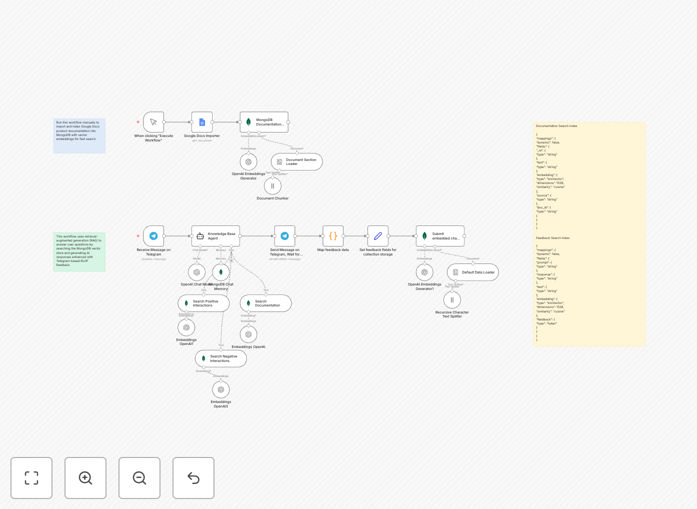
The workflow creates an intelligent AI assistant that automatically imports your product documentation, makes it searchable through vector embeddings, and provides instant, accurate answers via Telegram. More importantly, it incorporates a reinforcement learning loop where user feedback (thumbs up/down) continuously trains the system to deliver better responses over time.
By combining Retrieval-Augmented Generation (RAG) with Reinforcement Learning from Human Feedback (RLHF), you get a support system that not only answers questions but actually learns and improves from every interaction—turning your static documentation into a dynamic, self-improving knowledge asset.
How It Works
1. Document Ingestion & Vector Indexing
The workflow begins by connecting to your Google Docs containing product documentation, manuals, or internal knowledge. It automatically splits documents into manageable chunks, generates embeddings using OpenAI's models, and stores them in MongoDB Atlas with vector search capabilities. This creates a semantic searchable knowledge base that understands context, not just keywords.
2. Telegram Chat Interface Setup
A Telegram bot is configured as the user-facing interface. When team members or customers ask questions in the chat, the workflow triggers automatically. The bot provides a familiar, accessible channel for support queries without requiring users to learn new platforms or interfaces.
3. Intelligent Response Generation
For each query, the system performs a vector similarity search against your indexed documentation to find the most relevant information. This context is then fed to OpenAI's GPT-4o-mini model along with the user's question, generating accurate, context-aware responses that reference your actual documentation rather than generic information.
4. Feedback Collection & Learning Loop
After each response, the bot asks for feedback (approve/disapprove). User ratings are captured alongside the conversation context and stored in a separate MongoDB collection. This feedback dataset becomes training material that helps the system prioritize high-quality responses for similar future queries, creating a continuous improvement cycle.
Pro tip: Start with a small, well-organized documentation set (like your top 10 support articles) to train the initial model effectively. As the feedback loop matures, gradually expand the knowledge base.
Who This Is For
This template is ideal for internal support teams, product specialists, and knowledge managers in SaaS companies, tech startups, and enterprises with substantial documentation. Customer success teams handling repetitive queries, IT departments managing internal knowledge bases, and product teams needing to scale support without proportional headcount increases will benefit most.
Companies with existing documentation in Google Docs, Confluence, or similar platforms can quickly transform their static content into an interactive AI assistant. The solution particularly suits organizations where support quality consistency matters and where capturing user feedback to improve knowledge resources is a strategic priority.
What You'll Need
- n8n instance (cloud or self-hosted) with workflow execution permissions
- Telegram Bot Token from BotFather for the chat interface
- Google Docs access with documentation you want to index
- MongoDB Atlas account with vector search enabled (free tier available)
- OpenAI API key with GPT-4o-mini access for embeddings and generation
- Basic understanding of webhook configuration for Telegram bots
Quick Setup Guide
- Import the template into your n8n instance using the downloaded JSON file
- Configure credentials for Telegram, Google Docs, MongoDB Atlas, and OpenAI in n8n
- Set up MongoDB indexes using the provided search index templates for documentation and feedback collections
- Connect your Google Docs by adding the document URLs to the manual trigger node
- Test the ingestion workflow to ensure documents are properly chunked, embedded, and stored
- Configure the Telegram webhook to point to your n8n webhook URL for the chat workflow
- Customize the AI system prompt in the Knowledge Base Agent node to match your brand voice and requirements
- Deploy both workflows and start interacting with your bot via Telegram
Important: Ensure your MongoDB collections for documentation, feedback, and chat history are in the same database cluster. The vector search indexes must match the dimension configuration (1536 for OpenAI embeddings) and similarity metric (cosine) as specified in the template.
Key Benefits
Reduce support response time from hours to seconds while maintaining accuracy. The AI assistant provides immediate answers 24/7, freeing your team for complex issues that truly require human intervention.
Cut repetitive query handling by 40-60% through automated first-line support. Common questions about features, pricing, or troubleshooting get instant, consistent responses based on your actual documentation.
Transform static documentation into a learning asset that improves with every interaction. The RLHF loop captures tacit knowledge from your best support agents and incorporates it into future responses.
Scale support operations without linear headcount growth as your customer base expands. The system handles increasing query volumes with minimal additional cost, providing predictable support cost structures.
Gain insights into knowledge gaps through feedback analytics. Patterns in negative ratings highlight documentation deficiencies or common misunderstandings that need addressing in your core materials.