Facebook Messenger Google Gemini AI Chatbot Customer Service n8n

Build a Facebook Messenger AI Chatbot with Google Gemini

Automate customer service responses 24/7 with an intelligent AI chatbot that learns from conversations and provides instant support.

Download Template JSON · n8n compatible · Free
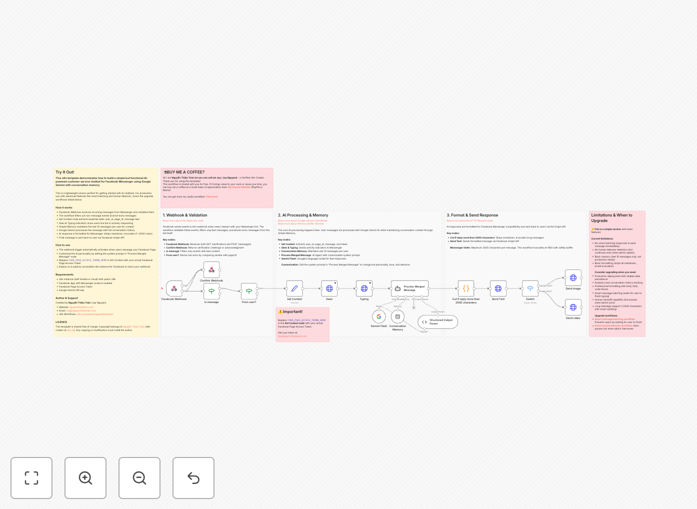
Visual diagram of a Facebook Messenger AI chatbot workflow integrating Google Gemini for automated customer service

What This Workflow Does

Customer service teams often struggle with responding to repetitive inquiries on social media platforms like Facebook Messenger. Manual responses consume hours each day, lead to inconsistent answers, and fail to provide 24/7 support. This creates frustrated customers and overloaded support staff.

This automation solves that by deploying an AI-powered chatbot directly within Facebook Messenger. It uses Google Gemini to understand customer messages, maintain conversation context, and generate intelligent, personalized responses instantly. The workflow automatically handles webhook verification, processes incoming messages, applies AI reasoning, and sends replies back through Facebook's API—all without human intervention.

The result is a scalable customer service channel that responds in seconds, handles common queries accurately, and frees your team to focus on complex issues that truly require human expertise.

How It Works

Step 1: Message Reception & Validation

When a customer sends a message via Facebook Messenger, Facebook triggers a webhook to your n8n instance. The workflow first validates this webhook to ensure it's a legitimate request, filtering out echo messages and non-text content.

Step 2: Context Extraction & User Feedback

The workflow extracts the user ID, message content, and authentication token. It then sends "seen" and "typing" indicators back to Facebook, providing immediate visual feedback to the customer that their message is being processed.

Step 3: AI Processing with Memory

The user's message is passed to a conversation memory node that maintains a 10-message history per user, ensuring the AI understands the context of the ongoing conversation. This memory is then combined with the new message and sent to Google Gemini AI.

Step 4: Response Generation & Formatting

Google Gemini analyzes the merged conversation context and generates a natural, helpful response based on predefined guidelines and your business knowledge. The response is then cleaned—removing markdown, truncating if excessively long—to ensure it's suitable for Messenger.

Step 5: Delivery via Facebook API

The formatted AI response is sent back through Facebook's Graph API as a reply to the original message, completing the automated support cycle.

Who This Is For

This workflow is ideal for businesses that receive significant customer inquiries through Facebook Messenger and want to improve response quality and speed. E-commerce stores, SaaS companies, service providers, and any organization with repetitive support queries will benefit most.

Marketing teams looking to engage customers instantly, support departments aiming to reduce ticket volume, and startups needing to provide professional support without a full-time team are perfect candidates. Even solo entrepreneurs can deploy this to handle customer questions while focusing on core business activities.

What You'll Need

  1. A Facebook App with Messenger product enabled (created via developers.facebook.com)
  2. A Facebook Page Access Token for authentication
  3. A publicly accessible n8n instance (cloud or self-hosted) to receive webhooks
  4. Google Gemini API credentials (available through Google AI Studio)
  5. Basic understanding of Facebook webhook configuration

Quick Setup Guide

1. Import the downloaded JSON template into your n8n workspace.

2. Update the "Set Context" node with your Facebook Page Access Token.

3. Configure the Google Gemini node with your API credentials.

4. Deploy the workflow to make it publicly accessible for webhooks.

5. In your Facebook App settings, configure the webhook URL (your n8n public URL), verification token, and subscribe to "messages" and "messaging_postbacks" events.

6. Test by sending a message to your Facebook Page—the AI chatbot should respond automatically.

Pro tip: Before full deployment, test the chatbot with a limited audience using Facebook's "Test Users" feature. This allows you to refine AI responses and ensure accuracy without affecting all customers.

Key Benefits

Reduce response times from hours to seconds. Customers get immediate answers instead of waiting for human availability, dramatically improving satisfaction and engagement metrics.

Cut customer service costs by up to 70%. Automating repetitive queries reduces the need for large support teams, allowing you to reallocate resources to growth initiatives.

Provide 24/7 support without staffing night shifts. The AI chatbot handles inquiries anytime, ensuring global customers receive consistent support regardless of time zones.

Maintain consistent brand voice across all interactions. The AI can be trained on your specific tone, terminology, and policies, ensuring every response aligns with your brand identity.

Scale support capacity instantly during peak periods. During promotions or crises, the chatbot can handle increased volume without additional hiring or training.

Frequently Asked Questions

Common questions about AI chatbot automation and customer service integration

Automating customer service with an AI chatbot reduces response times from hours to seconds, handles repetitive queries 24/7, and frees up human agents for complex issues. It improves customer satisfaction while cutting operational costs significantly.

For example, an e-commerce store using an AI chatbot can automatically answer order status questions, provide shipping updates, and handle basic returns—all without staff intervention. This allows human agents to focus on escalated complaints or personalized service.

Integrating Facebook Messenger with AI like Gemini allows businesses to provide instant, intelligent responses within a platform customers already use daily. It combines conversational context with AI's ability to understand intent, delivering personalized support without human intervention.

This integration means customers don't need to switch channels for support—they get help right where they message you. The AI can reference previous conversations, understand nuanced questions, and provide accurate answers based on your business data.

An AI chatbot excels at handling FAQs, order status checks, basic troubleshooting, appointment scheduling, and product information requests. It can also escalate complex issues to human agents when predefined conditions are met, ensuring a seamless support experience.

Common effective uses include answering "Where is my order?", providing store hours, explaining return policies, and guiding users through simple setup processes. The chatbot can even suggest related products or services based on the conversation context.

Accuracy is ensured by training the AI on your specific knowledge base, setting clear response guidelines, and implementing fallback rules. Safety involves content filtering, monitoring outputs, and having a human review loop for sensitive topics.

Best practices include regularly updating the AI's training data, setting confidence thresholds for responses, and creating escalation triggers for topics like refunds or complaints. Continuous monitoring and feedback loops further refine accuracy over time.

Key metrics include response time, resolution rate, customer satisfaction score, conversation volume, escalation rate, and cost per interaction. Tracking these helps optimize the chatbot's performance and ROI.

For instance, monitoring escalation rates tells you when the chatbot needs better training, while cost per interaction shows the financial impact of automation. These metrics guide continuous improvement and resource allocation.

Yes, an AI chatbot can integrate with CRM systems to update customer records, with helpdesk software to create tickets, and with databases to fetch real-time information. This creates a seamless support ecosystem across your business tools.

Integration examples include updating a customer's support history in Salesforce after a chatbot interaction, creating a Zendesk ticket when escalation is needed, or checking inventory levels from your database before suggesting products.

A custom AI customer service automation typically takes 2-4 weeks from design to deployment. This includes integration configuration, AI training, testing, and rollout. Complex multi-channel systems may require additional time.

The timeline involves understanding your support workflows, configuring the AI model with your knowledge base, integrating with your platforms, and thorough testing before launch. Ongoing optimization continues after deployment.

Yes, GrowwStacks specializes in building custom Facebook Messenger AI chatbot automations tailored to your business needs. We handle integration, AI configuration, and deployment to ensure your chatbot aligns with your brand and support goals.

Our team works with you to understand your customer inquiries, train the AI on your specific content, integrate with your existing systems, and deploy a solution that scales with your business. We provide ongoing support and optimization as your needs evolve.

  • Tailored AI training using your FAQs and knowledge base
  • Integration with your CRM, helpdesk, or other business tools
  • Performance monitoring and regular optimization updates

Need a Custom Facebook Messenger AI Chatbot Automation?

This free template is a starting point. Our team builds fully tailored automation systems for your specific business needs.