What This Workflow Does
This template solves a common bottleneck for businesses and developers: the need to quickly create a functional backend API to connect services, prototype applications, or build internal tools. Traditionally, this requires weeks of coding, setting up servers, and managing infrastructure.
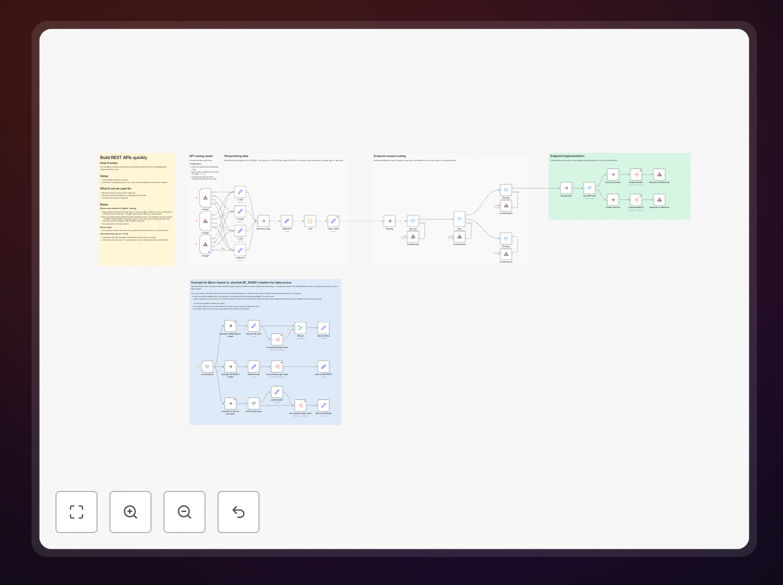
Our n8n workflow provides a clean, extensible REST-style API routing framework using webhooks. It accepts HTTP requests, routes them based on URL paths and methods (GET, POST, PUT, etc.), processes the data, and returns structured JSON responses—all within a visual, maintainable automation canvas. It turns n8n from an automation tool into a powerful API backend engine.
How It Works
The workflow is built on a modular, separation-of-concerns architecture, making it easy to understand, extend, and maintain.
1. Request Ingestion & Normalization
An n8n Webhook node acts as the entry point, listening for incoming HTTP requests. It captures all request details—headers, body, query parameters, and path variables—and passes them into the workflow.
2. Central Configuration & Request Context
Two dedicated "global" nodes are set up: a Code node for configuration (API keys, settings, constants) and a Function node that normalizes the incoming request into a standardized `_REQUEST` object. This ensures every part of your workflow has consistent access to the request data and global settings.
3. Intelligent Routing
Switch nodes examine the HTTP method (GET, POST) and up to three levels of the URL path (e.g., `/api/v1/users/123`). Based on this, the request is routed to the appropriate branch of logic—like fetching data, creating a record, or updating information.
4. Business Logic Execution
Each route branch contains the specific operations for that endpoint. This could involve querying a database (via a connected node), calling another API, processing data with a Code node, or performing calculations.
5. Structured Response
A final "Respond to Webhook" node sends back a properly formatted HTTP response with status codes (200, 404, 500), headers, and a JSON body, completing the API request cycle.
Who This Is For
This template is invaluable for several roles and scenarios:
Startup Founders & Product Managers: Rapidly prototype a mobile app backend or MVP without hiring a backend developer. Test ideas and gather user feedback with a working API in days.
Software Developers & Engineers: Build internal tools, admin panels, or glue code between microservices. Offload simple but critical endpoints to a maintainable, visual system, freeing up time for complex core development.
IT & Operations Teams: Create secure APIs to expose internal system data (like inventory, support tickets, or server metrics) to other departments or partner applications in a controlled way.
Automation Consultants & Agencies: Deliver custom integration solutions for clients who need to connect their CRM, e-commerce platform, or marketing tools with other systems via a reliable API layer.
What You'll Need
- A running n8n instance: You can use n8n.cloud or self-host n8n on your own server/VPS.
- Basic understanding of HTTP/REST concepts: Knowing what GET, POST, endpoints, and JSON are will help you customize the template.
- Your data sources or destinations: Decide what this API will connect to—a database (PostgreSQL, MySQL), a Google Sheet, an internal system, or another SaaS tool.
- A way to trigger the API: You'll need to call your webhook URL from another application, tool (like Postman), or frontend code.
Pro tip: Use this template as a "backend-for-frontend" (BFF) layer. Let n8n handle the complex integrations and data aggregation, then serve clean, simple JSON to your lightweight frontend application (built with React, Vue, or even a no-code tool).
Quick Setup Guide
Follow these steps to get your API live in under 30 minutes:
- Download & Import: Click the "Download Template" button above and save the JSON file. In your n8n instance, go to Workflows > Import from File and select the downloaded file.
- Activate the Webhook: Find the Webhook node in the imported workflow and click "Activate". Copy the unique URL it generates—this is your API's base endpoint (e.g., `https://your-n8n.com/webhook/abc123`).
- Configure Global Settings: Open the "Global Config" Code node. Here, you can set environment variables, API keys for external services, or default settings that all your routes will use.
- Define Your Routes: Examine the Switch nodes. Modify the rules to match your desired URL structure (e.g., `/api/products` for GET, `/api/orders` for POST). Add or remove route branches as needed.
- Connect Your Logic: For each route branch, replace the example nodes with your own logic. Connect database nodes, HTTP request nodes to other APIs, or Code nodes for custom processing.
- Test Your Endpoints: Use a tool like Postman or curl to send a GET request to your webhook URL with a path (e.g., `{your-webhook-url}/api/test`). You should receive a JSON response.
- Deploy & Secure: For production, ensure your n8n instance is secured (HTTPS, authentication). Consider adding an API key check in the first node of the workflow to validate incoming requests.
Key Benefits
From Weeks to Hours: Deploy a fully functional, multi-endpoint API in a single afternoon, bypassing weeks of server setup, framework decisions, and boilerplate coding.
Unmatched Integration Flexibility: Leverage n8n's 200+ native nodes to connect your API directly to databases, cloud services, internal systems, and AI models without writing a single line of integration code.
Visual Maintenance & Collaboration: The entire API logic is mapped out visually. Onboard team members quickly, debug issues by following the flow, and make changes without digging through thousands of lines of code.
Cost-Effective Scaling: Start for free on n8n.cloud or a low-cost VPS. The template is lightweight and can handle significant traffic. Scale your infrastructure as needed, without rewriting the application.
Future-Proof Foundation: This isn't a throwaway prototype. The structured, global-config pattern means you can build serious business logic on top of it, evolving the API into a core piece of your technology stack.