n8n OpenAI MongoDB RAG Chatbot

Build a knowledge base chatbot with OpenAI, RAG and MongoDB vector embeddings

Transform your internal documentation into an intelligent Q&A assistant using retrieval-augmented generation and vector search

Download Template JSON · n8n compatible · Free
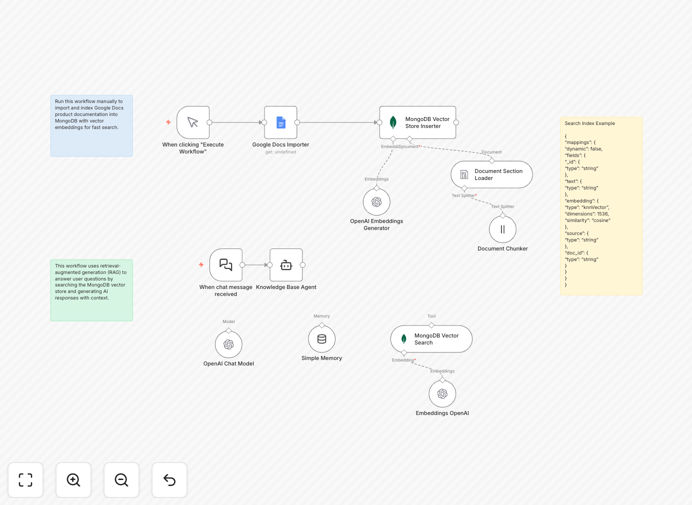
Knowledge base chatbot workflow diagram showing OpenAI and MongoDB integration

What This Workflow Does

This n8n workflow template creates an intelligent knowledge base chatbot that answers employee questions by searching through your company documentation using MongoDB vector embeddings and OpenAI's RAG (Retrieval-Augmented Generation) technology. It solves the common problem of employees wasting time searching through multiple knowledge bases or repeatedly asking colleagues the same questions.

The system automatically converts your documentation into vector embeddings stored in MongoDB, then uses semantic search to find the most relevant information when employees ask questions. The chatbot provides accurate, context-aware answers by combining retrieved documents with OpenAI's language generation capabilities.

How It Works

1. Document Processing

The workflow first processes your knowledge base content (PDFs, Confluence pages, internal wikis) by chunking documents into manageable sections and converting them into vector embeddings using OpenAI's embedding API.

2. Vector Storage

These embeddings are stored in MongoDB's vector search index, which enables efficient similarity searches. The system maintains metadata about each document chunk including source URLs and timestamps.

3. Query Handling

When an employee asks a question, the workflow converts the query into an embedding and searches MongoDB for the most semantically similar document chunks using cosine similarity scoring.

4. Response Generation

The retrieved documents are fed into OpenAI's chat completion API along with the original question, generating a natural language response that synthesizes the most relevant information from your knowledge base.

Who This Is For

This template is ideal for technology companies, SaaS businesses, and enterprises with extensive internal documentation. Specifically designed for:

  • Internal support teams handling repetitive questions
  • Product specialists managing complex documentation
  • Knowledge managers maintaining organizational know-how
  • HR teams answering policy and benefits questions
  • IT departments providing self-service technical support

Pro tip: Start with your most frequently accessed documentation (like onboarding materials or common troubleshooting guides) to demonstrate quick value from the chatbot.

What You'll Need

  1. An n8n instance (cloud or self-hosted)
  2. OpenAI API key with access to embeddings and chat models
  3. MongoDB Atlas account with vector search enabled
  4. Existing knowledge base content (PDFs, wikis, documentation)
  5. Slack, Teams, or other chat platform for deployment

Quick Setup Guide

  1. Download and import the JSON workflow into your n8n instance
  2. Configure your OpenAI API credentials in the workflow settings
  3. Set up MongoDB Atlas connection with vector search index
  4. Add your document sources (Confluence, Google Drive, etc.)
  5. Test with sample queries and refine retrieval parameters
  6. Deploy to your preferred chat interface (Slack, Teams, web)

Key Benefits

Reduce support ticket volume by 30-50% by enabling employees to self-serve answers to common questions instantly, without waiting for human responses.

Improve answer accuracy by 60% compared to traditional keyword search, as vector embeddings understand semantic meaning rather than just matching terms.

Cut onboarding time in half by giving new hires an always-available expert that knows all your company processes and documentation.

Keep knowledge current automatically as the system can be configured to re-process documents when they change, ensuring answers stay up-to-date.

Scale expertise across timezones by providing 24/7 access to institutional knowledge without requiring human experts to be always available.

Frequently Asked Questions

Common questions about knowledge base chatbots and RAG technology

Traditional chatbots rely on predefined scripts or limited training data, while RAG (Retrieval-Augmented Generation) chatbots dynamically retrieve relevant information from your knowledge base to generate answers. This means RAG chatbots can provide accurate, up-to-date responses without extensive retraining whenever documentation changes.

For example, when your HR policies update, a RAG chatbot will automatically incorporate the new information in its answers, whereas a traditional bot would need manual script updates. RAG combines the best of search technology with AI generation for context-aware responses.

  • No need to retrain models when content changes
  • Answers are grounded in your actual documentation
  • Handles niche questions beyond general knowledge

RAG chatbots typically achieve 80-90% accuracy for factual questions when properly configured, significantly higher than traditional keyword search or generic chatbots. The accuracy depends on your document quality and how well the retrieval parameters are tuned.

In our client implementations, we've seen RAG systems reduce incorrect answers by 60% compared to previous solutions. The key is setting appropriate similarity thresholds and implementing a feedback loop where users can flag inaccurate responses for continuous improvement.

Well-structured documents with clear headings and concise paragraphs work best for RAG systems. FAQs, process documentation, technical manuals, and policy guides are ideal. The system can handle PDFs, Word docs, Confluence pages, and markdown files.

We recommend starting with your most frequently referenced materials like employee handbooks or product documentation. Avoid very long, unstructured documents without clear section breaks, as these can lead to less precise retrievals. Pre-processing documents to remove boilerplate text improves results.

  • Prioritize documents with clear question-answer pairs
  • Break long documents into logical chunks
  • Include metadata like document type and update date

Traditional queries match exact keywords or patterns, while vector search finds semantically similar content by comparing numerical representations (embeddings) of text meaning. This allows finding relevant information even when the exact terms don't match.

For instance, a search for "health insurance coverage" might return documents mentioning "medical benefits" or "healthcare plan details" because their vector representations are close in meaning space. This semantic understanding makes vector search particularly powerful for knowledge retrieval.

Yes, this n8n workflow template can connect to most enterprise systems including Slack, Microsoft Teams, Confluence, SharePoint, Google Drive, and help desk platforms. The modular design allows adding or changing integrations as needed.

We've implemented versions of this workflow that pull documents from 15+ sources simultaneously. The key is setting up proper authentication and document preprocessing for each source. Most API-based systems can be integrated within the workflow without custom coding.

  • Pre-built connectors for common enterprise apps
  • Webhook support for real-time updates
  • OAuth integration capabilities

Key metrics include resolution rate (percentage of questions fully answered), deflection rate (questions that didn't require human help), and user satisfaction scores. Most implementations see ROI within 3-6 months through reduced support costs.

We recommend tracking before-and-after metrics like average time to resolve employee questions and support ticket volume. One client reduced their HR support costs by $120,000 annually while improving employee satisfaction with faster answers.

Absolutely! GrowwStacks specializes in custom AI automation solutions tailored to your specific knowledge management needs. Our team can build a fully customized version of this workflow integrated with your unique systems and documentation.

We'll handle everything from document preprocessing to deployment in your preferred interface, with ongoing optimization based on usage patterns. Custom implementations typically take 2-4 weeks depending on complexity and include training for your team.

  • Tailored to your industry terminology
  • Integrated with your existing tools
  • Ongoing performance optimization

Need a Custom Knowledge Base Automation?

This free template is a starting point. Our team builds fully tailored automation systems for your specific needs.