What This Workflow Does
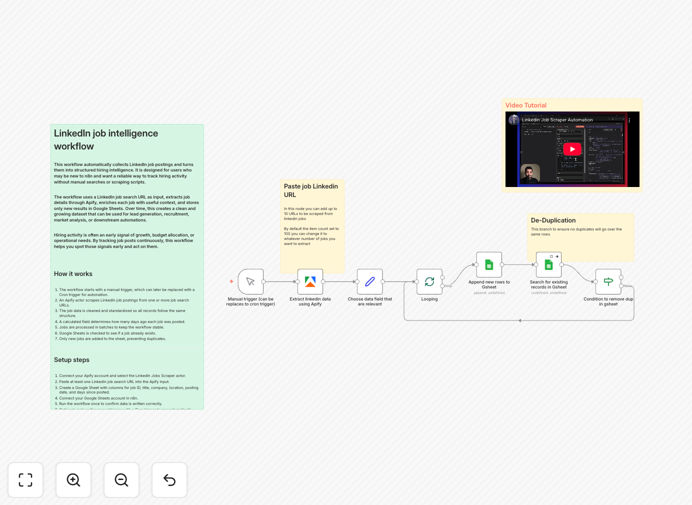
This automation transforms LinkedIn from a manual search platform into a real-time business intelligence system. It continuously scrapes job postings based on your criteria, enriches the data with time-based insights, removes duplicates, and stores everything in a structured Google Sheet for analysis, outreach, or decision-making.
Built for founders, sales teams, recruiters, and consultants, this workflow turns passive job listings into active hiring signals. Instead of guessing which companies are growing, you get data-driven evidence of expansion, budget allocation, and hiring urgency—often weeks before official announcements.
The system automatically calculates how many days ago each job was posted, ensuring you prioritize recent opportunities. Deduplication logic prevents repeated entries, maintaining clean historical datasets perfect for trend analysis or feeding into CRM systems and AI agents.
How It Works
1. LinkedIn Job Scraping with Apify
The workflow starts with the Apify LinkedIn Jobs Scraper actor. You configure search URLs for specific roles, locations, or keywords. The scraper extracts structured data including job titles, company names, locations, posting dates, and direct URLs—typically up to 100 jobs per run.
2. Data Enrichment & Standardization
Raw scraped data passes through a Set node that standardizes all fields. The workflow calculates "Days Since Posted" by comparing the posting date with the current runtime, giving you immediate insight into hiring urgency without manual date math.
3. Batch Processing for Stability
A Split In Batches node controls the flow to avoid API throttling and maintain stable execution. This becomes crucial when scaling to larger job volumes or running the automation frequently for continuous intelligence gathering.
4. Deduplication Against Historical Data
Before storing anything, the workflow checks your Google Sheet for existing job IDs. Only new, unique postings get added, ensuring your dataset remains clean and analysis-ready over months of automated collection.
5. Persistent Storage in Google Sheets
Validated records append to a centralized Google Sheet with columns for Job ID, Title, Company, Location, Posted Date, Days Since Posted, and direct URL. This becomes your searchable intelligence database accessible to your entire team.
Pro tip: Schedule this workflow to run daily or weekly using n8n's Cron trigger. This creates a living intelligence system that automatically updates your market view without any manual intervention.
Who This Is For
Sales & Business Development Teams: Target companies actively hiring roles related to your offerings. Hiring indicates budget availability and growth initiatives—perfect timing for outreach.
Recruiters & Staffing Agencies: Build live job pipelines without manual LinkedIn searches. Reduce sourcing time by 70-90% while maintaining comprehensive coverage of relevant opportunities.
Founders & Executives: Monitor competitor hiring velocity and market expansion signals. Detect which companies are scaling in your space before they become dominant threats.
Consultants & Agencies: Identify companies entering problem-aware or scaling phases. Align service offerings with real hiring pain points and budget allocation patterns.
Market Analysts & Investors: Use hiring data as a leading indicator for company growth or decline. Supplement traditional financial analysis with real-time operational signals.
What You'll Need
- Apify Account: Free tier available. You'll need to connect OAuth credentials and access the LinkedIn Jobs Scraper actor.
- Google Sheets: A target spreadsheet with columns for Job ID, URL, Title, Company, Location, Posted Date, and Days Since Posted.
- n8n Instance: Self-hosted or cloud version. The workflow uses core nodes plus the Apify integration.
- LinkedIn Search URLs: Up to 10 search URLs for roles, locations, or keywords you want to monitor.
- Basic Automation Understanding: Familiarity with connecting services in n8n, though the template handles the complex logic.
Quick Setup Guide
- Download and Import: Click the download button above to get the JSON file. Import it into your n8n instance via the workflow import feature.
- Configure Apify Connection: Create credentials for Apify in n8n using OAuth. Select the "LinkedIn Jobs Scraper" actor in the Apify node settings.
- Set Up Google Sheets: Create your target spreadsheet with the required columns. Connect your Google account in n8n and point the Google Sheets node to your sheet ID and range.
- Customize Search Parameters: In the Apify node, add your LinkedIn job search URLs. Adjust parameters like maximum results per run (default 100) based on your needs.
- Test and Schedule: Run the workflow manually to verify data flows correctly. Then replace the Manual Trigger node with a Cron trigger for automated daily or weekly execution.
Pro tip: Start with broad searches to understand market volume, then refine to specific roles or locations. The deduplication logic ensures you don't waste storage on repeated entries as you experiment.
Key Benefits
Turn hiring data into revenue intelligence. Companies actively hiring have allocated budget and growth plans—making them ideal prospects for your products or services. This workflow identifies these signals automatically.
Save 10+ hours weekly on manual research. Replace endless LinkedIn scrolling with automated intelligence gathering. What used to be a weekly research task becomes a continuously updated dataset.
Detect market trends before competitors. Hiring patterns often precede public announcements by weeks or months. Automated collection gives you early warning of industry shifts and emerging opportunities.
Build scalable lead generation systems. Connect this workflow to your CRM via additional n8n nodes to automatically create leads, tasks, or outreach sequences based on new hiring signals.
Create defensible business intelligence assets. Your historical job dataset becomes a proprietary asset that improves over time, revealing long-term hiring trends and company growth trajectories.