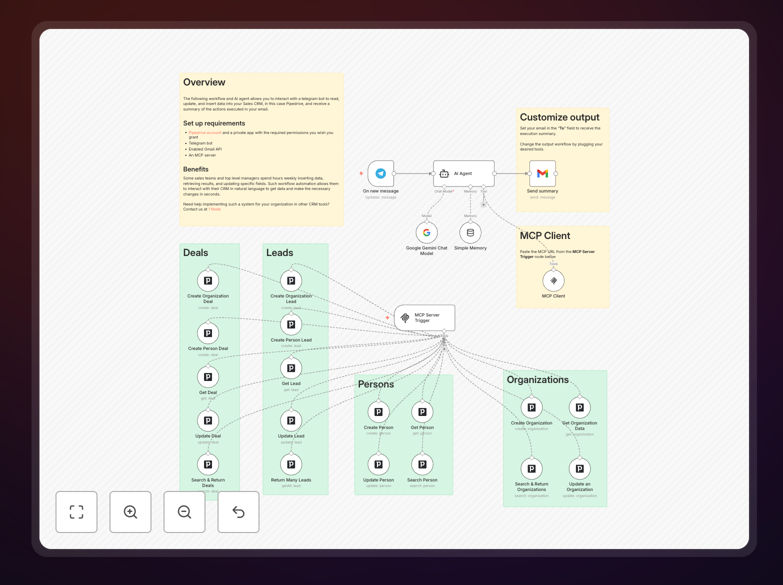
What This Workflow Does
This n8n workflow creates an AI-powered command center for your Pipedrive CRM using Google Gemini. It translates natural language requests into precise CRM actions, eliminating manual data entry and enabling voice/text-based CRM management. Sales teams can update deals, log activities, and manage pipelines using conversational commands instead of navigating multiple screens.
The system handles complex commands like "Move Acme Corp's $50K deal to negotiation stage and schedule follow-up for next Tuesday." It automatically identifies contacts, deals, and contextual details while executing the appropriate CRM actions with proper field mapping and data validation.
How It Works
1. Natural Language Processing
Google Gemini AI analyzes incoming text/voice commands, extracting entities (names, amounts, dates), intent (create/update/query), and contextual references to existing CRM data.
2. Command Validation
The workflow verifies extracted data against Pipedrive's schema, requesting clarification for ambiguous commands or missing required fields before execution.
3. CRM Action Execution
Validated commands trigger the appropriate Pipedrive API calls - updating deals, creating activities, modifying contacts, or generating reports - with all field mappings automatically handled.
Pro tip: Start with simple commands like deal updates before progressing to multi-action sequences. This helps the AI learn your team's communication patterns.
Who This Is For
This workflow benefits sales teams and CRM managers who:
- Spend excessive time on manual CRM data entry
- Need mobile-friendly CRM access without complex navigation
- Want to reduce training time for new sales reps
- Manage high-volume deal pipelines requiring frequent updates
What You'll Need
- Active Pipedrive account with API access
- Google Cloud project with Gemini API enabled
- n8n instance (cloud or self-hosted)
- Basic understanding of Pipedrive's data structure
Quick Setup Guide
- Download and import the JSON workflow into your n8n instance
- Configure Pipedrive OAuth credentials in the first node
- Add your Google Cloud API key to the Gemini node
- Test with sample commands in the debug panel
- Deploy as webhook or connect to your communication channels
Key Benefits
70% faster CRM updates: What took 5-7 clicks now happens with one voice command or text message.
Reduced training overhead: New reps interact naturally instead of learning complex CRM navigation.
Mobile-optimized workflow: Update your CRM from anywhere via text, voice, or messaging apps.
Data consistency: AI ensures proper field mapping and follows business rules automatically.