What This Workflow Does
This automation solves a critical problem for eCommerce businesses, distributors, and B2B companies: customers can't find accurate product information quickly, leading to abandoned carts and support overload. Manual product catalogs become outdated, and support teams waste hours answering repetitive questions about specifications, availability, and compatibility.
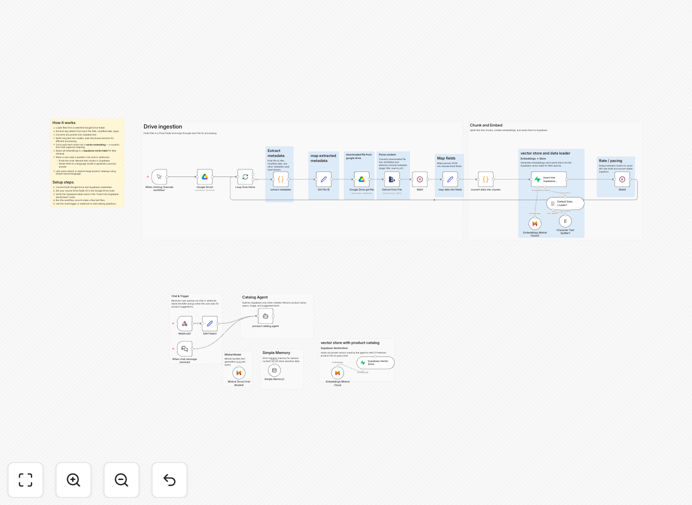
The workflow creates a dual-system AI solution that automatically ingests your product data from Google Drive, processes it into a searchable knowledge base using Supabase RAG (Retrieval-Augmented Generation), and powers an intelligent chatbot with Mistral AI. Customers get instant, accurate answers to product questions 24/7, while your team saves hours of manual support work each week.
Unlike generic chatbots, this system uses your actual product data—specifications, images, manuals, and technical details—to provide precise answers. It understands natural language questions like "What drill bits work with titanium?" or "Show me blue medium t-shirts" and returns structured product information with links and images.
How It Works
1. Automated Document Ingestion
The system monitors your Google Drive folder for new or updated product JSON files. When changes are detected, it automatically downloads, parses, and processes the structured product data without manual intervention.
2. Intelligent Data Processing
Product information is cleaned, normalized, and split into logical chunks. The workflow extracts key fields like product names, specifications, images, URLs, and categories, then prepares them for vector embedding.
3. Vector Storage with Supabase
Mistral AI generates vector embeddings for each product chunk, capturing semantic meaning. These embeddings are stored in Supabase with metadata, creating a fast, searchable product knowledge base that understands relationships between items.
4. AI-Powered Chat Interface
When a customer asks a question, Mistral AI searches the Supabase vector store for relevant products, then generates a natural language response with specific details, images, and links. The system maintains conversation context for follow-up questions.
5. Continuous Updates
The workflow can run on a schedule or trigger, ensuring your chatbot always has the latest product information. Rate limiting protects API limits while keeping data current.
Who This Is For
This template is ideal for eCommerce stores with extensive product catalogs, manufacturing companies with technical specifications, distributors managing thousands of SKUs, and B2B businesses with complex product lines. Marketing teams can deploy it to reduce support tickets, sales teams can use it for instant product information during calls, and customer success teams can offer 24/7 self-service.
Companies managing product data across multiple systems—Google Drive for specifications, separate databases for inventory, and different platforms for customer queries—will benefit most. The workflow bridges these silos, creating a unified product intelligence system that improves customer experience while reducing operational costs.
What You'll Need
- n8n instance (cloud or self-hosted n8n instances.
What You'll Need
- n8n instance (cloud or self-hosted) with workflow execution permissions
- Google Drive account with product data in structured JSON format
- Mistral AI API key for embeddings and chat capabilities
- Supabase account with vector extension enabled for RAG storage
- Product data organized with consistent fields (name, specs, images, URLs)
- Deployment channel (website embed, Slack integration, or webhook endpoint)
Quick Setup Guide
- Download and import the JSON template into your n8n instance
- Configure credentials for Google Drive, Mistral AI, and Supabase in n8n
- Prepare your product data in JSON format with consistent field names
- Upload sample files to your designated Google Drive folder
- Test the ingestion pipeline by manually executing the workflow
- Verify data appears in your Supabase vector store tables
- Test the chatbot through the webhook or chat interface
- Deploy to production with appropriate scheduling and monitoring
Pro tip: Start with a small subset of your product catalog (50-100 items) to test accuracy and performance before scaling to thousands of products. This helps identify any data formatting issues early.
Key Benefits
Reduce support costs by 30-50% by automating repetitive product questions, allowing your team to focus on complex customer issues that require human expertise.
Increase conversion rates by helping shoppers find the right products faster with instant, accurate information about specifications, compatibility, and availability.
Eliminate manual data updates with automated ingestion from Google Drive—when product information changes, your chatbot updates overnight without IT involvement.
Scale customer support 24/7 without adding staff, providing consistent, accurate answers even outside business hours and during peak shopping seasons.
Improve data accuracy by centralizing product information in one searchable system, reducing errors from outdated spreadsheets or inconsistent team knowledge.