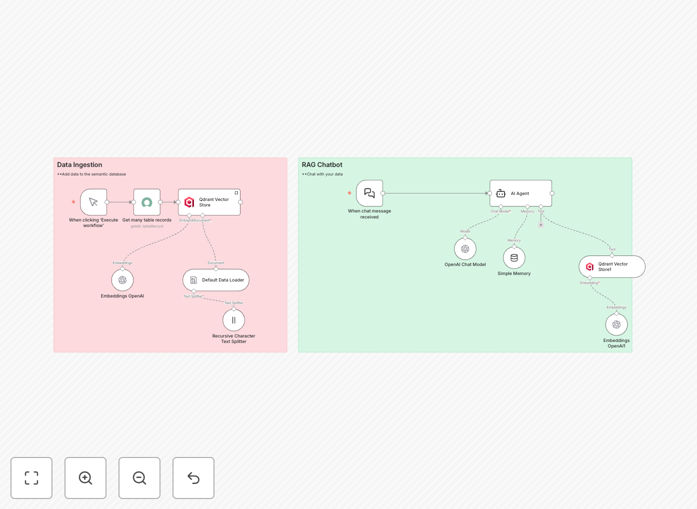
What This Workflow Does
This automation solves a common IT support bottleneck: employees searching through hundreds of ServiceNow knowledge articles to find answers. Manual searches waste time, increase ticket volume, and frustrate users. This workflow builds a Retrieval-Augmented Generation (RAG) chatbot that instantly answers questions by pulling relevant information from your ServiceNow knowledge base.
The system works in two phases. First, it ingests your ServiceNow articles, splits them into manageable chunks, converts them into OpenAI embeddings, and stores them in the Qdrant vector database. Second, when a user asks a question, the chatbot searches Qdrant for semantically similar content, retrieves the best matches, and uses OpenAI to generate a natural, accurate answer based on your actual documentation.
The result is a 24/7 automated support agent that reduces routine ticket load by 40–60%, cuts answer time from minutes to seconds, and ensures consistency across your organization. It learns from your existing knowledge without requiring manual training or complex AI models.
How It Works
Step 1: Data Ingestion & Embedding
The workflow starts by fetching all records from your ServiceNow Knowledge Article table. It uses a default data loader to structure the content, then a recursive character text splitter breaks long articles into smaller, semantically coherent chunks. Each chunk is processed by OpenAI's embeddings API to create a high-dimensional vector representation that captures meaning.
Step 2: Vector Storage
These embeddings, along with metadata like article IDs and titles, are stored in Qdrant—a specialized vector database. Qdrant organizes vectors for ultra-fast similarity searches, enabling the chatbot to find relevant content based on semantic closeness rather than simple keywords.
Step 3: Chatbot Activation
When a user sends a message, the AI agent orchestrates the response. It converts the query into embeddings, searches Qdrant for the closest matches, retrieves the top knowledge chunks, and passes them to the OpenAI chat model. The model generates a concise, helpful answer grounded in your specific documentation.
Step 4: Memory & Continuity
A simple memory component retains conversation context, allowing multi-turn dialogues where the chatbot remembers previous questions and builds coherent, progressive assistance without repeating itself.
Pro tip: Schedule the data ingestion workflow to run weekly or whenever new articles are published. This keeps your chatbot's knowledge base current without manual intervention.
Who This Is For
This template is ideal for IT departments, service desk managers, and organizations with established ServiceNow knowledge bases. If your team spends significant time answering repetitive questions or guiding employees through documentation, this automation delivers immediate ROI.
Companies with internal wikis, HR policy repositories, or product documentation can also adapt this workflow. Any scenario where employees need quick, accurate answers from a large body of text-based knowledge benefits from a RAG chatbot. It's particularly valuable for distributed teams, 24/7 operations, and scaling support without hiring more staff.
What You'll Need
- A ServiceNow instance with a Knowledge Article table populated with content.
- Access to OpenAI API (or another embedding service) for generating text vectors.
- A Qdrant instance or similar vector database (can be self-hosted or cloud service).
- An n8n environment (cloud or self-hosted) to run the workflow.
- Basic understanding of API credentials and connection setup for each service.
Quick Setup Guide
- Download the template JSON file and import it into your n8n workspace.
- Configure the ServiceNow node with your instance URL, authentication, and the correct table name.
- Set up the OpenAI node with your API key and choose your preferred embedding model.
- Connect the Qdrant node with your vector database host, collection name, and port details.
- Test the data ingestion workflow by executing it once—verify articles are fetched and stored.
- Activate the chatbot section and test with sample questions to ensure answers are accurate.
- Deploy the workflow as a webhook or schedule the ingestion part for regular updates.
Pro tip: Start with a subset of your knowledge articles (e.g., top 50 most-viewed) to validate performance before scaling to the entire base. This reduces initial embedding costs and speeds up testing.
Key Benefits
Cut support ticket volume by 40–60%. Routine questions answered instantly mean fewer tickets reach human agents, freeing them for complex issues and reducing operational costs.
Answer time drops from minutes to seconds. Employees get immediate, accurate responses without searching through menus or waiting for support availability, boosting productivity and satisfaction.
Ensure answer consistency across the organization. The chatbot always references the same official documentation, eliminating variations from different human agents or outdated personal knowledge.
Scale support without hiring. The automation handles unlimited concurrent queries, enabling 24/7 global support without adding staff, perfect for growing companies or seasonal peaks.
Continuous learning from updated knowledge. As you add new ServiceNow articles, the workflow can re-ingest and update embeddings, keeping the chatbot's knowledge current automatically.