Google Drive OpenAI Pinecone LangChain RAG

Build & Query RAG System with Google Drive, OpenAI GPT-4o-mini, and Pinecone

Automate document ingestion, vectorization, storage, and AI-powered retrieval

Download Template JSON · n8n compatible · Free
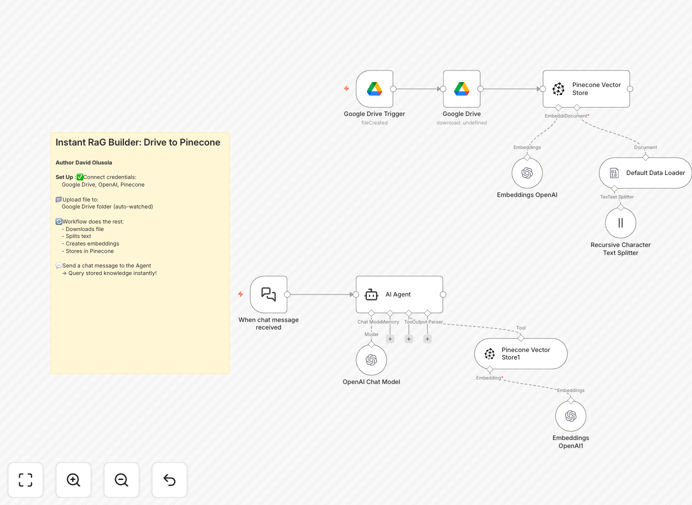
RAG system workflow diagram showing Google Drive to OpenAI to Pinecone integration

What This Workflow Does

This RAG (Retrieval-Augmented Generation) Pipeline automates the entire process of turning your Google Drive documents into an AI-ready knowledge base. It detects new files, processes their content, and makes them searchable through natural language queries.

The system combines the strengths of Google Drive for document storage, OpenAI for understanding content, and Pinecone for efficient retrieval. The LangChain integration manages the conversation flow, ensuring responses are grounded in your actual documents rather than generic AI knowledge.

How It Works

1. Document Ingestion

The workflow monitors a specified Google Drive folder for new files. When detected, it downloads the document and prepares it for processing.

2. Text Processing

Documents are split into logical chunks using a recursive text splitter. This maintains context while creating manageable pieces for the AI to process.

3. Vectorization

OpenAI's embedding model converts each text chunk into a numerical vector that captures its semantic meaning. These vectors enable similarity-based searches.

4. Vector Storage

Processed vectors are stored in Pinecone's specialized vector database, organized for fast retrieval based on semantic similarity.

5. Query Handling

When users ask questions, the system retrieves the most relevant document chunks from Pinecone and uses GPT-4o-mini to generate contextual answers.

Who This Is For

This workflow is ideal for:

  • Teams maintaining internal knowledge bases
  • Customer support departments needing quick access to documentation
  • Researchers managing large collections of reference materials
  • Companies wanting to make their documentation more accessible
  • Developers prototyping AI-powered search solutions

What You'll Need

  1. Google Drive account with documents to process
  2. OpenAI API key (GPT-4o-mini access)
  3. Pinecone account and API credentials
  4. n8n instance (self-hosted or cloud)
  5. Basic understanding of API authentication

Quick Setup Guide

  1. Download the JSON template file
  2. Import into your n8n instance
  3. Configure credentials for Google Drive, OpenAI, and Pinecone
  4. Set your target Google Drive folder path
  5. Adjust chunking parameters for your document types
  6. Deploy the workflow and test with sample queries

Key Benefits

Automated knowledge management: Transform static documents into an always-updated, searchable knowledge base without manual intervention.

Context-aware responses: Get answers grounded in your specific documents rather than generic AI knowledge, reducing hallucinations.

Scalable architecture: The modular design handles everything from small document collections to enterprise-scale knowledge bases.

Natural language interface: Team members can ask questions in plain English without learning complex search syntax.

Continuous learning: As you add more documents, the system automatically incorporates them into its knowledge base.

Frequently Asked Questions

Common questions about RAG automation and integration

RAG (Retrieval-Augmented Generation) combines information retrieval with generative AI. It first searches a knowledge base for relevant content, then uses that context to generate more accurate and relevant responses compared to standalone AI models.

This two-step approach significantly reduces hallucinations and ensures answers are grounded in your specific documentation rather than the AI's general training data.

Pinecone is a managed vector database optimized for fast similarity search at scale. Unlike traditional databases, it specializes in storing and retrieving vector embeddings efficiently, making it ideal for AI applications requiring semantic search capabilities.

Key advantages include:

  • Built-in support for high-dimensional vectors
  • Optimized indexing for fast nearest-neighbor search
  • Scalability to handle large document collections
  • Managed infrastructure reducing operational overhead

This workflow handles text-based documents well including PDFs, Word files, and plain text. Structured documents with clear headings and sections typically yield the best results as the system can better chunk and contextualize the content.

For optimal results:

  • Use documents with clear semantic structure
  • Break large documents into logical sections
  • Avoid image-heavy files without text content
  • Clean formatting before processing when possible

The workflow inherits security from its components: Google Drive's access controls, OpenAI's data policies, and Pinecone's security features. For highly sensitive data, consider self-hosting components or implementing additional encryption layers.

Best practices for sensitive data:

  • Restrict Google Drive folder access
  • Use enterprise-grade OpenAI plans for data protection
  • Consider private Pinecone deployments
  • Implement additional encryption for document storage

Regular maintenance includes monitoring API usage costs, updating document indexes when source files change, and periodically reviewing query results to ensure the system maintains accuracy as your knowledge base evolves.

Typical maintenance tasks:

  • Monthly review of API usage and costs
  • Quarterly accuracy checks with sample queries
  • Document format validation when adding new types
  • Performance monitoring as document volume grows

Yes, the OpenAI embeddings support multiple languages. However, performance may vary based on the language's representation in the training data. For best results with non-English content, consider language-specific embedding models.

For multilingual implementations:

  • Test with your target languages before full deployment
  • Consider language-specific chunking strategies
  • Monitor retrieval accuracy across languages
  • Explore multilingual embedding models if needed

Yes! GrowwStacks specializes in building tailored RAG systems for specific business needs. We can customize document processing, retrieval logic, and integration with your existing systems to create an optimal solution for your use case.

Our custom RAG solutions include:

  • Domain-specific document processing pipelines
  • Custom retrieval ranking algorithms
  • Integration with proprietary data sources
  • Enterprise-grade security and compliance
  • Ongoing optimization and support

Need a Custom RAG Automation?

This free template is a starting point. Our team builds fully tailored automation systems for your specific business needs.