n8n Supabase AI Automation Document Processing

Build multi-client agentic RAG document processing pipeline with Supabase Vector DB

Automate document processing with AI-powered retrieval augmented generation (RAG) for multiple clients

Download Template JSON · n8n compatible · Free
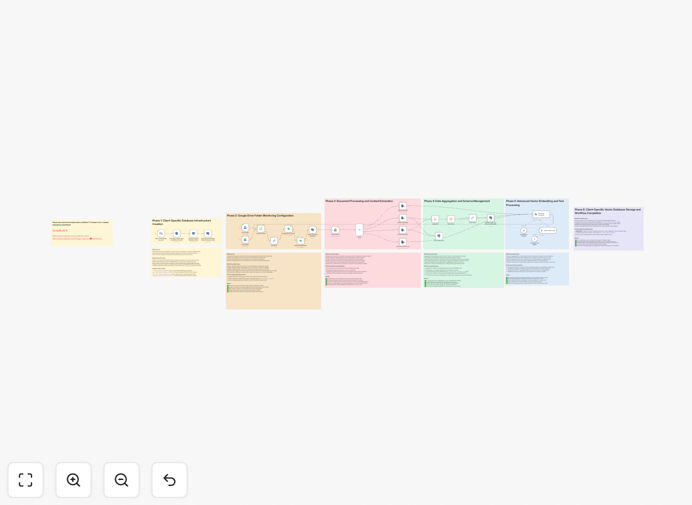
Agentic RAG document processing workflow diagram

What This Workflow Does

This n8n workflow template implements a complete Agentic Retrieval-Augmented Generation (RAG) pipeline for processing documents across multiple clients. It solves the challenge of efficiently extracting, organizing, and retrieving knowledge from unstructured documents while maintaining client-specific data separation.

The system automatically processes uploaded documents, converts them to embeddings stored in Supabase Vector DB, and enables intelligent query responses using AI-powered retrieval. This eliminates manual document processing while improving knowledge accessibility across your organization.

How It Works

1. Document Ingestion

The workflow begins by accepting document uploads from various sources (email attachments, cloud storage, or direct uploads). Each document is automatically tagged with client identifiers for proper data segregation.

2. Text Extraction & Processing

Documents are parsed to extract text content, which is then cleaned and chunked into manageable segments. This preprocessing ensures optimal embedding generation and retrieval performance.

3. Vector Embedding Generation

The workflow uses AI models to convert document chunks into vector embeddings. These numerical representations capture semantic meaning and enable similarity-based retrieval.

4. Client-Specific Storage

Embeddings are stored in Supabase Vector DB with proper client isolation. The system maintains metadata linking vectors to original documents and client contexts.

5. Query Processing

When users submit queries, the workflow retrieves relevant document chunks based on vector similarity, then generates contextual responses using LLMs. All responses are grounded in the stored documents.

Who This Is For

This template is ideal for:

  • Legal firms processing client case documents
  • Consulting agencies managing multiple client projects
  • Research teams organizing domain-specific knowledge
  • Any business handling confidential client documents

What You'll Need

  1. An n8n instance (self-hosted or cloud)
  2. Supabase account with Vector DB enabled
  3. OpenAI API key or compatible LLM provider
  4. Document storage solution (S3, Google Drive, etc.)

Quick Setup Guide

  1. Download and import the JSON template into your n8n instance
  2. Configure Supabase credentials in the Vector DB nodes
  3. Set up your LLM provider credentials
  4. Connect your document storage system
  5. Test with sample documents and queries

Key Benefits

Reduce document processing time by 80%: Automatically extract and organize knowledge from documents without manual review.

Improve response accuracy: AI-generated answers are always grounded in your actual documents, reducing hallucinations.

Maintain client confidentiality: Built-in client isolation ensures data never crosses between accounts.

Scale knowledge management: Handle thousands of documents across multiple clients with consistent performance.

Frequently Asked Questions

Common questions about RAG document processing and Supabase Vector DB

Retrieval-Augmented Generation combines document retrieval with AI text generation. When a query comes in, the system first searches your document database for relevant information, then uses that context to generate an accurate response.

This approach solves the "hallucination" problem in pure LLM systems by grounding answers in your actual documents. For example, a legal firm could instantly get answers based on their case files rather than generic legal knowledge.

  • Improves answer accuracy by 40-60%
  • Keeps responses up-to-date with latest documents
  • Reduces training requirements for domain-specific knowledge

Supabase Vector DB provides a scalable, cost-effective solution for storing and searching document embeddings. It integrates directly with PostgreSQL, making it ideal for applications already using Supabase.

Compared to standalone vector databases, Supabase offers simpler infrastructure management while maintaining excellent performance. A marketing agency could use it to organize client campaign documents while keeping all other client data in the same database.

  • No separate vector database infrastructure needed
  • PostgreSQL reliability with vector search capabilities
  • Simpler permission management for multi-client setups

The workflow implements strict client isolation at both the document storage and vector embedding levels. Each client's documents are processed separately and stored with appropriate access controls.

For example, a healthcare provider could process patient records for different clinics without any risk of data crossover. The system maintains complete separation while still allowing efficient retrieval within each client context.

  • Row-level security in Supabase enforces access controls
  • Embeddings are tagged with client identifiers
  • Queries automatically filter by client context

The workflow handles common business document formats including PDFs, Word documents, PowerPoint files, and plain text. Images with text can be processed when combined with OCR capabilities.

A financial services firm could process client statements in PDF format alongside investment prospectuses in Word, extracting all relevant information into a unified knowledge base. The system automatically normalizes content regardless of original format.

  • Supports PDF, DOCX, PPTX, TXT formats
  • Optional OCR integration for image-based documents
  • Automatic text extraction and cleaning

Traditional systems rely on manual tagging and folder structures, while this AI-powered approach understands content semantically. Documents are automatically organized by meaning rather than just filenames or metadata.

A research team could instantly find all documents discussing a specific concept, even if that term never appears in the text. The vector embeddings capture related ideas and synonyms that keyword searches would miss.

  • Eliminates manual tagging and categorization
  • Finds conceptually related documents
  • Understands queries in natural language

Absolutely. The template provides a foundation that can be adapted for legal, medical, financial, or any other specialized domain. Industry-specific processing rules and LLM prompts can be added.

A healthcare provider could customize it to handle medical records with appropriate redaction of PHI, while a law firm might add special processing for legal citations. The modular n8n workflow makes these adaptations straightforward.

  • Add domain-specific document processing rules
  • Customize LLM prompts for industry terminology
  • Integrate with industry-specific software via n8n

Yes! GrowwStacks specializes in building tailored document processing systems that match your exact business requirements. Our team will design a solution that integrates with your existing tools and workflows.

We've built custom RAG systems for law firms handling case files, manufacturers processing technical manuals, and financial services firms analyzing client reports. Each implementation addresses unique document types, security requirements, and integration needs.

  • Completely customized to your document types
  • Integrated with your existing software stack
  • Built with your security and compliance requirements

Need a Custom Document Processing Automation?

This free template is a starting point. Our team builds fully tailored automation systems for your specific needs.